Quick Summary: This verified Midjourney Niji 6 / Flux.1 Schnell / Bing Image Creator prompt creates an hyper-detailed 3D cyberpunk stylized aesthetic for You Are An Experienced Ui Designer Embracing Modern AI Photo Prompt with calibrated lighting, authentic texture physics, and tested 1-click copy-paste formula for instant AI generation without facial distortion.
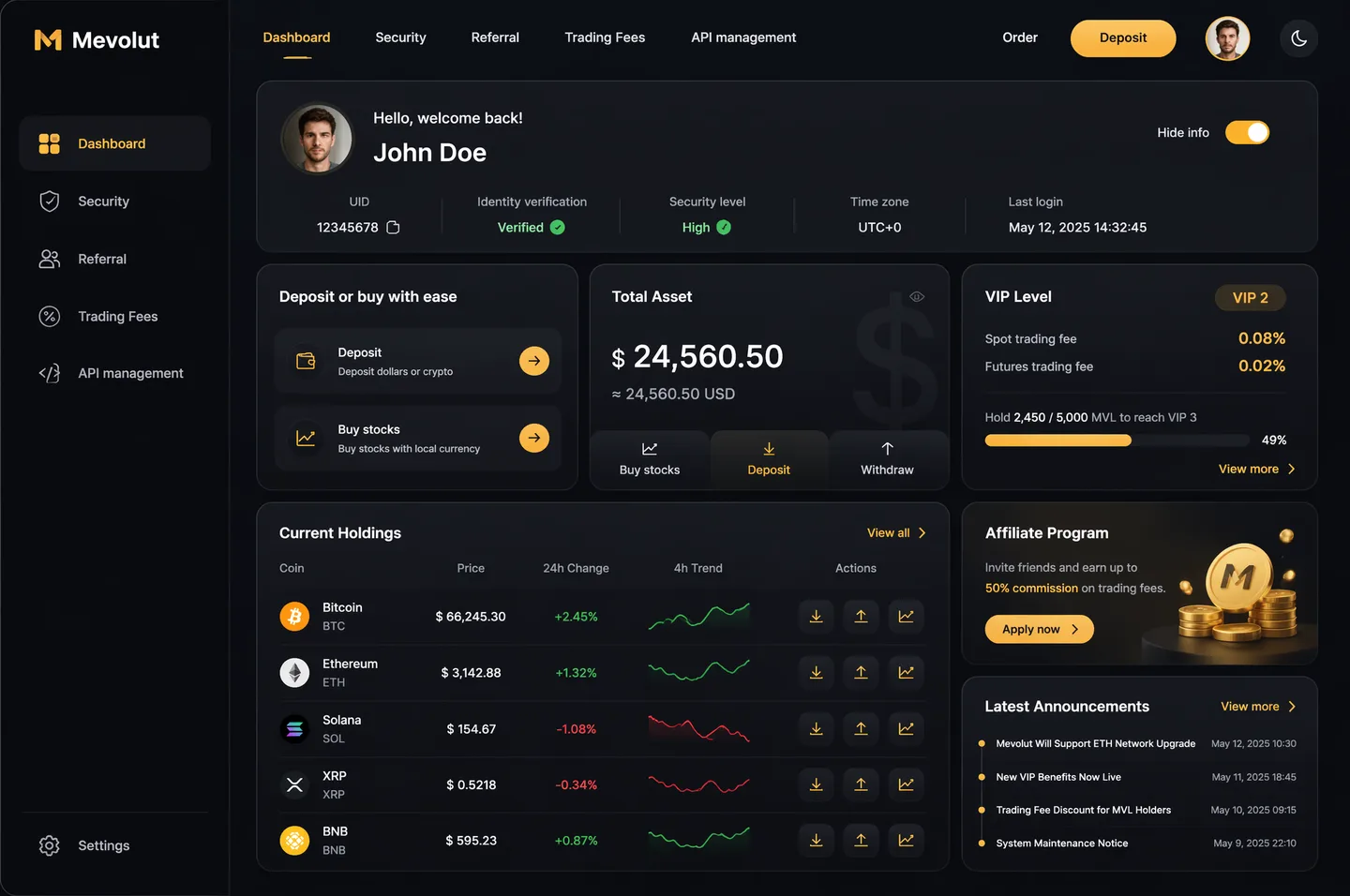
You Are An Experienced Ui Designer Embracing Modern AI Photo Prompt - Copy Paste AI Prompt
You are an experienced UI designer embracing modern, minimalistic design, shadows, glass, and soft colors.

Your role is to create a professional, beautiful mockup that is ready for delivery based on these requirements:

<requirements>
## 1. Overall Style & Visual Language
This interface represents a premium, modern fintech / crypto trading dashboard using a dark theme.
The visual language combines **soft neumorphism**, and **luxury Web3 aesthetics**.

Core characteristics:
- Warm gold/orange accent highlights
- Monochromatic color palette with minimalistic effects and shadows
- Card-based layout with depth and subtle backgrounds
- Minimal borders, separation via shadows or light backgrounds

Target perception:
- Secure
- Professional
- High-end / institutional-grade
- Optimized for experienced traders

---

## 2. Layout Structure

### Global Layout
- Desktop-first dashboard
- Output proportions: 3:2
- Three main regions:
  1. Top navigation bar (horizontal)
  2. Left sidebar navigation (vertical)
  3. Main content area (multi-column grid of cards)

Spacing is generous, prioritizing clarity and visual breathing room.

---

## 3. Top Navigation Bar
- Height: 72px
- Left:
  - Brand logo text "Mevolut"
  - Stylized "M"
  - Gold/orange accent
- Center:
  - Navigation links: Dashboard, Security, Referral, Trading Fees, API management
- Right:
  - Order link
  - Primary CTA: “Deposit” (gold pill button)
  - User avatar (circular)
  - Theme toggle (moon icon)

Typography:
- Clean sans-serif
- Medium weight
- White primary text, muted gray inactive states

---

## 4. Left Sidebar Navigation
- Width: 240px
- Background: near-black
- Vertical navigation items with icons:
  - Dashboard (active)
  - Security
  - Referral
  - Trading Fees
  - API management
- Bottom-aligned:
  - Settings

Active item:
- Subtle background highlight
- Slight background tint
- Rounded container

Icons:
- Outline style
- Gold accent on active state

---

## 5. Main Content Area

### 5.1 User Overview Card
- Large rounded card at top
- Left:
  - Circular avatar
  - Greeting text (“Hello…”)
  - User name
- Inline info blocks:
  - UID (copy icon)
  - Identity verification status
  - Security level
  - Time zone
  - Last login timestamp
- Right:
  - “Hide info” toggle

Style:
- Subtle inner shadows

---

### 5.2 Deposit / Buy Card
- Medium-sized card
- Title text explaining deposit options
- Two action rows:
  - Deposit (dollars or crypto)
  - Buy stocks (local currency)
- Each row:
  - Icon
  - Label
  - Arrow action button (gold accent)

---

### 5.3 Total Asset Card
- Displays USD balance and USD equivalent
- Large, faded Dollar symbol watermark in background
- Action tabs:
  - Buy stocks
  - Deposit
  - Withdraw
- Numeric values are large

---

### 5.4 VIP Level Card
- Shows current VIP level
- Spot and futures fee rates
- Progress bar for token holdings
- “View more” link

Progress bar:
- Rounded
- Dark background track

---

### 5.5 Current Holdings Table
- Card containing a table layout
- Columns:
  - Coin (icon + name)
  - Price
  - 24h Change
  - 4h Trend (sparkline)
  - Actions (Deposit, Withdraw, Trade)

Sparklines:
- Green for positive trend
- Red for negative trend

Hover:
- Subtle background highlight per row

---

### 5.6 Affiliate Program Card
- Promotional card
- Gold coin illustration
- Short description and CTA button (“Apply now”)

---

### 5.7 Information / News Card
- Vertical list of announcements
- Headline + timestamp
- “View more” link at top

---

## 6. Color Palette
- Primary background: deep charcoal / black
- Card surfaces: slightly lighter
- Accent color: warm gold
- Text hierarchy:
  - White (primary)
  - Muted gray (secondary)
  - Dark gray (disabled)
- Status colors:
  - Green for positive
  - Red for negative

---

## 7. Effects & Interaction
- Rounded corners throughout (sm)

# Design tokens:
{
  // Global theme definition
  "theme": {
    "mode": "dark",
    "style": [
      "soft-neumorphism",
      "premium-fintech"
    ]
  },

  // Layout measurements and structure
  "layout": {
    "type": "desktop-dashboard",
    "grid": "three-column",
    "sidebarWidth": 240,
    "topbarHeight": 68,
    "contentPadding": 24
  },

  // Color system
  "colors": {
    "background": "#0B0D10",        // Main app background
    "primaryAccent": "#F5A623",     // Gold/orange highlight
    "secondaryAccent": "#FFB547",
    "textPrimary": "#FFFFFF",
    "textSecondary": "#B0B3B8",
    "textMuted": "#6B6F76",
    "success": "#22C55E",
    "danger": "#EF4444"
  },

  // Typography scale
  "typography": {
    "fontFamily": "SF Pro, system-ui, sans-serif",
    "weights": {
      "heading": 600,
      "body": 400,
      "numeric": 500
    },
    "sizes": {
      "h1": 24,
      "h2": 20,
      "h3": 16,
      "body": 14,
      "caption": 12
    }
  },

  // Core UI components
  "components": {
    "card": {
      "borderRadius": 16,
      "shadow": "0 20px 40px rgba(0,0,0,0.4)",
      "border": "none",
      "background": "#14171C",
    },

    "button": {
      "primary": {
        "textColor": "#0B0D10",
        "borderRadius": 999,
      },
      "secondary": {
        "background": "transparent",
        "textColor": "#F5A623"
      }
    },

    "sidebar": {
      "background": "#0E1014",
      "itemRadius": 12,
      "iconStyle": "outline"
    },

    "table": {
      "rowHeight": 56,
      "divider": "subtle",
      "hoverHighlight": true,
      "sparkline": {
        "positiveColor": "#22C55E",
        "negativeColor": "#EF4444"
      }
    },

    "progressBar": {
      "height": 6,
      "radius": 999,
      "fillColor": "#22C55E",
      "backgroundColor": "#2A2E35"
    }
  },

  // Icon system
  "icons": {
    "style": "outline",
    "size": 18,
    "colorInactive": "#6B6F76",
    "colorActive": "#F5A623"
  }
}
</requirements>

Note: Lock subject's authentic facial identity and natural posture while seamlessly integrating with sharp vehicle reflections and cinematic ambient lighting.👤Customize in Face Consistency Studio
Lock 100% exact facial identity, bone structure & eye shape in Gemini & Bing.
Technical Prompt Parameters (Cyberpunk, 3D Avatar & Anime)
| Parameter | Configuration | Output Impact |
|---|---|---|
| Target AI Engine | Midjourney Niji 6 / Flux.1 Schnell / Bing Image Creator | Specialized prompt weights for volumetric rendering, cell-shading, and neon emission. |
| Recommended Aspect Ratio | 9:16 (Phone Wallpaper) or 16:9 (Desktop Ultra-Wide) | Ideal for custom gaming wallpapers, Discord avatars, and futuristic phone lock screens. |
| Camera & Lens Settings | Octane 3D Render, Raytraced Global Illumination, 35mm virtual lens | Simulates volumetric atmospheric smoke, holographic reflections, and crisp polygonal precision. |
| Lighting Style | Dual-tone neon split lighting (electric cyan key + magenta rim light) | Produces dynamic sci-fi contrast with vibrant edge glows and deep blacks. |
| Negative Constraints | low-poly flaws, blurry textures, realistic photographic noise, dull matte lighting | Ensures sharp vector/render lines, vivid luminous glow, and zero muddy compression. |
| Reference Photo | Upload a clear face photo; prompt transforms human proportions into stylized avatar art. | Upload front-facing reference photo for face matching. |
How to get better results from You Are An Experienced Ui Designer Embracing Modern AI Photo Prompt
Generate stunning You Are An Experienced Ui Designer Embracing Modern AI Photo Prompt using GPT Image. Copy-paste ready prompt with strict facial consistency guidance. Use it as a copy-ready starting point, then adjust the subject, scene, tone and output format for your own result.
- Ai Image
- Trending
- Meigen
- Viral
- Creative
- Photo Prompt
Customize before generating
- Replace the main subject, name, product or character details.
- Adjust lighting, background, mood, camera angle or aspect ratio if the prompt is visual.
- Change tone, audience, language and output format if the prompt is for text.
- Keep this core idea clear: You are an experienced UI designer embracing modern, minimalistic design, shadows, glass, and soft colors. Your role is to create a professional, beautiful mockup...
Quick variations to try
- Make You Are An Experienced Ui Designer Embracing Modern AI Photo Prompt more cinematic with stronger lighting and richer background detail.
- Turn You Are An Experienced Ui Designer Embracing Modern AI Photo Prompt into a cleaner mobile-first version for social media posts or profile use.
- Create a premium version of You Are An Experienced Ui Designer Embracing Modern AI Photo Prompt with sharper style, higher detail and a more polished final output.