Quick Summary: This verified Google Gemini & Midjourney v6 prompt creates an authentic 90s vintage film aesthetic for Vintage Saree Portrait Collage AI Photo Prompt with calibrated lighting, authentic texture physics, and tested 1-click copy-paste formula for instant AI generation without facial distortion.
- Photography
- Vintage
- Retro
- Saree
- Traditional
- Collage
- Editorial
- Ai Image
- Trending
- Photography
- Vintage
- Retro
- Saree
- Traditional
- Collage
- Editorial
- Ai Image
- Trending
Vintage Saree Portrait Collage AI Photo Prompt - Copy Paste AI Prompt
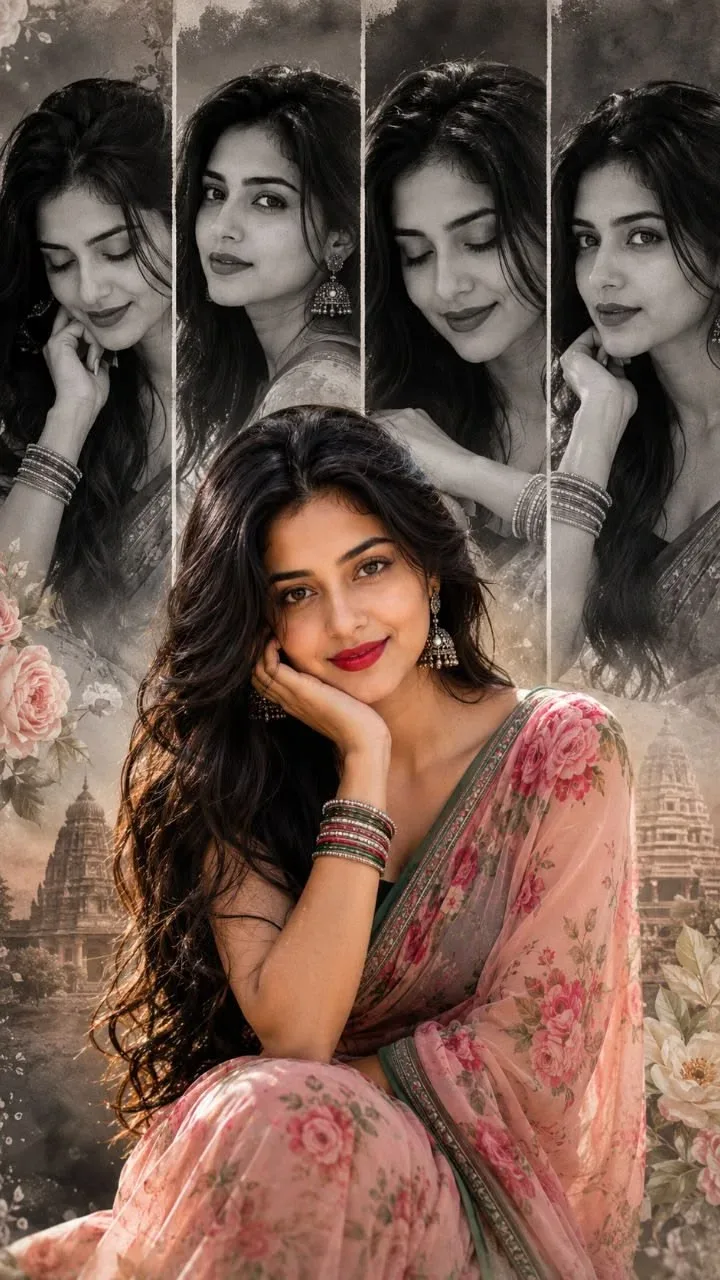
Create a highly detailed vertical editorial portrait collage using the uploaded user photo as the **ONLY identity reference** for the main person. Preserve the user's exact recognizable identity: facial structure, proportions, face shape, forehead, eyebrows, eyes, nose, lips, jawline, cheekbones, chin, skin tone, natural skin texture, hairline, hairstyle characteristics, and all distinctive facial features. **Do not copy the identity of anyone in the reference image.** Do not beautify, reshape, slim, age, de-age, feminize, masculinize, or redesign the user's face. The uploaded photo determines **WHO the person is**; the reference image determines **HOW that person looks, poses, dresses, and expresses themselves**. If the user's gender differs from the reference, keep the user's identity and gender presentation unchanged.
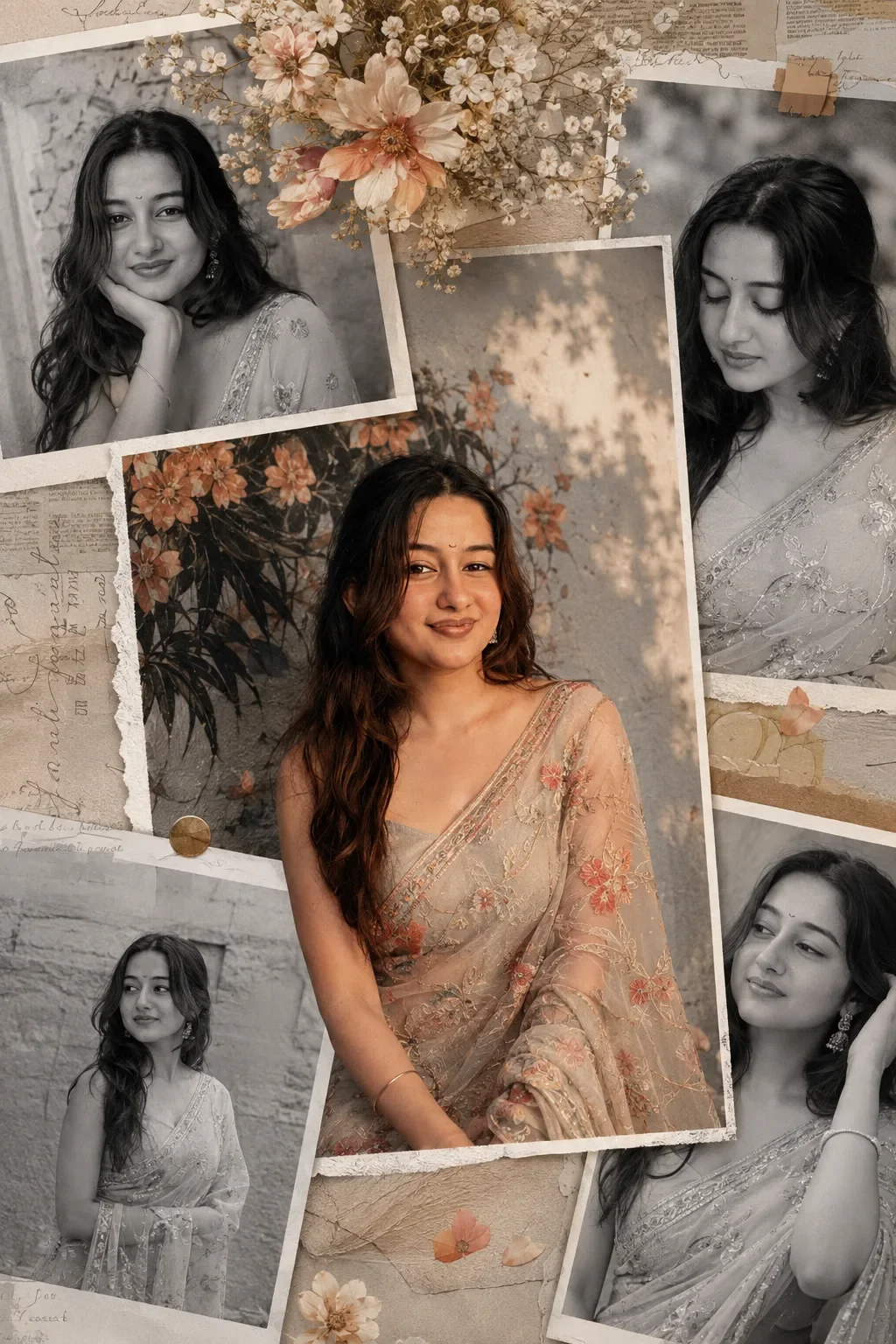
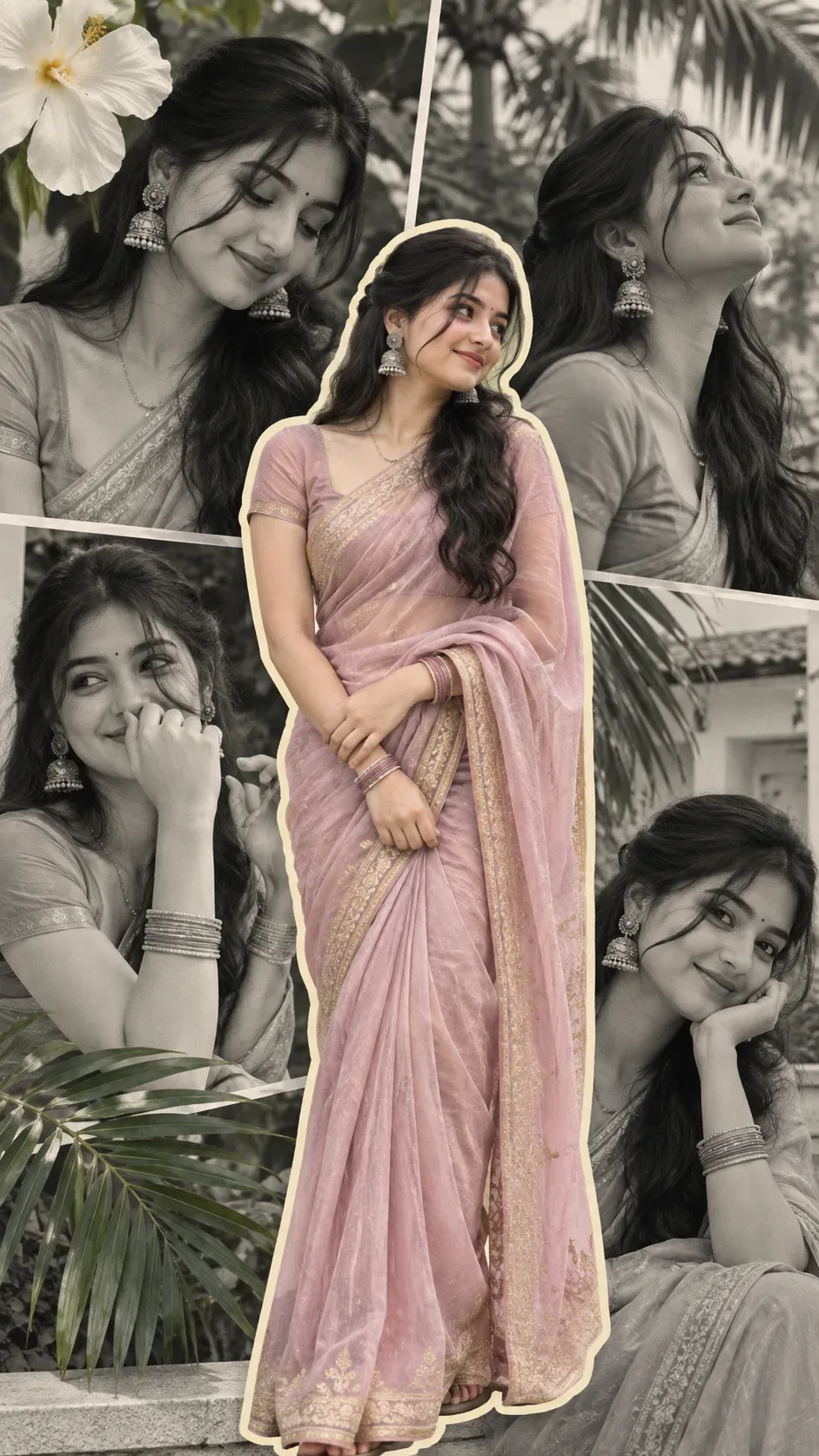
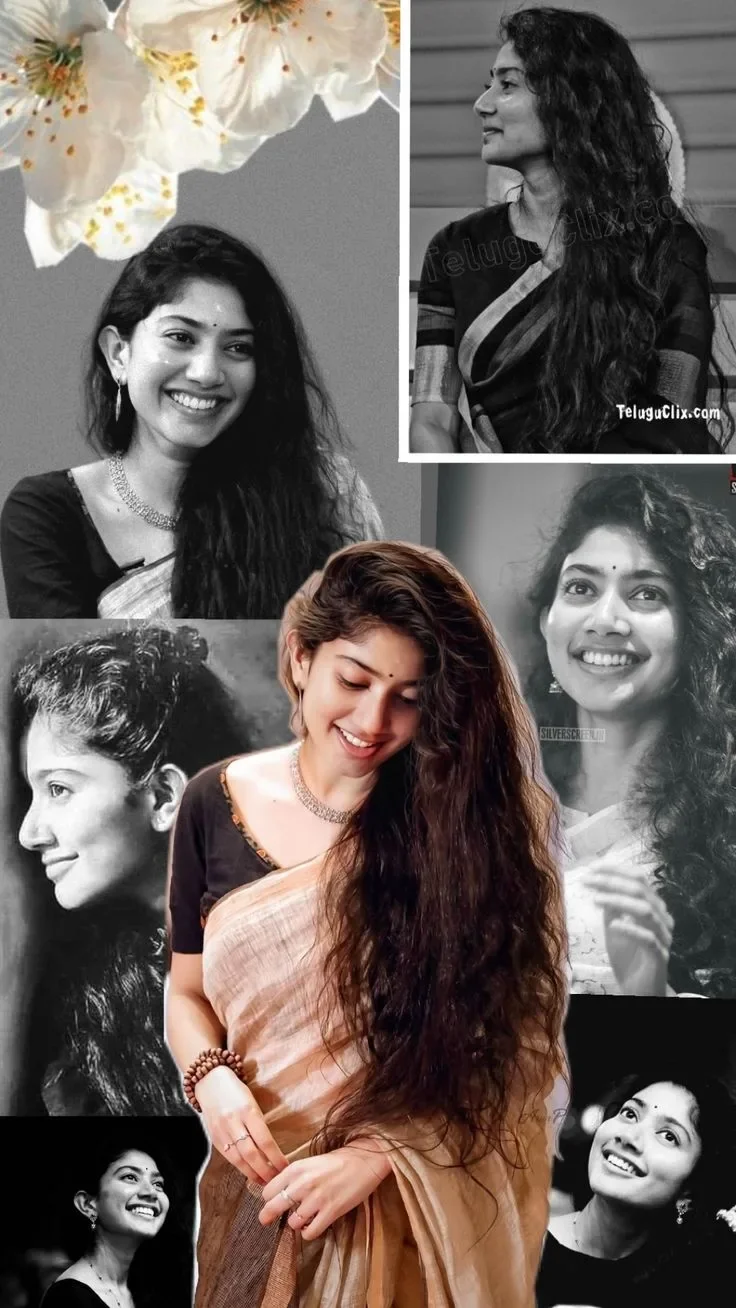
Recreate the reference as a tall **9:16 vertical photographic collage** with a nostalgic cinematic Indian fashion/editorial aesthetic. The composition contains one large warm-color portrait of the user in the foreground, surrounded by several overlapping black-and-white portraits of the SAME user. Preserve the layered, asymmetrical arrangement, varied crops, photographic borders, gray background, dark lower areas, and strong contrast between the central color portrait and monochrome surrounding images.
**CENTRAL FOREGROUND SUBJECT:** Place the user as the dominant figure, approximately centered and slightly right of center, extending from the middle of the frame toward the bottom edge. Dress the subject in an elegant traditional saree matching the reference: a soft pale peach/blush-beige saree with subtle translucent woven texture, natural folds, delicate sheen, and realistic draping, paired with a fitted dark charcoal/black short-sleeve blouse. Add a delicate metallic necklace, subtle earrings, understated rings, and earthy brown/wood-toned bangles. Accessories must remain refined and realistic.
Give the subject long, thick, naturally flowing dark hair cascading dramatically over one side of the body and extending well below the waist, matching the reference's overall silhouette while preserving the user's natural hair identity and hairline.
**BODY POSE:** Reproduce the reference's graceful relaxed standing pose. The torso is turned slightly in a three-quarter orientation, shoulders relaxed, with natural weight distribution. One arm bends toward the waist while the opposite hand rests gently across the front of the saree near the lower abdomen. Fingers are relaxed and anatomically correct, lightly touching or gathering the fabric. Avoid exaggerated fashion posing.
**HEAD, GAZE & EXPRESSION:** The user's original source-photo expression must NOT be copied. Reconstruct the reference expression independently. Lower the head slightly and angle it gently toward the subject's left, with the chin lowered. Use a soft three-quarter/downward facial orientation. The eyes look downward rather than directly at the camera, with relaxed partially lowered eyelids. Expression is warm, peaceful, shy, intimate, and genuinely joyful, with a gentle natural smile rather than an exaggerated commercial grin. Match the reference's eyebrow relaxation, eye openness, mouth position, head tilt, gaze direction, and emotional softness while maintaining the user's exact identity.
**BACKGROUND COLLAGE:** Behind the central subject, create multiple separate archival-style black-and-white portraits of the same user. Every surrounding portrait must retain the user's identity but have different crops, head angles, expressions, and gaze directions, creating the feeling of authentic photographs collected into one artistic collage.
**TOP-LEFT:** Large grayscale portrait of the user with long dark hair and a gentle smile. Add large delicate white blossoms entering from the upper-left corner, with thin stems and detailed petals/stamens, softly layered over the gray background.
**TOP-RIGHT:** A tall vertical black-and-white portrait panel with a thin light border. Show the user in a near side-profile, head turned toward the left, chin slightly raised, gaze directed off-frame left, long hair falling over the shoulder, wearing traditional saree styling.
**MIDDLE-LEFT:** Large monochrome portrait cropped around the chest and shoulders, showing the user with a bright natural smile, long hair framing the face, and a softly textured vintage photographic appearance.
**MIDDLE-RIGHT:** Another large grayscale portrait partially hidden behind the central figure. Show the user smiling warmly and looking slightly upward, with traditional clothing, long textured hair, and delicate jewelry.
**LOWER-LEFT:** Add a larger monochrome side-profile portrait extending upward toward the center. The user faces left with a calm subtle smile and hair swept backward. Use strong grayscale tonal separation.
**BOTTOM-LEFT:** Smaller high-contrast black-and-white portrait against a dark background, with the user looking upward and smiling naturally, partially cropped by the frame.
**BOTTOM-RIGHT:** Smaller black-and-white portrait of the user looking upward with a joyful open smile and slightly raised head, against a nearly black background. Partially hide it behind the central subject and crop it naturally at the bottom/right edge.
The surrounding portraits must feel like different genuine photographs, **not duplicated copies**. Maintain consistent identity across every panel.
**BACKGROUND & COLOR:** Use a muted medium-gray textured backdrop with darker charcoal and near-black areas toward the lower frame. Keep the overall palette restrained: grayscale surrounding photographs contrasted with soft peach, beige, brown, and natural skin tones in the central image. Avoid bright saturated colors.
**LIGHTING:** Illuminate the central portrait with soft directional natural light from the upper/front-left, producing gentle highlights on the face, neck, arms, hair, and saree while retaining realistic shadows. Surrounding monochrome photographs should have varied vintage lighting, including soft diffusion and subtle side shadows.
**PHOTOGRAPHIC STYLE:** Ultra-realistic photography, cinematic Indian fashion portraiture, nostalgic vintage-film aesthetic, authentic skin texture, realistic pores, natural anatomy, detailed individual hair strands, believable fabric fibers, subtle analog grain, faded monochrome blacks, soft halation, restrained contrast, and realistic photographic imperfections. The central portrait should be the sharpest and most visually dominant element; surrounding portraits may have softer focus and stronger archival grain.
**CAMERA & COMPOSITION:** Photograph the central subject from approximately eye/chest level using a natural portrait perspective similar to a 50mm lens. Maintain realistic proportions, moderate depth of field, crisp facial detail, and cinematic separation. Preserve the reference's vertical framing, overlapping panels, varied portrait scales, top-left flowers, bordered upper-right photograph, dark lower sections, and layered collage structure.
**FINAL PRIORITY:** 1) Uploaded photo controls exact identity. 2) Reference controls expression, emotion, gaze, head pose, and facial behavior. 3) Reference controls body pose and composition. 4) Reference controls clothing, environment, objects, and collage arrangement. 5) Reference controls lighting, camera perspective, color treatment, and photographic style. Never sacrifice identity. Never copy the reference person's identity. Do not add unrelated objects, text, logos, captions, signatures, or watermarks. The final artwork must unmistakably depict the uploaded user while faithfully recreating the reference image's nostalgic multi-photo collage, emotional expression, styling, composition, and cinematic visual character.

Optical Identity & Likeness Preservation: Strictly retain 100% exact facial likeness, natural cheekbone contours, true skin undertone, and authentic gaze from source image without generic face replacement.👑Customize in Royal Saree & Ethnic Studio
Customize silk sarees, Rajputi jewelry & heritage temple aesthetics.
Technical Prompt Parameters (Vintage Film & Retro Polaroid)
| Parameter | Configuration | Output Impact |
|---|---|---|
| Target AI Engine | Google Gemini & Midjourney v6 | Preserves organic analog warmth, natural color saturation, and retro lighting response. |
| Recommended Aspect Ratio | 4:5 (Classic Film) or 1:1 (Square Polaroid) | Faithful recreation of vintage paper print dimensions and nostalgic photo albums. |
| Camera & Lens Settings | 35mm Leica M6, Kodak Portra 400, f/2.8, subtle chromatic dispersion | Renders genuine analog grain, gentle halation, and authentic film stock color science. |
| Lighting Style | Direct camera flash with soft falloff or warm golden hour sunset flare | Creates natural retro exposure highlights without artificial digital gloss. |
| Negative Constraints | digital sheen, oversaturated HDR, plastic skin, neon light, CGI 3D, modern watermark | Eliminates hyper-digital smoothness to maintain true photochemical aesthetic. |
| Reference Photo | Upload a daylight selfie; avoid heavy ring-light filters for best film look. | Upload front-facing reference photo for face matching. |
How to use this prompt
- Copy the prompt, open Google Gemini or Bing Image Creator, attach your reference photo, and generate instant 8K results.
How to get better results from Vintage Saree Portrait Collage AI Photo Prompt
Free 1-click copy vintage saree portrait collage ai photo prompt for Google Gemini and Bing Image Creator. Authentic photography aesthetic, realistic lighting, and instant camera settings. Use it as a copy-ready starting point, then adjust the subject, scene, tone and output format for your own result.
- Photography
- Vintage
- Retro
- Saree
- Traditional
- Collage
Customize before generating
- Replace the main subject, name, product or character details.
- Adjust lighting, background, mood, camera angle or aspect ratio if the prompt is visual.
- Change tone, audience, language and output format if the prompt is for text.
- Keep this core idea clear: Create a highly detailed vertical editorial portrait collage using the uploaded user photo as the **ONLY identity reference** for the main person. Preserve the user's...
Quick variations to try
- Make Vintage Saree Portrait Collage AI Photo Prompt more cinematic with stronger lighting and richer background detail.
- Turn Vintage Saree Portrait Collage AI Photo Prompt into a cleaner mobile-first version for social media posts or profile use.
- Create a premium version of Vintage Saree Portrait Collage AI Photo Prompt with sharper style, higher detail and a more polished final output.