Quick Summary: This verified Google Gemini & Midjourney v6 prompt creates an cinematic moody dark atmospheric aesthetic for Shot 1 (00:0000:02) Ws AI Photo Prompt with calibrated lighting, authentic texture physics, and tested 1-click copy-paste formula for instant AI generation without facial distortion.
About This Prompt
Use this prompt to generate a Shot 1 (00:0000:02) Ws AI Photo Prompt — a high-quality, photorealistic image with balanced lighting, sharp focus, and intricate details suitable for social media sharing and digital content creation.
This prompt works best with your AI generator. Simply copy the prompt text below and paste it into the generator. You can easily customize specific keywords like colors, backgrounds, or subjects to make the final output uniquely yours.
Shot 1 (00:0000:02) Ws AI Photo Prompt - Copy Paste AI Prompt
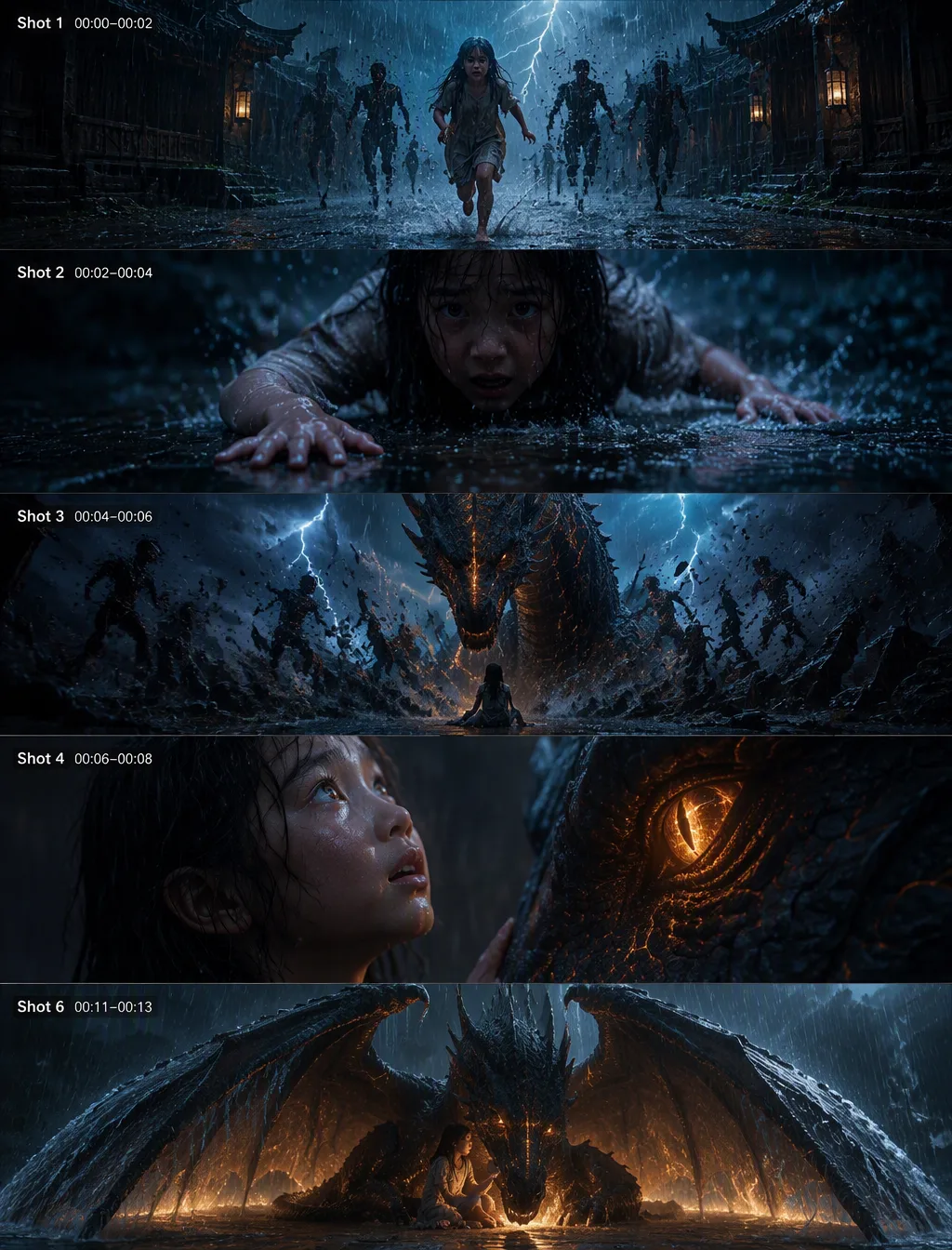
Shot 1 (00:00–00:02) – WS, Rainy Night, Forward Tracking. A narrow, ancient village alley drenched in relentless rain. Water streams down slanted rooftops and floods uneven stone pathways, reflecting flickering lantern light. A young girl runs barefoot through the water, her soaked dress clinging to her as she struggles to keep balance. Behind her, shadowy figures move unnaturally—distorted, stretching and glitching with each lightning flash as they close in. VFX: Heavy rain simulation, reflective wet surfaces, lightning illuminating distorted shadows. SFX: Thunder cracks, rapid splashing footsteps, howling wind. Shot 2 (00:02–00:04) – CU, Panic Fall, Slight Handheld Shake. She suddenly slips and crashes onto the wet stone. Water splashes outward. Close on her face—rain mixes with tears, her breath sharp and uneven. Her trembling hands push against the ground as she tries to move back, eyes locked on the approaching darkness. VFX: Detailed splash simulation, motion blur, lens water droplets. SFX: Intensifying heartbeat, heavy breathing, rain striking surfaces. Shot 3 (00:04–00:06) – LS, Violent Ground Eruption. The ground beneath the shadows fractures violently. Stone explodes upward in a powerful shockwave, sending debris and water into the air. A massive dragon bursts from below—its body dark and armored, faint glowing veins pulsing beneath its scales. It rises between the girl and the shadows, instantly scattering them into fragments of darkness. VFX: Ground destruction, flying debris, glowing cracks, volumetric dust. SFX: Deep impact boom, layered dragon roar with sub-bass rumble. Shot 4 (00:06–00:08) – CU, Emotional Realization, Slow Push-In. The girl freezes, looking up. Her fear begins to fade. Lightning briefly illuminates the dragon’s face—its glowing eye calm, focused. The reflection of that eye fills hers. The rain appears to slow slightly in this moment. VFX: Eye reflection detail, subtle slow-motion rain, soft glow from dragon’s eye. SFX: Thunder fades into low ambient tone, rain softens. Shot 5 (00:08–00:11) – MS, Gentle Interaction, Static Frame. The dragon slowly lowers its massive head toward her, movements controlled and careful. It gently nudges her shoulder. Water droplets slide across its scales, glowing faintly as they fall. She hesitates, then slowly lifts her hand toward it, tension leaving her body. VFX: Subtle bioluminescent pulses under scales, detailed water interaction. SFX: Deep calm breathing, soft ambient hum. Shot 6 (00:11–00:13) – LS, Protective Wing Expansion. The dragon spreads its massive wings wide, forming a protective barrier around her. Rain violently hits the outer surface of the wings, but inside the space becomes still—dry, warm, and silent. The contrast between chaos outside and calm inside is immediate and striking. VFX: Rain deflection on wings, cold blue tones outside vs warm

Note: Strictly retain 100% exact facial likeness, natural cheekbone contours, true skin undertone, and authentic gaze from source image without generic face replacement.Frequently asked questions
- How do I use the Shot 1 (00:0000:02) Ws AI Photo Prompt prompt?
- To use this prompt, simply click the "Copy Prompt" button above. Then, open your AI generator, paste the copied text into the prompt box, and hit generate. You can instantly generate high-quality images without needing any reference photos.
- What is this prompt best used for?
- This specific prompt is highly optimized for creating engaging social media content and digital art. The formula is structured to produce high-contrast, visually appealing results that perform well on visual platforms.
- Can I customize the details of this prompt?
- Yes! While the core structure of the prompt is optimized for your AI generator, you can easily customize the details. We recommend changing specific keywords like clothing colors, background locations, or the overall mood (e.g., changing "sunny" to "rainy" or "neon") to match your exact vision.
What You'll Get
- 🎨 Style: Ai Image
- ✨ Mood: Meigen
- 📱 Best For: Trending
- 🤖 Works With: your AI generator
- 🔥 Popularity: Copied 73 times
- 📅 Added: Sep 15, 2026
Explore Related Collections
Explore Ai Image Prompts — Browse our curated collection of Ai Image prompts tailored for creators. View all Ai Image prompts →
Explore Trending Prompts — Discover more viral Trending ideas for your next AI generation. View all Trending prompts →