Quick Summary: This verified Midjourney Niji 6 / Flux.1 Schnell / Bing Image Creator prompt creates an hyper-detailed 3D cyberpunk stylized aesthetic for Moody Art Gallery Aesthetic Museum Walk Portrait AI Prompt with calibrated lighting, authentic texture physics, and tested 1-click copy-paste formula for instant AI generation without facial distortion.
- Ai Image
- Photography
- Trending
- Photography
- Ai Image
- Trending
- Viral Prompt
- Gemini Ai
- Bing Image Creator
- Copy Paste
About This Prompt
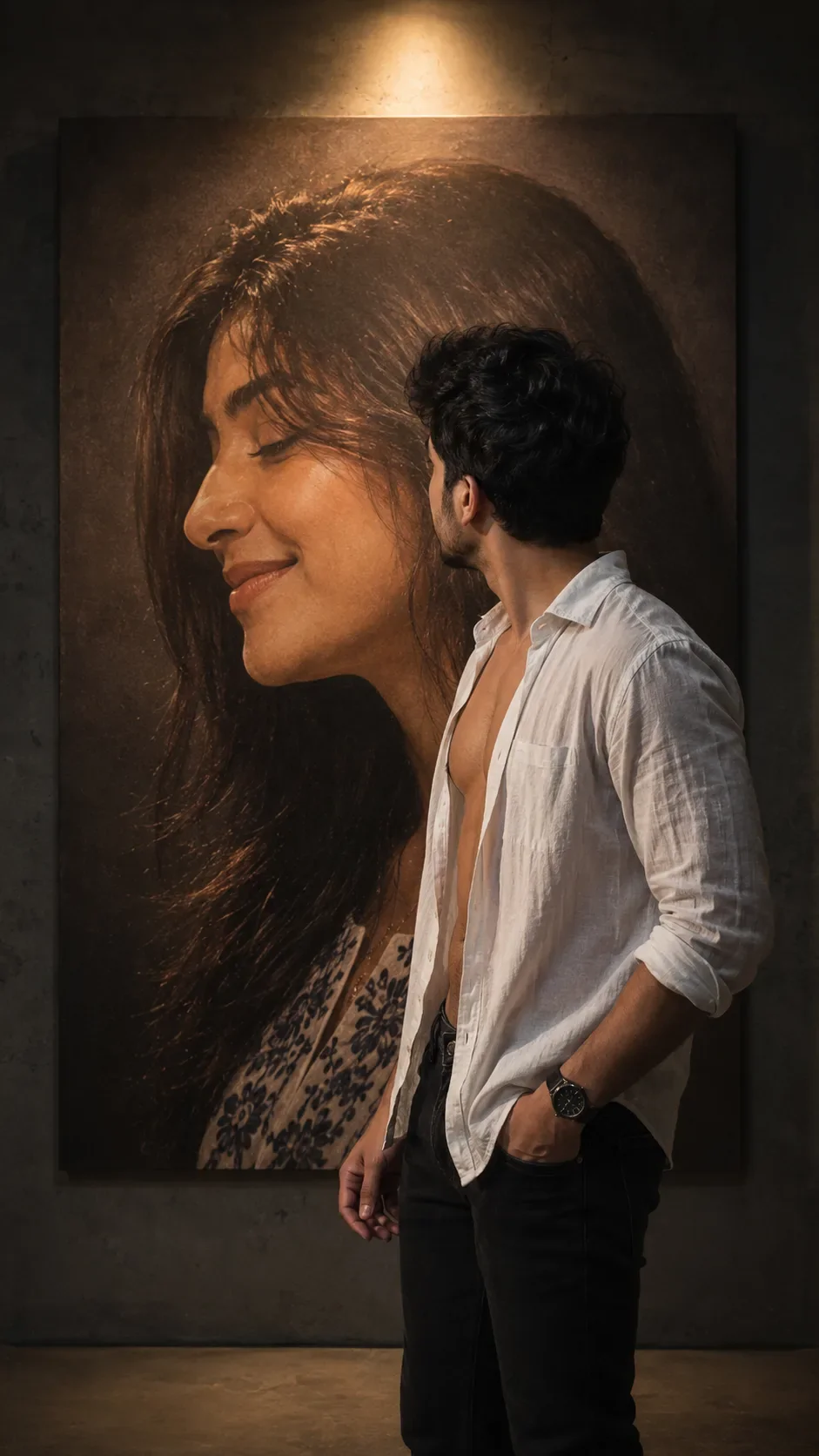
Design a Moody Art Gallery Aesthetic Museum Walk Portrait AI Prompt — a high-quality, photorealistic image with balanced lighting, sharp focus, and intricate details suitable for social media sharing and digital content creation.
We recommend generating this using Google Gemini. Simply copy the prompt text below and paste it into the generator. You can easily customize specific keywords like colors, backgrounds, or subjects to make the final output uniquely yours.
Moody Art Gallery Aesthetic Museum Walk Portrait AI Prompt - Copy Paste AI Prompt
Ultra-realistic cinematic portrait, vertical 9:16 composition, professional DSLR photography, 85mm lens, f/1.8, RAW photo, HDR, ultra-detailed 8K quality.

Scene: A dimly lit indoor art gallery or studio with a dark concrete wall. A single warm spotlight from directly above creates dramatic soft lighting, casting realistic shadows and illuminating both the subject and a huge wall-mounted portrait behind him.

Background: An oversized vertical canvas occupying most of the wall. The painting features a close-up side profile of a beautiful young woman with long dark brown hair, warm medium-fair skin tone, closed eyes, a gentle genuine smile, natural makeup, soft facial features, realistic skin texture, and a peaceful emotional expression. The painting has warm brown and beige tones with subtle canvas texture.

Subject: A slim young man with light-medium warm skin tone, messy wavy black hair, clean-shaven face, standing with his back mostly facing the camera. His head is turned slightly left as if quietly looking at the woman's portrait. Only part of his side profile and jawline are visible. His posture is calm, emotional, and reflective.

Outfit: White long-sleeve linen button-up shirt worn completely unbuttoned, exposing the chest and upper abdomen naturally. Dark charcoal or black fitted jeans. Black luxury stainless-steel wristwatch on the left wrist. No necklace, no sunglasses, no hat.

Pose: Standing slightly off-center to the right side of the frame. Left hand resting inside the front jeans pocket, right arm relaxed naturally by his side. Shoulders relaxed. Looking directly at the large portrait instead of the camera.

Lighting: Warm cinematic overhead spotlight, soft golden highlights, natural falloff, realistic shadows, volumetric light rays, subtle ambient darkness around the edges, moody atmosphere.

Color grading: Warm brown, beige, cream, dark gray, cinematic contrast, soft highlights, deep shadows, realistic skin tones, natural colors, premium editorial photography look.

Camera angle: Eye-level shot from behind the subject with a slight three-quarter rear angle, allowing both the man and the woman's portrait to dominate the composition.

Style: Hyper-realistic, photorealistic, emotionally expressive, luxury editorial photography, museum-quality composition, extremely detailed skin texture, realistic fabric folds, sharp focus, natural depth of field, authentic lighting, no artificial look.

Negative Prompt: cartoon, CGI, anime, painting style, illustration, low resolution, blurry, noise, overexposed, oversaturated, bad anatomy, extra limbs, duplicate body parts, distorted face, unrealistic skin, plastic skin, watermark, logo, text, cropped body, poor lighting, low quality.

Optical Identity & Likeness Preservation: Strictly retain 100% exact facial likeness, natural cheekbone contours, true skin undertone, and authentic gaze from source image without generic face replacement.What You'll Get
- 🎨 Style: Ai Image
- ✨ Mood: Photography
- 📱 Best For: Photography
- 🤖 Works With: Google Gemini
- 🔥 Popularity: Copied 5,775 times
- 📅 Added: Sep 14, 2026
Frequently asked questions
- How do I use the Moody Art Gallery Aesthetic Museum Walk Portrait AI Prompt prompt?
- To use this prompt, simply click the "Copy Prompt" button above. Then, open Google Gemini, paste the copied text into the prompt box, and hit generate. You can instantly generate high-quality images without needing any reference photos.
- What is this prompt best used for?
- This specific prompt is highly optimized for creating engaging social media content and digital art. The formula is structured to produce high-contrast, visually appealing results that perform well on visual platforms.
- Can I customize the details of this prompt?
- Yes! While the core structure of the prompt is optimized for Google Gemini, you can easily customize the details. We recommend changing specific keywords like clothing colors, background locations, or the overall mood (e.g., changing "sunny" to "rainy" or "neon") to match your exact vision.
Explore Related Collections
Explore Ai Image Prompts — Browse our curated collection of Ai Image prompts tailored for creators. View all Ai Image prompts →
Explore Photography Prompts — Discover more viral Photography ideas for your next AI generation. View all Photography prompts →
Explore Trending Prompts — Explore our extensive library of Trending templates ready to copy and paste. View all Trending prompts →