Quick Summary: This verified Google Gemini & Midjourney v6 prompt creates an authentic 90s vintage film aesthetic for Minimalist Fashion Artistic Dispersion Effect AI Photo Prompt with calibrated lighting, authentic texture physics, and tested 1-click copy-paste formula for instant AI generation without facial distortion.
- Photography
- Ai Image
- Trending
- Photography
- Ai Image
- Trending
- Viral Prompt
- Gemini Ai
- Bing Image Creator
- Copy Paste
About This Prompt
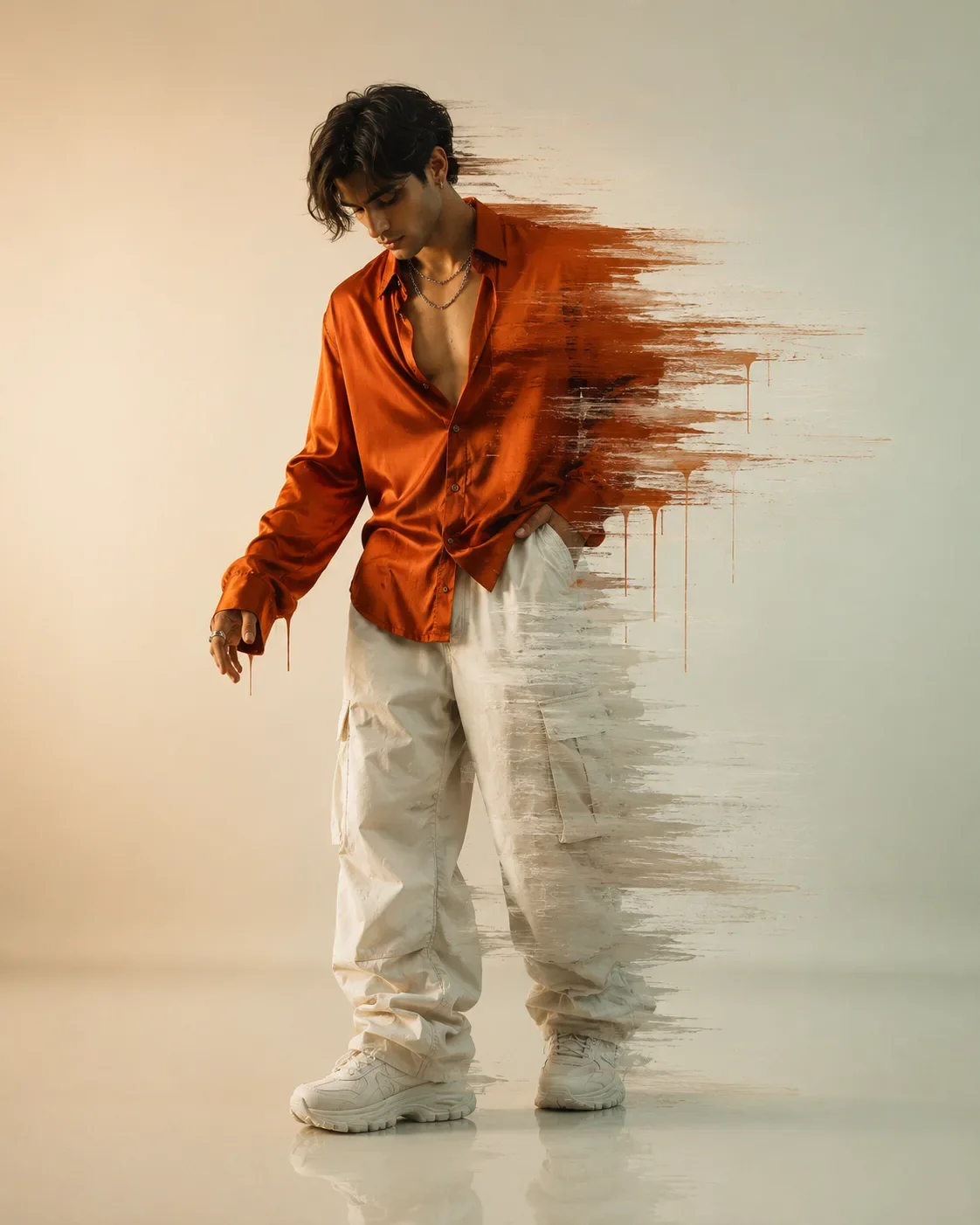
This prompt creates an Minimalist Fashion Artistic Dispersion Effect AI Photo Prompt — a high-quality, photorealistic image with balanced lighting, sharp focus, and intricate details suitable for social media sharing and digital content creation.
This prompt works best with Google Gemini. Simply copy the prompt text below and paste it into the generator. You can easily customize specific keywords like colors, backgrounds, or subjects to make the final output uniquely yours.
Minimalist Fashion Artistic Dispersion Effect AI Photo Prompt - Copy Paste AI Prompt
{

"project_name": "MALE_ARTISTIC_GLITCH_FASHION_EDITORIAL",

"version": "1.0",

"canvas": {

"aspect_ratio": "4:5",

"resolution": "4096x5120",

"dpi": 300,

"output_format": "PNG",

"quality": "Ultra HD 8K"

},

"style": {

"genre": "Luxury Fashion Editorial",

"visual_style": "Minimal Studio Fashion + Digital Glitch Art",

"inspiration": [

"High-End Fashion Campaign",

"Zara Editorial",

"COS Campaign",

"Acne Studios",

"Aesop Minimalism",

"Contemporary Digital Art",

"Abstract Motion Smear"

],

"mood": [

"Calm",

"Confident",

"Modern",

"Artistic",

"Luxury",

"Minimal",

"Experimental"

]

},

"subject": {

"gender": "Male",

"age": "22-28",

"body_type": "Lean Athletic",

"height": "6ft",

"ethnicity": "South Asian",

"skin": {

"tone": "Warm Wheat",

"texture": "Natural",

"finish": "Soft Matte"

},

"expression": {

"emotion": "Thoughtful",

"eyes": "Looking Down",

"mouth": "Neutral",

"confidence": "Quiet"

}

},

"hair": {

"style": "Messy Textured Middle-Part Curtains",

"color": "Dark Brown",

"strands": "Loose Hair Falling Over Forehead",

"volume": "Natural"

},

"wardrobe": {

"top": {

"type": "Oversized Premium Satin Shirt",

"color": "Burnt Orange",

"fit": "Relaxed",

"buttons": "Top 3 Open",

"fabric": "Luxury Satin",

"sleeves": "Extra Long",

"texture": "Soft Wrinkled"

},

"bottom": {

"type": "Oversized Parachute Cargo Pants",

"color": "Off White",

"fit": "Baggy",

"fabric": "Premium Cotton Nylon",

"length": "Stacked Around Shoes"

},

"footwear": {

"type": "Chunky Sneakers",

"color": "White",

"finish": "Minimal Luxury"

},

"accessories": {

"necklaces": [

"Silver Chain",

"Layered Chain"

],

"earrings": "Small Silver Hoop",

"rings": "Minimal Silver Rings"

}

},

"pose": {

"stance": "Relaxed Standing",

"weight_distribution": "Mostly On Right Leg",

"left_leg": "Bent Naturally",

"head": "Tilted Downward",

"left_hand": "Extended Slightly Forward",

"right_hand": "Inside Pocket",

"body_rotation": "25 Degrees Side Angle"

},

"composition": {

"camera_distance": "Full Body",

"camera_angle": "Eye Level",

"framing": "Centered",

"negative_space": "Large",

"reflection": "Soft Floor Reflection",

"balance": "Minimal Symmetrical"

},

"environment": {

"location": "Luxury Studio",

"background": {

"type": "Smooth Matte Wall",

"gradient": {

"left": "#F7EFE3",

"right": "#DDE7DA"

}

},

"floor": {

"material": "Glossy White Epoxy",

"reflection": "Soft"

}

},

"lighting": {

"main_light": {

"type": "Large Softbox",

"position": "Front Left 45°",

"intensity": "Medium"

},

"fill_light": {

"type": "Soft Diffused",

"position": "Front Right"

},

"rim_light": {

"enabled": true,

"intensity": "Low",

"color": "Warm White"

},

"shadow": {

"style": "Soft",

"opacity": "35%"

}

},

"effects": {

"primary_effect": {

"name": "Horizontal Digital Paint Glitch",

"origin": "Right Side Of Subject",

"direction": "Right",

"coverage": {

"upper_body": "70%",

"lower_body": "35%"

},

"brush_style": "Dry Paint Smear",

"motion_blur": {

"enabled": true,

"direction": "Horizontal",

"strength": "Medium"

},

"paint_drips": {

"enabled": true,

"color": "Matching Clothing Colors",

"gravity": "Natural",

"length": "Random"

},

"edge_detail": {

"roughness": "Medium",

"opacity_falloff": true

}

}

},

"color_palette": {

"primary": "#C76A21",

"secondary": "#EFE9DD",

"background": "#F5F0E6",

"accent": "#7A4319",

"contrast": "Medium",

"saturation": "Slightly Muted"

},

"camera": {

"lens": "85mm",

"aperture": "f/4",

"iso": 100,

"shutter_speed": "1/160",

"focus": "Face",

"depth_of_field": "Medium"

},

"render": {

"engine": "Photorealistic",

"quality": "Maximum",

"sharpness": "Ultra",

"dynamic_range": "High",

"global_illumination": true,

"ray_tracing": true,

"ambient_occlusion": true,

"skin_details": true,

"fabric_simulation": true,

"realistic_wrinkles": true

},

"post_processing": {

"contrast": "+8",

"clarity": "+15",

"texture": "+10",

"highlights": "-10",

"shadows": "+8",

"vignette": "Very Light",

"grain": "Minimal Fine Film Grain",

"color_grading": "Luxury Warm Editorial",

"bloom": "Subtle"

},

"negative_prompt": [

"Female body",

"Female face",

"Extra fingers",

"Extra arms",

"Low quality",

"Low resolution",

"Plastic skin",

"Overexposed",

"Blurred face",

"Cartoon",

"Anime",

"Text",

"Logo",

"Watermark",

"Frame",

"Signature",

"Background objects",

"Crowd",

"Messy lighting",

"Bad anatomy",

"Duplicate body",

"Deformed hands",

"Overdone glitch",

"Oversaturated colors",

"Noise artifacts"

]

}

Optical Identity & Likeness Preservation: Strictly retain 100% exact facial likeness, natural cheekbone contours, true skin undertone, and authentic gaze from source image without generic face replacement.Frequently asked questions
- How do I use the Minimalist Fashion Artistic Dispersion Effect AI Photo Prompt prompt?
- To use this prompt, simply click the "Copy Prompt" button above. Then, open Google Gemini, paste the copied text into the prompt box, and hit generate. You can instantly generate high-quality images without needing any reference photos.
- What is this prompt best used for?
- This specific prompt is highly optimized for creating engaging social media content and digital art. The formula is structured to produce high-contrast, visually appealing results that perform well on visual platforms.
- Can I customize the details of this prompt?
- Yes! While the core structure of the prompt is optimized for Google Gemini, you can easily customize the details. We recommend changing specific keywords like clothing colors, background locations, or the overall mood (e.g., changing "sunny" to "rainy" or "neon") to match your exact vision.
What You'll Get
- 🎨 Style: Photography
- ✨ Mood: Photography
- 📱 Best For: Ai Image
- 🤖 Works With: Google Gemini
- 🔥 Popularity: Copied 5,708 times
- 📅 Added: Sep 14, 2026
Explore Related Collections
Explore Photography Prompts — Browse our curated collection of Photography prompts tailored for creators. View all Photography prompts →
Explore Ai Image Prompts — Discover more viral Ai Image ideas for your next AI generation. View all Ai Image prompts →
Explore Trending Prompts — Explore our extensive library of Trending templates ready to copy and paste. View all Trending prompts →