Quick Summary: This verified Google Gemini & Midjourney v6 prompt creates an authentic 90s vintage film aesthetic for "divine Silhouette Blessing Panchmukhi Hanuman Ji" AI Photo Prompt with calibrated lighting, authentic texture physics, and tested 1-click copy-paste formula for instant AI generation without facial distortion.
- Ai Image
- Illustration 3d
- Trending
- Illustration 3d
- Ai Image
- Trending
- Viral Prompt
- Gemini Ai
- Bing Image Creator
- Copy Paste
About This Prompt
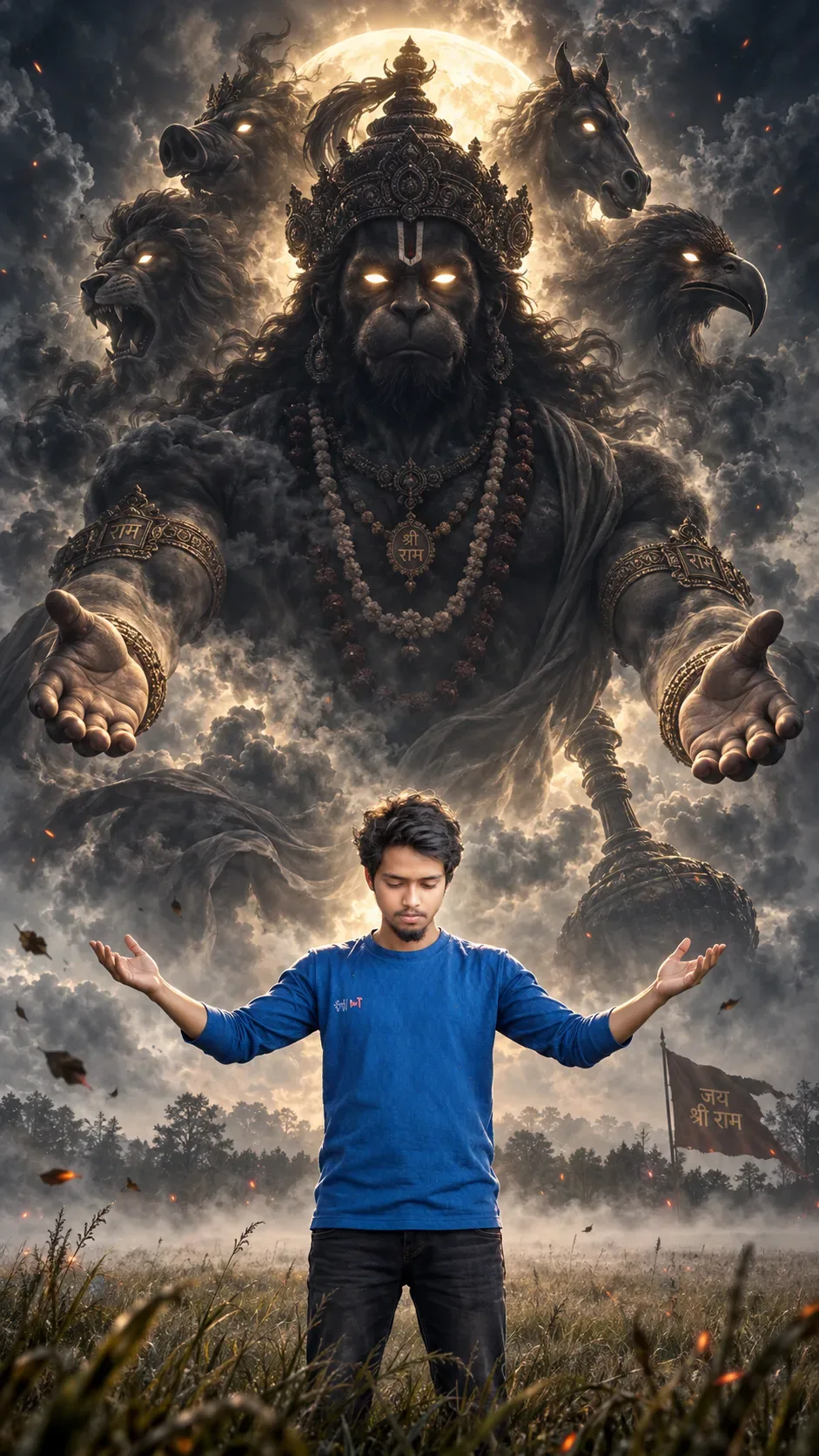
Create a "divine Silhouette Blessing Panchmukhi Hanuman Ji" AI Photo Prompt — a high-quality, photorealistic image with balanced lighting, sharp focus, and intricate details suitable for social media sharing and digital content creation.
This prompt works best with Google Gemini. Simply copy the prompt text below and paste it into the generator. You can easily customize specific keywords like colors, backgrounds, or subjects to make the final output uniquely yours.
"divine Silhouette Blessing Panchmukhi Hanuman Ji" AI Photo Prompt - Copy Paste AI Prompt
IDENTITY LOCK: Use the uploaded reference photo for the human subject.
Do not change his facial bone structure, eye shape and color, nose
shape, lip shape, jawline, or skin tone in any way — keep it 100%
identical to the original photo. Body build and proportions unchanged.
Non-negotiable.

CONCEPT: Create a highly realistic, cinematic vertical portrait — a
massive divine silhouette of Panchmukhi Hanuman ji looming in the sky
behind and above the human subject, as if manifesting to bless him.
The subject stands small in the foreground with both arms raised
outward in a mirrored gesture of reverence and connection, head bowed
slightly.

DIVINE FIGURE (Panchmukhi Hanuman ji): A colossal dark smoky silhouette
figure filling the sky, formed from swirling storm clouds and drifting
embers/ash particles. The central face is Hanuman ji's — strong,
noble, fully silhouetted in deep charcoal-black with two intensely
glowing white-gold eyes as the only visible light source on the face.
Subtly arranged around the central face, partially emerging from the
swirling smoke at the sides and above, suggest the four additional
faces of the Panchmukhi form — Narasimha (lion face) to one side,
Garuda (eagle face) to the other side, Varaha (boar face) subtly
above, and Hayagriva (horse face) subtly above the other — each
rendered softly within the smoke and shadow, more felt than fully
detailed, so the main Hanuman face remains the clear visual focus. A
detailed crown (mukut) sits atop the central head with a flowing
plume, layered rudraksha and rock-crystal mala necklaces hang across
the chest, ornate armlets and wristbands on the massive outstretched
arms, and a flowing dhoti/vastra rendered as living smoke trailing
into the storm clouds. A large full-moon-like glow radiates directly
behind the central head like a halo, backlighting the entire divine
figure.

DIVINE POSE: Both colossal arms spread wide open in a powerful
blessing gesture, palms facing outward and slightly downward toward
the human subject below, fingers relaxed and slightly curled —
anatomically correct, five digits per hand, no fused or extra fingers.

HUMAN SUBJECT POSE: Standing in an open misty field, both arms raised
outward mirroring the divine figure's gesture, palms open and upward
as if receiving blessing, head tilted slightly down in humility,
weight settled evenly, a natural unposed stance rather than stiff
symmetry. Anatomically correct hands with five fingers each.

ENVIRONMENT & ATMOSPHERE: Vast open grassy field with light ground
mist, scattered dark storm clouds swirling upward into the divine
figure, fine embers/ash and a few wind-blown leaves drifting through
the air, distant faint tree line at the horizon fading into haze.

LIGHTING SETUP (as a real photographer/VFX artist would dial it in):
Key light — the massive glowing moon-halo behind the divine figure's
head acts as the dominant backlight, casting strong rim light down
onto the human subject's hair and shoulders. Fill — soft diffused
ambient light from the misty ground, gently lifting shadows on the
subject's face so he isn't a full silhouette. The divine figure itself
remains a near-black silhouette against the glow, with only the eyes
and fine smoke edges catching light.

LENS & OPTICS: Simulate a wide-angle 24mm lens at f/4 to capture both
the towering divine figure and the human subject in one dramatic
vertical frame, deep focus keeping both sharp, with a very faint
natural vignette at the corners for cinematic weight.

FILM/COLOR SCIENCE: Desaturated, high-contrast cinematic grade — deep
charcoal blacks, cool grey-blue storm tones, with the moon-halo and
divine eyes as the only warm-gold highlight accents in the frame.
Human subject's skin tone and clothing colors stay natural and true,
not affected by the overall desaturation.

PEAK DETAILING: Intricately carved texture on the crown and jewelry,
individually rendered rudraksha beads, fine strands of hair/mane
within the smoke, sharp glowing catchlight in the divine eyes, visible
fine ash and mist particles lit by the halo, crisp naturalistic detail
on the human subject (fabric texture, skin texture, hair strands)
contrasted against the painterly smoke-and-shadow divine figure.

FINAL CHECK: Ensure zero facial distortion on the human subject,
correct anatomical hands for both the human subject and the divine
figure (five fingers each, no fused or extra digits), and consistent
light-source logic radiating from the moon-halo behind Hanuman ji's
head.

Optical Identity & Likeness Preservation: Lock subject's authentic facial identity and natural posture while seamlessly integrating with sharp vehicle reflections and cinematic ambient lighting.What You'll Get
- 🎨 Style: Ai Image
- ✨ Mood: Illustration 3d
- 📱 Best For: Illustration 3d
- 🤖 Works With: Google Gemini
- 🔥 Popularity: Copied 174 times
- 📅 Added: Sep 14, 2026
Explore Related Collections
Explore Ai Image Prompts — Browse our curated collection of Ai Image prompts tailored for creators. View all Ai Image prompts →
Explore Illustration 3d Prompts — Discover more viral Illustration 3d ideas for your next AI generation. View all Illustration 3d prompts →
Explore Trending Prompts — Explore our extensive library of Trending templates ready to copy and paste. View all Trending prompts →
Frequently asked questions
- How do I use the "divine Silhouette Blessing Panchmukhi Hanuman Ji" AI Photo Prompt prompt?
- To use this prompt, simply click the "Copy Prompt" button above. Then, open Google Gemini, paste the copied text into the prompt box, and hit generate. You can instantly generate high-quality images without needing any reference photos.
- What is this prompt best used for?
- This specific prompt is highly optimized for creating engaging social media content and digital art. The formula is structured to produce high-contrast, visually appealing results that perform well on visual platforms.
- Can I customize the details of this prompt?
- Yes! While the core structure of the prompt is optimized for Google Gemini, you can easily customize the details. We recommend changing specific keywords like clothing colors, background locations, or the overall mood (e.g., changing "sunny" to "rainy" or "neon") to match your exact vision.