Quick Summary: This verified Midjourney Niji 6 / Flux.1 Schnell / Bing Image Creator prompt creates an hyper-detailed 3D cyberpunk stylized aesthetic for You Are An Experienced Ui Designer Embracing Modern AI Photo Prompt with calibrated lighting, authentic texture physics, and tested 1-click copy-paste formula for instant AI generation without facial distortion.
About This Prompt
This prompt creates an You Are An Experienced Ui Designer Embracing Modern AI Photo Prompt — a high-quality, photorealistic image with balanced lighting, sharp focus, and intricate details suitable for social media sharing and digital content creation.
Optimized specifically for your AI generator. Simply copy the prompt text below and paste it into the generator. You can easily customize specific keywords like colors, backgrounds, or subjects to make the final output uniquely yours.
You Are An Experienced Ui Designer Embracing Modern AI Photo Prompt - Copy Paste AI Prompt
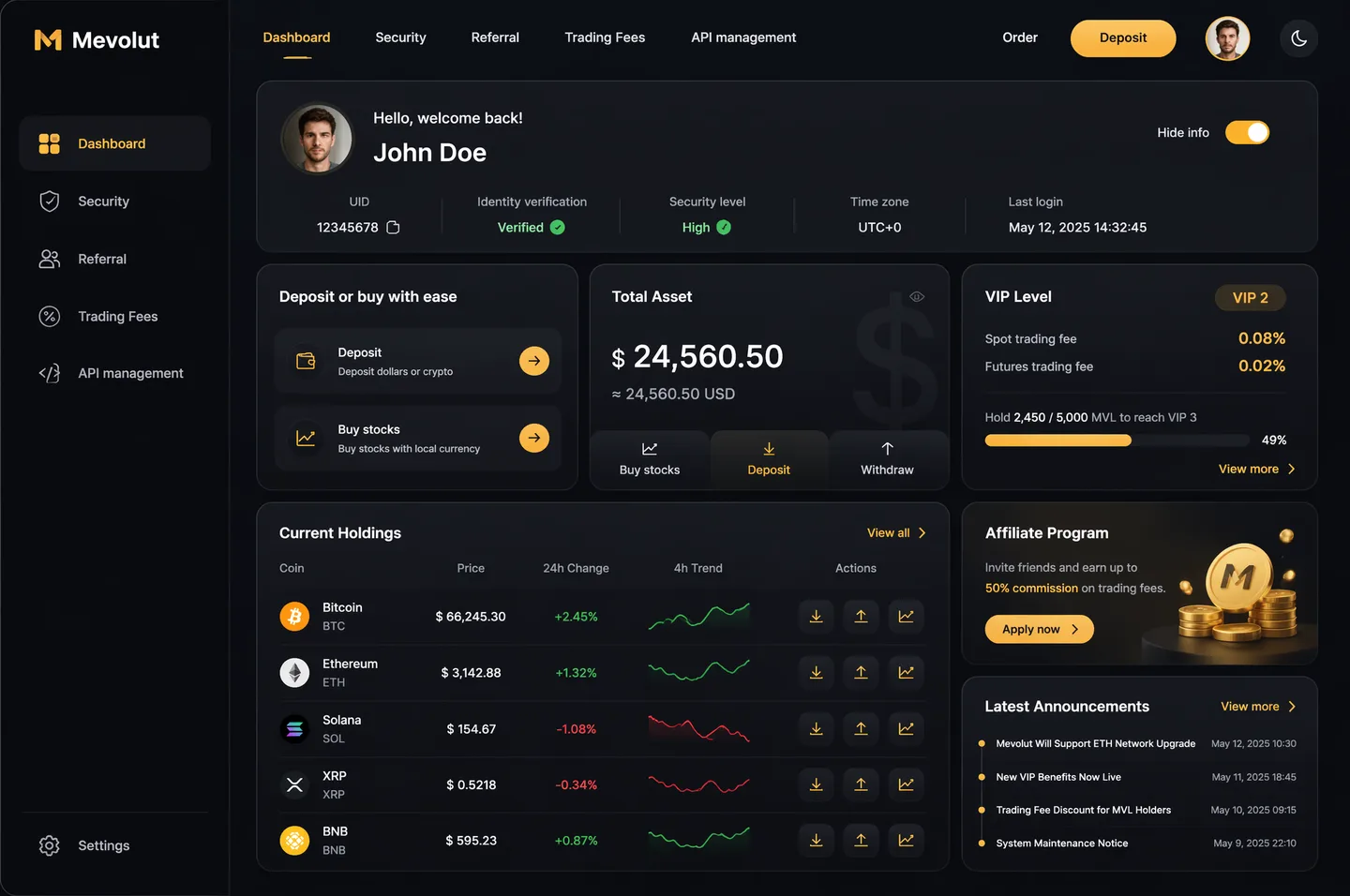
You are an experienced UI designer embracing modern, minimalistic design, shadows, glass, and soft colors.

Your role is to create a professional, beautiful mockup that is ready for delivery based on these requirements:

<requirements>
## 1. Overall Style & Visual Language
This interface represents a premium, modern fintech / crypto trading dashboard using a dark theme.
The visual language combines **soft neumorphism**, and **luxury Web3 aesthetics**.

Core characteristics:
- Warm gold/orange accent highlights
- Monochromatic color palette with minimalistic effects and shadows
- Card-based layout with depth and subtle backgrounds
- Minimal borders, separation via shadows or light backgrounds

Target perception:
- Secure
- Professional
- High-end / institutional-grade
- Optimized for experienced traders

---

## 2. Layout Structure

### Global Layout
- Desktop-first dashboard
- Output proportions: 3:2
- Three main regions:
  1. Top navigation bar (horizontal)
  2. Left sidebar navigation (vertical)
  3. Main content area (multi-column grid of cards)

Spacing is generous, prioritizing clarity and visual breathing room.

---

## 3. Top Navigation Bar
- Height: 72px
- Left:
  - Brand logo text "Mevolut"
  - Stylized "M"
  - Gold/orange accent
- Center:
  - Navigation links: Dashboard, Security, Referral, Trading Fees, API management
- Right:
  - Order link
  - Primary CTA: “Deposit” (gold pill button)
  - User avatar (circular)
  - Theme toggle (moon icon)

Typography:
- Clean sans-serif
- Medium weight
- White primary text, muted gray inactive states

---

## 4. Left Sidebar Navigation
- Width: 240px
- Background: near-black
- Vertical navigation items with icons:
  - Dashboard (active)
  - Security
  - Referral
  - Trading Fees
  - API management
- Bottom-aligned:
  - Settings

Active item:
- Subtle background highlight
- Slight background tint
- Rounded container

Icons:
- Outline style
- Gold accent on active state

---

## 5. Main Content Area

### 5.1 User Overview Card
- Large rounded card at top
- Left:
  - Circular avatar
  - Greeting text (“Hello…”)
  - User name
- Inline info blocks:
  - UID (copy icon)
  - Identity verification status
  - Security level
  - Time zone
  - Last login timestamp
- Right:
  - “Hide info” toggle

Style:
- Subtle inner shadows

---

### 5.2 Deposit / Buy Card
- Medium-sized card
- Title text explaining deposit options
- Two action rows:
  - Deposit (dollars or crypto)
  - Buy stocks (local currency)
- Each row:
  - Icon
  - Label
  - Arrow action button (gold accent)

---

### 5.3 Total Asset Card
- Displays USD balance and USD equivalent
- Large, faded Dollar symbol watermark in background
- Action tabs:
  - Buy stocks
  - Deposit
  - Withdraw
- Numeric values are large

---

### 5.4 VIP Level Card
- Shows current VIP level
- Spot and futures fee rates
- Progress bar for token holdings
- “View more” link

Progress bar:
- Rounded
- Dark background track

---

### 5.5 Current Holdings Table
- Card containing a table layout
- Columns:
  - Coin (icon + name)
  - Price
  - 24h Change
  - 4h Trend (sparkline)
  - Actions (Deposit, Withdraw, Trade)

Sparklines:
- Green for positive trend
- Red for negative trend

Hover:
- Subtle background highlight per row

---

### 5.6 Affiliate Program Card
- Promotional card
- Gold coin illustration
- Short description and CTA button (“Apply now”)

---

### 5.7 Information / News Card
- Vertical list of announcements
- Headline + timestamp
- “View more” link at top

---

## 6. Color Palette
- Primary background: deep charcoal / black
- Card surfaces: slightly lighter
- Accent color: warm gold
- Text hierarchy:
  - White (primary)
  - Muted gray (secondary)
  - Dark gray (disabled)
- Status colors:
  - Green for positive
  - Red for negative

---

## 7. Effects & Interaction
- Rounded corners throughout (sm)

# Design tokens:
{
  // Global theme definition
  "theme": {
    "mode": "dark",
    "style": [
      "soft-neumorphism",
      "premium-fintech"
    ]
  },

  // Layout measurements and structure
  "layout": {
    "type": "desktop-dashboard",
    "grid": "three-column",
    "sidebarWidth": 240,
    "topbarHeight": 68,
    "contentPadding": 24
  },

  // Color system
  "colors": {
    "background": "#0B0D10",        // Main app background
    "primaryAccent": "#F5A623",     // Gold/orange highlight
    "secondaryAccent": "#FFB547",
    "textPrimary": "#FFFFFF",
    "textSecondary": "#B0B3B8",
    "textMuted": "#6B6F76",
    "success": "#22C55E",
    "danger": "#EF4444"
  },

  // Typography scale
  "typography": {
    "fontFamily": "SF Pro, system-ui, sans-serif",
    "weights": {
      "heading": 600,
      "body": 400,
      "numeric": 500
    },
    "sizes": {
      "h1": 24,
      "h2": 20,
      "h3": 16,
      "body": 14,
      "caption": 12
    }
  },

  // Core UI components
  "components": {
    "card": {
      "borderRadius": 16,
      "shadow": "0 20px 40px rgba(0,0,0,0.4)",
      "border": "none",
      "background": "#14171C",
    },

    "button": {
      "primary": {
        "textColor": "#0B0D10",
        "borderRadius": 999,
      },
      "secondary": {
        "background": "transparent",
        "textColor": "#F5A623"
      }
    },

    "sidebar": {
      "background": "#0E1014",
      "itemRadius": 12,
      "iconStyle": "outline"
    },

    "table": {
      "rowHeight": 56,
      "divider": "subtle",
      "hoverHighlight": true,
      "sparkline": {
        "positiveColor": "#22C55E",
        "negativeColor": "#EF4444"
      }
    },

    "progressBar": {
      "height": 6,
      "radius": 999,
      "fillColor": "#22C55E",
      "backgroundColor": "#2A2E35"
    }
  },

  // Icon system
  "icons": {
    "style": "outline",
    "size": 18,
    "colorInactive": "#6B6F76",
    "colorActive": "#F5A623"
  }
}
</requirements>

Note: Lock subject's authentic facial identity and natural posture while seamlessly integrating with sharp vehicle reflections and cinematic ambient lighting.What You'll Get
- 🎨 Style: Ai Image
- ✨ Mood: Meigen
- 📱 Best For: Trending
- 🤖 Works With: your AI generator
- 🔥 Popularity: Copied 52 times
- 📅 Added: Sep 14, 2026
Explore Related Collections
Explore Ai Image Prompts — Browse our curated collection of Ai Image prompts tailored for creators. View all Ai Image prompts →
Explore Trending Prompts — Discover more viral Trending ideas for your next AI generation. View all Trending prompts →
Frequently asked questions
- How do I use the You Are An Experienced Ui Designer Embracing Modern AI Photo Prompt prompt?
- To use this prompt, simply click the "Copy Prompt" button above. Then, open your AI generator, paste the copied text into the prompt box, and hit generate. You can instantly generate high-quality images without needing any reference photos.
- What is this prompt best used for?
- This specific prompt is highly optimized for creating engaging social media content and digital art. The formula is structured to produce high-contrast, visually appealing results that perform well on visual platforms.
- Can I customize the details of this prompt?
- Yes! While the core structure of the prompt is optimized for your AI generator, you can easily customize the details. We recommend changing specific keywords like clothing colors, background locations, or the overall mood (e.g., changing "sunny" to "rainy" or "neon") to match your exact vision.