Quick Summary: This verified Google Gemini & Midjourney v6 prompt creates an authentic 90s vintage film aesthetic for Cinematic Golden Hour Bridge Portrait Face Preserve AI Photo Prompt with calibrated lighting, authentic texture physics, and tested 1-click copy-paste formula for instant AI generation without facial distortion.
- Photography
- Ai Image
- Trending
- Photography
- Ai Image
- Trending
- Viral Prompt
- Gemini Ai
- Bing Image Creator
- Copy Paste
Cinematic Golden Hour Bridge Portrait Face Preserve AI Photo Prompt - Copy Paste AI Prompt
Use the uploaded photograph only as the facial-identity reference. Replace the person in the described scene with the person from the uploaded photograph. Preserve the uploaded person’s exact recognizable identity, natural skin colour, ethnicity, age, face shape, forehead, eyebrows, eyes, nose, lips, ears, jawline, beard and moustache pattern. The final person must clearly look like the person in the uploaded photograph. Do not copy the uploaded photograph’s clothes, pose, background, lighting or accessories.

Create an ultra-photorealistic vertical outdoor fashion portrait matching the following scene, pose, composition, clothing, background, camera angle and lighting precisely:

POSE AND BODY POSITION:
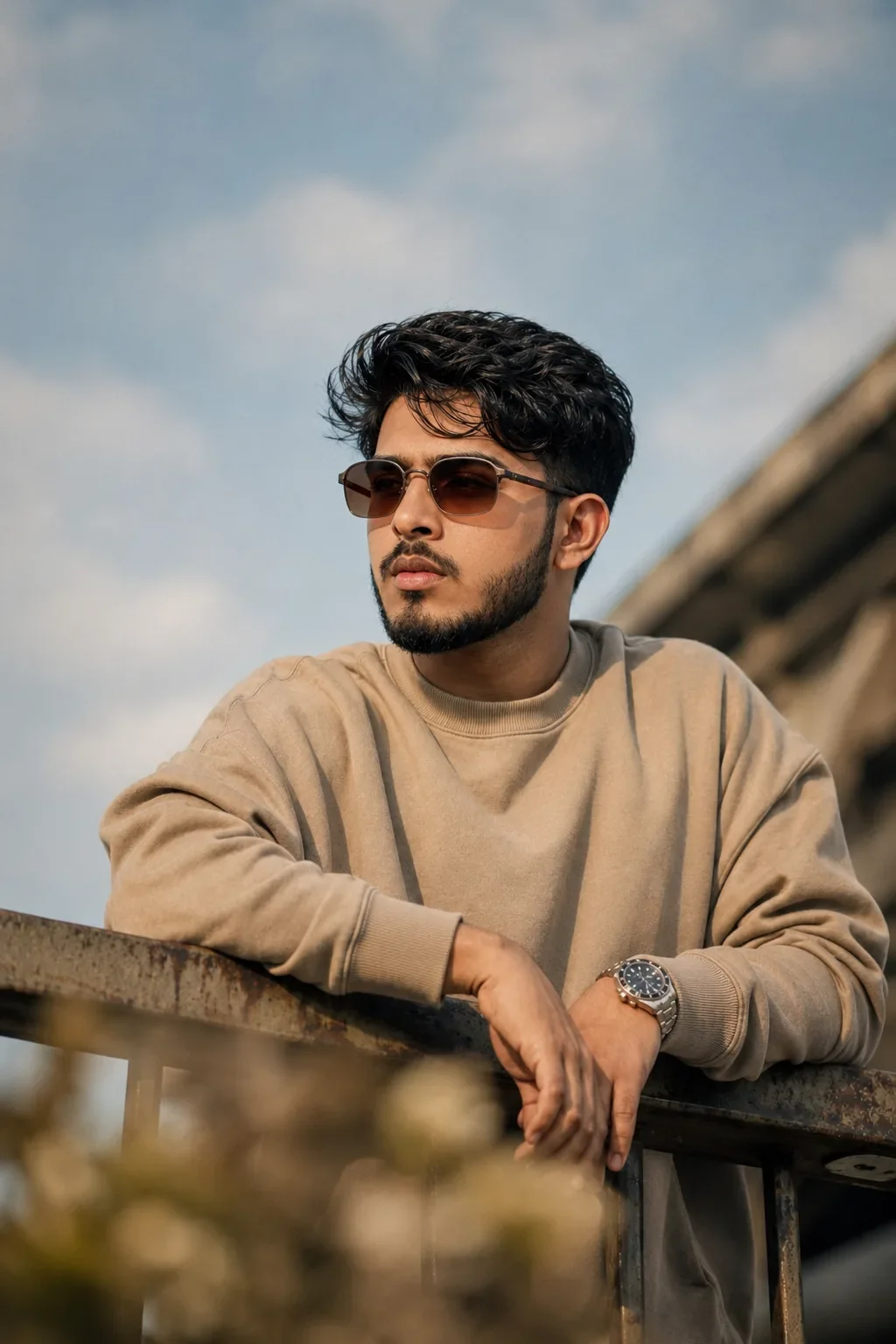
The man is standing behind an old rusted metal bridge railing. His upper body faces almost toward the camera but is turned slightly toward the left side of the frame. His head is turned approximately 40 degrees toward the left side of the image, looking calmly into the distance rather than at the camera. His chin is held naturally level, with a serious, confident and thoughtful expression and closed lips.

Both forearms rest casually across the top horizontal metal railing. His right forearm enters diagonally from the lower-left side and lies across the railing. His right wrist and hand rest near the centre of the frame. His left forearm rests on the railing from the right side, with a silver wristwatch visible on his left wrist. His left hand hangs naturally downward over the railing near the lower centre-right of the frame. Fingers must appear relaxed, separated naturally and anatomically correct. The shoulders are relaxed, producing an effortless masculine editorial pose.

FACIAL IDENTITY AND GROOMING:
Keep the exact face and recognizable identity of the person in the uploaded photograph. Retain realistic natural skin texture, pores, small facial details and the person’s natural skin tone. Give him thick black hair styled into a voluminous, slightly messy textured quiff, swept upward and slightly backward, with shorter tapered sides. Keep the hairstyle natural and realistic. Maintain a neat full beard and moustache appropriate to the uploaded person’s facial growth, with a clean cheek line and defined jawline.

EYEWEAR:
Add slim, narrow rectangular sunglasses with a dark brown metal frame and warm amber-brown tinted lenses. The sunglasses sit naturally on the nose and follow the correct facial perspective. The eyes should only be faintly visible through the tinted lenses. Do not use round, oversized or completely black sunglasses.

CLOTHING:
Dress the person in a plain oversized warm taupe-beige crew-neck sweatshirt. The sweatshirt must have a slightly loose dropped-shoulder fit, long sleeves, thick premium cotton fabric, a ribbed round collar and wide ribbed cuffs. Show realistic fabric folds around the chest, shoulders, elbows and wrists. The sweatshirt must not contain any print, pattern, logo, pocket, zipper, hood, drawstring or text.

WATCH:
Place one realistic silver stainless-steel analog wristwatch on the man’s left wrist only. Use a round dark charcoal-black dial, silver hour markers and a silver linked metal bracelet. The watch should appear medium-sized, premium and photographically realistic. Do not add any other jewellery or accessories.

RAILING:
Use an old industrial metal bridge railing running horizontally across the lower third of the image. The top bar is wide, rectangular, dark brown-grey and visibly weathered, with subtle rust, scratches and worn texture. Add thinner dark vertical metal bars underneath. The railing must pass in front of the man’s waist and support both arms naturally.

BACKGROUND:
Place the man outdoors beside a concrete flyover or overpass. A large blurred concrete bridge structure begins around the middle-right edge and travels diagonally upward toward the upper-right corner. The bridge must remain out of focus and should not cover the person.

Fill most of the upper background with an expansive pale blue-grey sky containing large soft white and light-grey clouds. Keep the sky muted, natural and slightly hazy rather than bright blue. Do not add buildings, cars, boats, sea, mountains, city lights or crowds.

Add heavily blurred golden-brown dry grass or vegetation across the extreme bottom foreground. This vegetation should partially cover the bottom edge of the railing and the lower body, creating a warm creamy foreground bokeh effect.

COMPOSITION AND FRAMING:
Use an exact vertical 2:3 portrait orientation, preferably 1024 × 1536 pixels. Frame the subject from approximately the upper thighs or waist to well above the head. Position the man slightly right of centre. His face should sit around the upper-middle portion of the frame.

Leave a large amount of empty cloudy sky above his hair—approximately the upper 30% of the image should primarily contain sky. Keep open negative space toward the upper-left. The right edge of the body and sweatshirt may come close to the right border. Do not crop the head, hairstyle, watch, hands or elbows.

Use a slightly low camera viewpoint, approximately chest-to-waist height, pointing gently upward toward the subject. The portrait should feel candid and naturally photographed, not like a studio pose.

LIGHTING:
Use warm late-afternoon golden-hour sunlight coming diagonally from the front-left side of the scene. Create soft golden highlights along the left side of the face, cheek, nose, beard, hair, sweatshirt sleeves and hands. Use natural but noticeable shadows on the opposite side of the face and beneath the chin.

The lighting should be warm, directional and cinematic but not orange or oversaturated. Preserve realistic highlight detail and natural skin colour. Do not use flat studio lighting, flash lighting, harsh rim lighting, neon lighting or artificial coloured light.

CAMERA AND PHOTOGRAPHIC STYLE:
Professional cinematic men’s lifestyle and street-fashion photography captured with a full-frame camera and an 85mm portrait lens at approximately f/1.8–f/2.2. Use a shallow depth of field with the face, sunglasses, beard, upper body, hands and wristwatch in sharp focus. Keep the bridge, sky edges and foreground vegetation softly blurred with natural optical bokeh.

Use realistic perspective, natural body proportions, high dynamic range, subtle film contrast, detailed hair strands, authentic skin texture, visible sweatshirt fibres and realistic metal reflections. Apply a premium warm cinematic colour grade using muted taupe, brown, golden-beige, pale blue-grey and charcoal tones. The result must look like a genuine professional camera photograph, not AI-generated.

FINAL IDENTITY RULE:
The uploaded person’s facial identity is the most important element. Keep the person instantly recognizable. Do not reproduce the face of another model. Transfer only the described pose, hairstyle styling, sunglasses, clothing, watch, railing, bridge environment, composition, lighting and colour grading onto the uploaded person.

Do not add text, typography, captions, logos, watermarks, borders or graphic elements.

NEGATIVE PROMPT:
different person, changed identity, unrecognizable face, copied model face, altered ethnicity, altered skin tone, pale skin, beautified face, face reshaping, different nose, different lips, different jawline, artificial face, plastic skin, waxy skin, excessive skin smoothing, female appearance, smiling, open mouth, looking at camera, front-facing head, wrong head direction, round sunglasses, oversized sunglasses, black opaque lenses, white shirt, button-up shirt, T-shirt, hoodie, jacket, printed sweatshirt, logos, necklace, earrings, rings, bracelets, multiple watches, watch on wrong wrist, missing watch, arms crossed over chest, hands inside pockets, wrong arm position, raised hands, duplicate hands, fused hands, extra arms, extra fingers, missing fingers, deformed fingers, bent wrist, unnatural anatomy, short railing, clean modern railing, yacht, boat, ocean, beach, buildings, cars, people, mountains, bright blue sky, sunset sun, night scene, studio background, hard flash, orange skin, oversaturated colours, extreme HDR, CGI, 3D render, cartoon, illustration, painting, low resolution, blurry face, excessive blur, noise, grain, compression artifacts, text, logo, watermark.

Optical Identity & Likeness Preservation: Strictly retain 100% exact facial likeness, natural cheekbone contours, true skin undertone, and authentic gaze from source image without generic face replacement.👤Customize in Face Consistency Studio
Lock 100% exact facial identity, bone structure & eye shape in Gemini & Bing.
Technical Prompt Parameters (Vintage Film & Retro Polaroid)
| Parameter | Configuration | Output Impact |
|---|---|---|
| Target AI Engine | Google Gemini & Midjourney v6 | Preserves organic analog warmth, natural color saturation, and retro lighting response. |
| Recommended Aspect Ratio | 4:5 (Classic Film) or 1:1 (Square Polaroid) | Faithful recreation of vintage paper print dimensions and nostalgic photo albums. |
| Camera & Lens Settings | 35mm Leica M6, Kodak Portra 400, f/2.8, subtle chromatic dispersion | Renders genuine analog grain, gentle halation, and authentic film stock color science. |
| Lighting Style | Direct camera flash with soft falloff or warm golden hour sunset flare | Creates natural retro exposure highlights without artificial digital gloss. |
| Negative Constraints | digital sheen, oversaturated HDR, plastic skin, neon light, CGI 3D, modern watermark | Eliminates hyper-digital smoothness to maintain true photochemical aesthetic. |
| Reference Photo | Upload a daylight selfie; avoid heavy ring-light filters for best film look. | Upload front-facing reference photo for face matching. |
How to use this prompt
- Copy the prompt, open Google Gemini or Bing Image Creator, attach your reference photo, and generate instant 8K results.
How to get better results from Cinematic Golden Hour Bridge Portrait Face Preserve AI Photo Prompt
Free 1-click copy cinematic golden hour bridge portrait face preserve ai photo prompt for Google Gemini and Bing Image Creator. Authentic photography aesthetic, realistic lighting, and instant camera settings. Use it as a copy-ready starting point, then adjust the subject, scene, tone and output format for your own result.
- Photography
- Ai Image
- Trending
- Viral Prompt
- Gemini Ai
- Bing Image Creator
Customize before generating
- Replace the main subject, name, product or character details.
- Adjust lighting, background, mood, camera angle or aspect ratio if the prompt is visual.
- Change tone, audience, language and output format if the prompt is for text.
- Keep this core idea clear: Use the uploaded photograph only as the facial-identity reference. Replace the person in the described scene with the person from the uploaded photograph. Preserve...
Quick variations to try
- Make Cinematic Golden Hour Bridge Portrait Face Preserve AI Photo Prompt more cinematic with stronger lighting and richer background detail.
- Turn Cinematic Golden Hour Bridge Portrait Face Preserve AI Photo Prompt into a cleaner mobile-first version for social media posts or profile use.
- Create a premium version of Cinematic Golden Hour Bridge Portrait Face Preserve AI Photo Prompt with sharper style, higher detail and a more polished final output.