Quick Summary: This verified Google Gemini & Midjourney v6 prompt creates an authentic 90s vintage film aesthetic for Becoming A Butterflys Journey AI Photo Prompt with calibrated lighting, authentic texture physics, and tested 1-click copy-paste formula for instant AI generation without facial distortion.
- Illustration 3d
- Ai Image
- Trending
- Illustration 3d
- Ai Image
- Trending
- Viral Prompt
- Gemini Ai
- Bing Image Creator
- Copy Paste
About This Prompt
This AI prompt generates a Becoming A Butterflys Journey AI Photo Prompt — a high-quality, photorealistic image with balanced lighting, sharp focus, and intricate details suitable for social media sharing and digital content creation.
For the best results, use this with Google Gemini. Simply copy the prompt text below and paste it into the generator. You can easily customize specific keywords like colors, backgrounds, or subjects to make the final output uniquely yours.
Becoming A Butterflys Journey AI Photo Prompt - Copy Paste AI Prompt
Use the uploaded user photo as the **only and absolute source of the subject’s identity**. Preserve the person’s recognizable facial identity exactly: facial structure and proportions, face shape, forehead, eyebrows, natural eye shape, nose, lips, jawline, cheekbones, chin, skin tone, natural skin texture, hairline, and all distinctive features. **Do not copy, blend with, or reinterpret the identity of the person in the reference image. Do not beautify or alter the user’s identity.** The user photo determines only **who the person is**; the reference determines **expression, gaze, head pose, body pose, styling, composition, environment, lighting, and artistic treatment**.

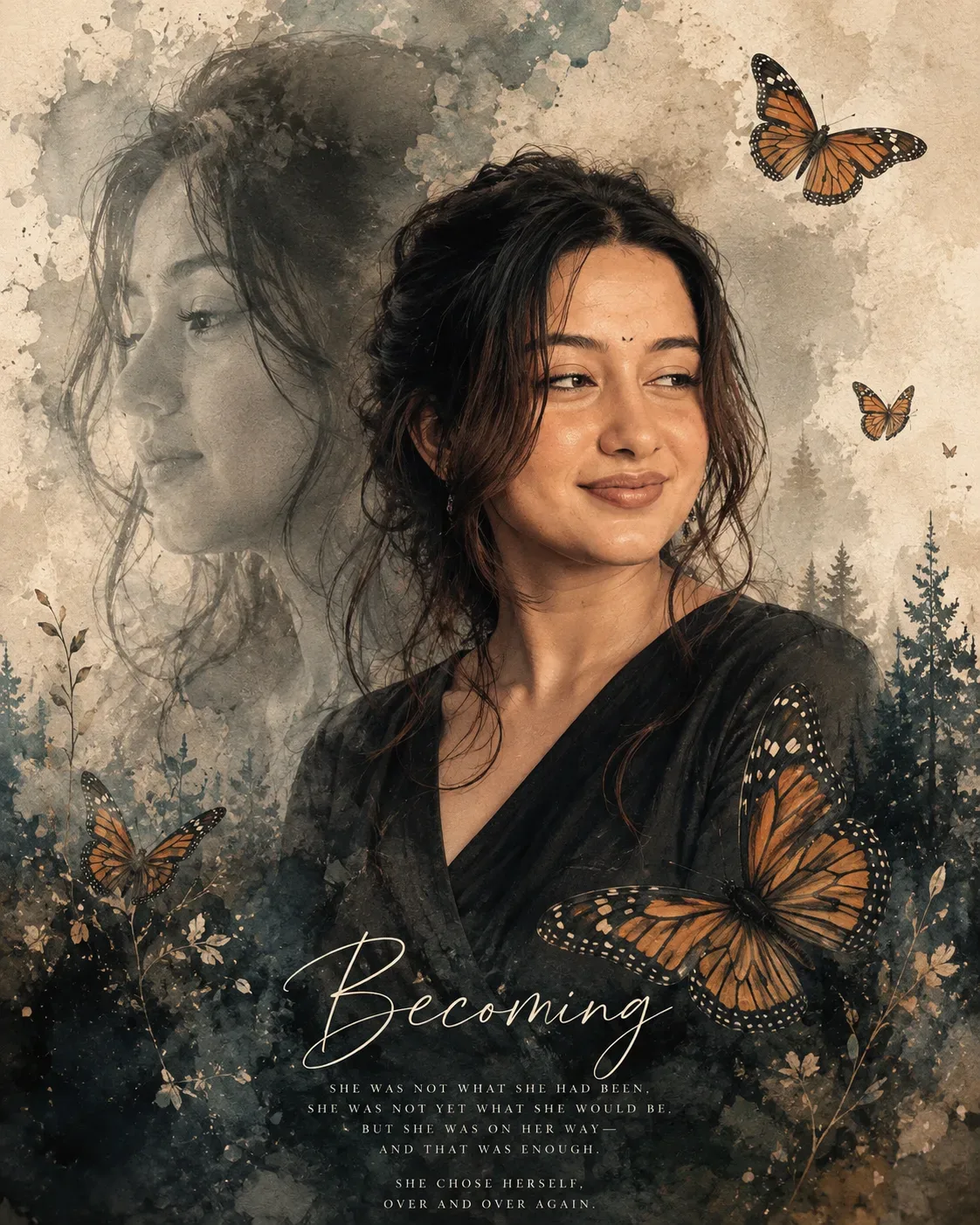
Create a vertical **4:5 fine-art editorial portrait** with a dreamy mixed-media watercolor-and-photographic aesthetic. Frame the subject from approximately the upper chest to the top of the head, positioned slightly right of center. The body is turned subtly toward the viewer’s left while the face is presented in a soft three-quarter view. Recreate the reference head position: chin relaxed and slightly lowered, face gently angled toward the viewer’s right, with both eyes looking distinctly toward the viewer’s right rather than into the camera. The expression is calm, introspective, quietly hopeful, and softly warm, with relaxed eyebrows, attentive open eyes, and a very subtle closed-mouth smile. Transfer this exact emotional quality and facial behavior from the reference while keeping the uploaded person unmistakably recognizable.

Give the subject dark, naturally textured hair styled in a loose, slightly windswept updo or softly gathered-back arrangement, with delicate wisps and strands escaping around the forehead, temples, cheeks, neck, and shoulders. Adapt this hairstyle naturally to the uploaded person’s hair while preserving their identity and realistic hair characteristics. Add a small, understated dangling earring visible on the nearer ear. Dress the subject in a simple dark charcoal or nearly black wrap-style garment with a soft V-shaped neckline, understated texture, and minimal styling.

Construct the composition as an artistic double-exposure portrait. Behind and to the left of the main subject, integrate a large, translucent monochrome side-profile silhouette of the same uploaded person, facing toward the viewer’s left. This secondary profile should appear ghostlike and softly faded into the watercolor background, occupying the left half of the image without competing with the main face. It must still depict the uploaded person’s identity, not the reference person.

Surround the portrait with atmospheric watercolor washes, ink-like textures, paper grain, faded splatters, and softly feathered edges. Use a muted palette of warm ivory, parchment beige, smoky gray, charcoal, muted sage-green, deep blue-green, and subtle earthy brown. The background should resemble aged handmade paper with layered watercolor blooms and irregular paint dispersion. Blend the lower half of the subject into dense, dark watercolor and textured foliage-like forms.

Place several realistic orange-and-black monarch-style butterflies throughout the composition: one medium-large butterfly near the upper-right area with wings open, one smaller butterfly farther right around mid-height, a faint tiny butterfly below it, one partially visible butterfly near the lower-left, and a prominent large butterfly overlapping the lower-right foreground near the subject’s shoulder and chest area. Include subtle silhouettes of evergreen trees rising from the lower-right background, softly integrated into the watercolor texture. Add sparse delicate botanical stems, leaves, and abstract ink marks near the lower edges.

Lighting should be soft, diffused, and luminous, with gentle warm illumination across the face, delicate natural shadows beneath the cheekbones and jaw, subtle highlights on the nose and forehead, and no harsh studio lighting. Maintain realistic skin texture beneath the painterly treatment. The face should remain the clearest and most detailed element, while the surrounding watercolor textures, profile overlay, butterflies, and forest forms dissolve softly into the background. Use a close portrait perspective at approximately eye level, with a natural short-telephoto portrait feel and gentle depth separation.

The final image should feel poetic, reflective, elegant, nostalgic, feminine-or-gender-neutral as appropriate to the uploaded person, and emotionally serene—an artistic visual metaphor for transformation, patience, healing, and quiet strength. Use sophisticated fine-art poster design, seamless photographic realism combined with watercolor illustration, subtle film grain, organic paper texture, soft edges, layered transparency, and carefully balanced negative space.

At the bottom center, integrate elegant decorative typography as part of the artwork: a large flowing handwritten script title, followed by a small refined uppercase serif line, then several smaller uppercase serif lines beneath it, arranged like a poetic editorial poster. The typography should be delicate, pale cream or muted off-white, partially blending into the dark watercolor textures. **Do not prioritize exact readable wording; prioritize the visual layout, hierarchy, handwritten calligraphy, spacing, and refined poster-like appearance of the reference.**

**Critical priority:** preserve the uploaded person’s exact identity above all else, but do not preserve their original expression, gaze, head position, or pose from the source photo. Replace those behavioral attributes with the reference: calm subtle smile, eyes looking toward the viewer’s right, three-quarter head orientation, relaxed posture, dreamy contemplative emotion, and the exact portrait composition described above. The result must look unmistakably like the uploaded person placed into this exact artistic scene—not like the person from the reference image.

Optical Identity & Likeness Preservation: Lock subject's authentic facial identity and natural posture while seamlessly integrating with sharp vehicle reflections and cinematic ambient lighting.Frequently asked questions
- How do I use the Becoming A Butterflys Journey AI Photo Prompt prompt?
- To use this prompt, simply click the "Copy Prompt" button above. Then, open Google Gemini, paste the copied text into the prompt box, and hit generate. You can instantly generate high-quality images without needing any reference photos.
- What is this prompt best used for?
- This specific prompt is highly optimized for creating engaging social media content and digital art. The formula is structured to produce high-contrast, visually appealing results that perform well on visual platforms.
- Can I customize the details of this prompt?
- Yes! While the core structure of the prompt is optimized for Google Gemini, you can easily customize the details. We recommend changing specific keywords like clothing colors, background locations, or the overall mood (e.g., changing "sunny" to "rainy" or "neon") to match your exact vision.
What You'll Get
- 🎨 Style: Illustration 3d
- ✨ Mood: Illustration 3d
- 📱 Best For: Ai Image
- 🤖 Works With: Google Gemini
- 🔥 Popularity: Copied 87 times
- 📅 Added: Sep 14, 2026
Explore Related Collections
Explore Illustration 3d Prompts — Browse our curated collection of Illustration 3d prompts tailored for creators. View all Illustration 3d prompts →
Explore Ai Image Prompts — Discover more viral Ai Image ideas for your next AI generation. View all Ai Image prompts →
Explore Trending Prompts — Explore our extensive library of Trending templates ready to copy and paste. View all Trending prompts →