Quick Summary: This verified Midjourney Niji 6 / Flux.1 Schnell / Bing Image Creator prompt creates an hyper-detailed 3D cyberpunk stylized aesthetic for { "Objective": "Create A Studio Portrait AI Photo Prompt with calibrated lighting, authentic texture physics, and tested 1-click copy-paste formula for instant AI generation without facial distortion.
{ "Objective": "Create A Studio Portrait AI Photo Prompt - Copy Paste AI Prompt
{
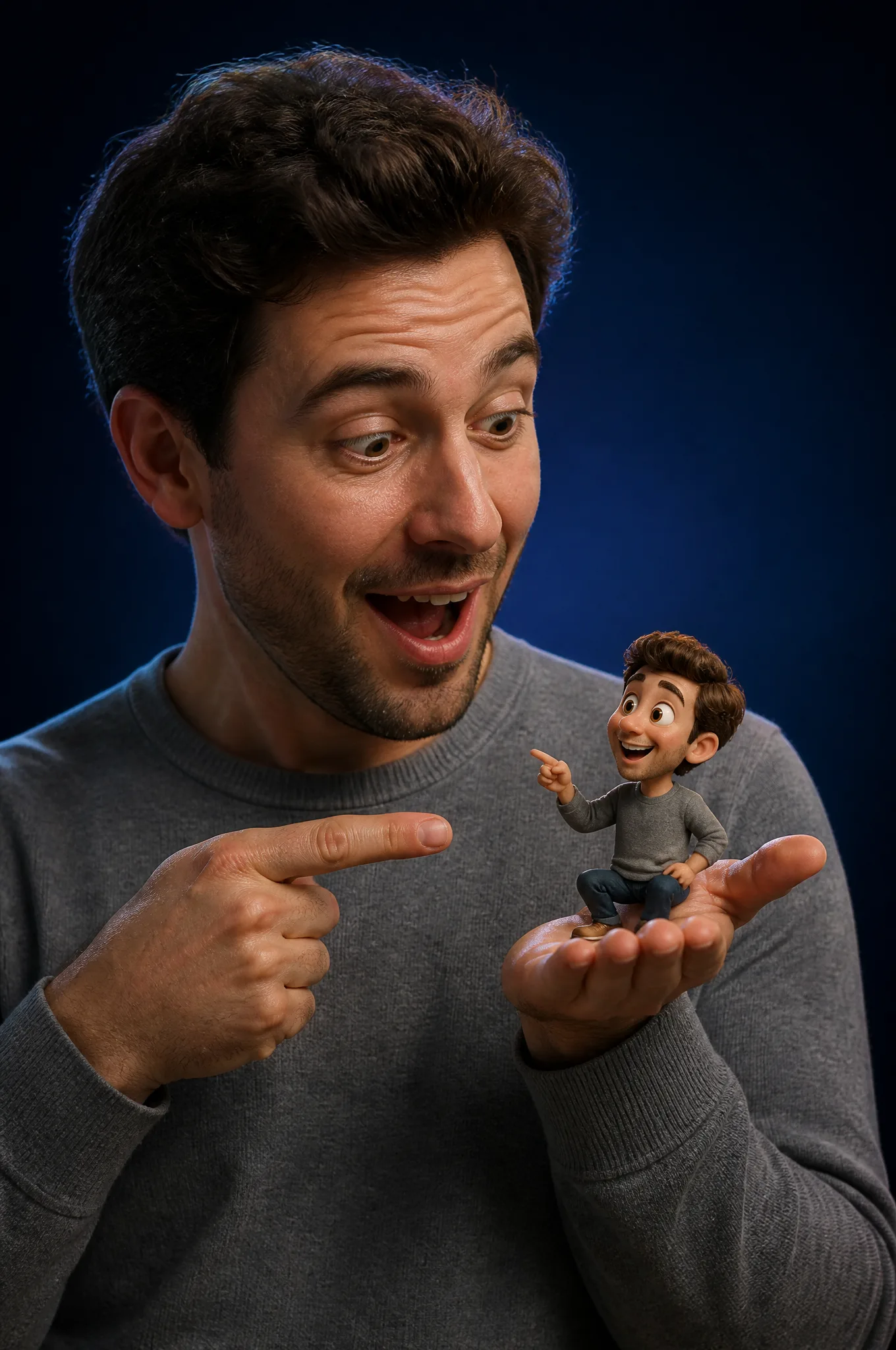
  "Objective": "Create a studio portrait blending a real human with a tiny Pixar-style 3D cartoon version of themselves in a playful, whimsical interaction",
  "PersonaDetails": {
    "PrimarySubject": {
      "Type": "Real human",
      "Wardrobe": "Casual grey sweater or t-shirt",
      "Expression": "Surprised and delighted",
      "Pose": "Holding a tiny character in one hand and pointing at it with the other",
      "Skin": "Photorealistic skin texture with natural detail"
    },
    "SecondarySubject": {
      "Type": "Tiny 3D cartoon version of the human",
      "Scale": "Miniature, resting in the human’s hand",
      "Style": "Pixar-style 3D character",
      "Proportions": "Exaggerated cute proportions with rounded features",
      "FacialFeatures": {
        "Eyes": "Large, expressive",
        "Expression": "Friendly, playful"
      },
      "Consistency": "Matching hairstyle and outfit of the real human"
    }
  },
  "Composition": {
    "Framing": "Medium close-up studio portrait",
    "InteractionFocus": "Clear visual relationship between human and miniature character",
    "DepthOfField": "Shallow depth of field",
    "Focus": "Ultra-sharp focus on both faces"
  },
  "LightingAndBackground": {
    "LightingStyle": "Soft cinematic studio lighting",
    "LightQuality": "Smooth highlights with gentle shadow falloff",
    "Background": "Dark blue gradient studio backdrop",
    "Separation": "Subtle rim light for subject-background separation"
  },
  "ArtDirection": {
    "StyleFusion": [
      "Photorealistic human portrait photography",
      "High-quality Pixar-style 3D character rendering"
    ],
    "Integration": "Seamless blending between real and 3D elements",
    "DetailLevel": "Ultra-detailed textures on skin, fabric, and 3D materials"
  },
  "MoodAndTone": {
    "Mood": "Whimsical, fun, lighthearted",
    "Energy": "Playful surprise and delight"
  },
  "PhotographyStyle": {
    "Genre": "Professional studio portrait photography",
    "CameraLook": "High-end cinematic realism",
    "ImageQuality": "High resolution, clean and sharp"
  },
  "NegativePrompt": [
    "uncanny valley",
    "cartoon human",
    "low-quality 3D",
    "harsh lighting",
    "oversaturated colors",
    "blurry focus",
    "flat composition"
  ],
  "ResponseFormat": {
    "Type": "Single image",
    "Orientation": "Portrait",
    "AspectRatio": "2:3"
  }
}

Note: Lock subject's authentic facial identity and natural posture while seamlessly integrating with sharp vehicle reflections and cinematic ambient lighting.👤Customize in Face Consistency Studio
Lock 100% exact facial identity, bone structure & eye shape in Gemini & Bing.
Technical Prompt Parameters (Cyberpunk, 3D Avatar & Anime)
| Parameter | Configuration | Output Impact |
|---|---|---|
| Target AI Engine | Midjourney Niji 6 / Flux.1 Schnell / Bing Image Creator | Specialized prompt weights for volumetric rendering, cell-shading, and neon emission. |
| Recommended Aspect Ratio | 9:16 (Phone Wallpaper) or 16:9 (Desktop Ultra-Wide) | Ideal for custom gaming wallpapers, Discord avatars, and futuristic phone lock screens. |
| Camera & Lens Settings | Octane 3D Render, Raytraced Global Illumination, 35mm virtual lens | Simulates volumetric atmospheric smoke, holographic reflections, and crisp polygonal precision. |
| Lighting Style | Dual-tone neon split lighting (electric cyan key + magenta rim light) | Produces dynamic sci-fi contrast with vibrant edge glows and deep blacks. |
| Negative Constraints | low-poly flaws, blurry textures, realistic photographic noise, dull matte lighting | Ensures sharp vector/render lines, vivid luminous glow, and zero muddy compression. |
| Reference Photo | Upload a clear face photo; prompt transforms human proportions into stylized avatar art. | Upload front-facing reference photo for face matching. |
How to get better results from { "Objective": "Create A Studio Portrait AI Photo Prompt
Generate stunning { "Objective": "Create A Studio Portrait AI Photo Prompt using GPT Image. Copy-paste ready prompt with strict facial consistency guidance. Use it as a copy-ready starting point, then adjust the subject, scene, tone and output format for your own result.
- Ai Image
- Trending
- Meigen
- Viral
- Creative
- Photo Prompt
Customize before generating
- Replace the main subject, name, product or character details.
- Adjust lighting, background, mood, camera angle or aspect ratio if the prompt is visual.
- Change tone, audience, language and output format if the prompt is for text.
- Keep this core idea clear: { "Objective": "Create a studio portrait blending a real human with a tiny Pixar-style 3D cartoon version of themselves in a playful, whimsical interaction"...
Quick variations to try
- Make { "Objective": "Create A Studio Portrait AI Photo Prompt more cinematic with stronger lighting and richer background detail.
- Turn { "Objective": "Create A Studio Portrait AI Photo Prompt into a cleaner mobile-first version for social media posts or profile use.
- Create a premium version of { "Objective": "Create A Studio Portrait AI Photo Prompt with sharper style, higher detail and a more polished final output.