Quick Summary: This verified Google Gemini (Imagen 3) & Bing Image Creator prompt creates an intimate cinematic romantic couple aesthetic for Mountain View Male Portrait AI Photo Prompt with calibrated lighting, authentic texture physics, and tested 1-click copy-paste formula for instant AI generation without facial distortion.
- Ai Image
- Photography
- Trending
- Photography
- Ai Image
- Trending
- Viral Prompt
- Gemini Ai
- Bing Image Creator
- Copy Paste
Mountain View Male Portrait AI Photo Prompt - Copy Paste AI Prompt
AI Image Prompt:
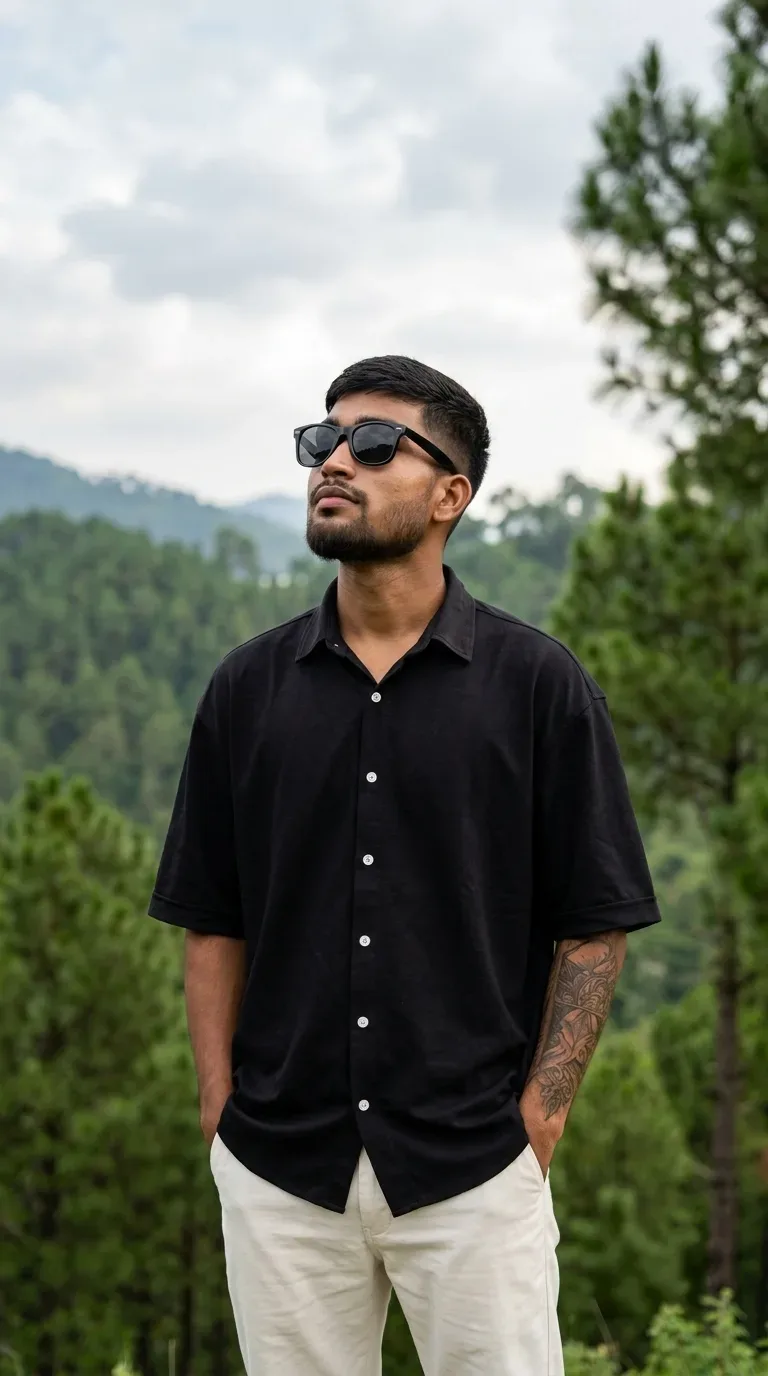
Vertical 9:16 aesthetic outdoor portrait of a young man standing amidst pine-covered green hills, looking upward toward the sky in a thoughtful candid pose.
 * Face & Identity: Must maintain 100% facial fidelity and exact likeness of the uploaded reference face, short textured dark cropped hair, clean faded beard/stubble along jawline, natural skin texture, head tilted upward looking toward the clouds.
 * Eyewear & Accessories: Classic black square/wayfarer-style dark sunglasses, detailed sleeve/arm tattoo visible on the left forearm.
 * Pose & Framing: Medium-shot / waist-up framing. Subject is standing relaxed with both hands tucked in trouser pockets.
 * Outfit: Oversized plain black short-sleeve button-up collared shirt with contrasting white buttons, paired with tailored off-white/cream casual trousers.
 * Environment & Background: Scenic green pine trees and rolling forest hills in the midground, with a soft daylight sky and cumulus clouds in the backdrop.
 * Lighting & Style: Natural overcast daylight, soft diffuse shadows, shallow depth of field with background bokeh, authentic 35mm DSLR lifestyle portrait photography, ultra-sharp 8K resolution.
Best Face Match Settings:
 * Midjourney: Apni reference photo attach karein aur prompt ke end me add karein: --cref <Image_URL> --cw 100 --ar 9:16 --v 6.1
 * Fooocus / Stable Diffusion: Image ko InstantID ya IP-Adapter Face / FaceID me lagayein aur weight 0.85 – 0.95 set karein.

Optical Identity & Likeness Preservation: Maintain 100% exact facial identity, bone structure, jawline contours, and natural skin undertone of reference photo without alteration or distortion.👤Customize in Face Consistency Studio
Lock 100% exact facial identity, bone structure & eye shape in Gemini & Bing.
Technical Prompt Parameters (Cinematic Romantic Couple)
| Parameter | Configuration | Output Impact |
|---|---|---|
| Target AI Engine | Google Gemini (Imagen 3) & Bing Image Creator | Flawless multi-subject compositional coherence and genuine emotional expressions. |
| Recommended Aspect Ratio | 3:4 (Portrait) or 16:9 (Cinematic Widescreen) | Perfect framing for dual-subject intimacy, shared poses, and environmental background depth. |
| Camera & Lens Settings | 50mm f/1.2 prime lens, Canon EOS R5, shallow depth of field | Isolates both subjects with creamy optical bokeh and ultra-sharp facial details. |
| Lighting Style | Warm twilight golden hour backlight with soft rim separation | Bathes both figures in romantic golden warmth while maintaining facial contour shadows. |
| Negative Constraints | misaligned eye lines, unnatural duplicate hands, harsh flat flash, plastic skin, distorted fingers | Prevents common AI multi-character hand mergers and disjointed eye directions. |
| Reference Photo | Upload individual headshots or a couple photo with visible facial angles. | Upload front-facing reference photo for face matching. |
How to use this prompt
- Copy the prompt, open Google Gemini or Bing Image Creator, attach your reference photo, and generate instant 8K results.
How to get better results from Mountain View Male Portrait AI Photo Prompt
Free 1-click copy mountain view male portrait ai photo prompt for Google Gemini and Bing Image Creator. Authentic photography aesthetic, realistic lighting, and instant camera settings. Use it as a copy-ready starting point, then adjust the subject, scene, tone and output format for your own result.
- Ai Image
- Photography
- Trending
- Viral Prompt
- Gemini Ai
- Bing Image Creator
Customize before generating
- Replace the main subject, name, product or character details.
- Adjust lighting, background, mood, camera angle or aspect ratio if the prompt is visual.
- Change tone, audience, language and output format if the prompt is for text.
- Keep this core idea clear: AI Image Prompt: Vertical 9:16 aesthetic outdoor portrait of a young man standing amidst pine-covered green hills, looking upward toward the sky in a thoughtful...
Quick variations to try
- Make Mountain View Male Portrait AI Photo Prompt more cinematic with stronger lighting and richer background detail.
- Turn Mountain View Male Portrait AI Photo Prompt into a cleaner mobile-first version for social media posts or profile use.
- Create a premium version of Mountain View Male Portrait AI Photo Prompt with sharper style, higher detail and a more polished final output.