Quick Summary: This verified Google Gemini (Imagen 3) & Bing Image Creator prompt creates an intimate cinematic romantic couple aesthetic for Love In The Mustard Fields AI Photo Prompt with calibrated lighting, authentic texture physics, and tested 1-click copy-paste formula for instant AI generation without facial distortion.
- Ai Image
- Photography
- Trending
- Photography
- Ai Image
- Trending
- Viral Prompt
- Gemini Ai
- Bing Image Creator
- Copy Paste
About This Prompt
This prompt creates an Love In The Mustard Fields AI Photo Prompt — a high-quality, photorealistic image with balanced lighting, sharp focus, and intricate details suitable for social media sharing and digital content creation.
We recommend generating this using Google Gemini. Simply copy the prompt text below and paste it into the generator. You can easily customize specific keywords like colors, backgrounds, or subjects to make the final output uniquely yours.
Love In The Mustard Fields AI Photo Prompt - Copy Paste AI Prompt
Use the uploaded photo as the primary facial identity reference for the boy. Preserve his exact recognizable facial identity, facial structure, skin tone, facial proportions, eyes, nose, lips, jawline and all distinctive facial characteristics.
Important identity integration requirement: Use only the face identity from the uploaded image. Do not copy the uploaded person's hairstyle, hair shape or head appearance. Use the same hairstyle shown in the reference image, including its length, volume, texture, shape and styling. Naturally integrate the hairstyle with the boy's face and head.
Do not cut out, crop, paste, overlay or face-swap the uploaded face onto a generated body. The final result must look like one naturally photographed real person, with the face naturally connected to the hair, ears, neck and body. Maintain consistent skin texture, pores, lighting, shadows, perspective and color across the entire subject.
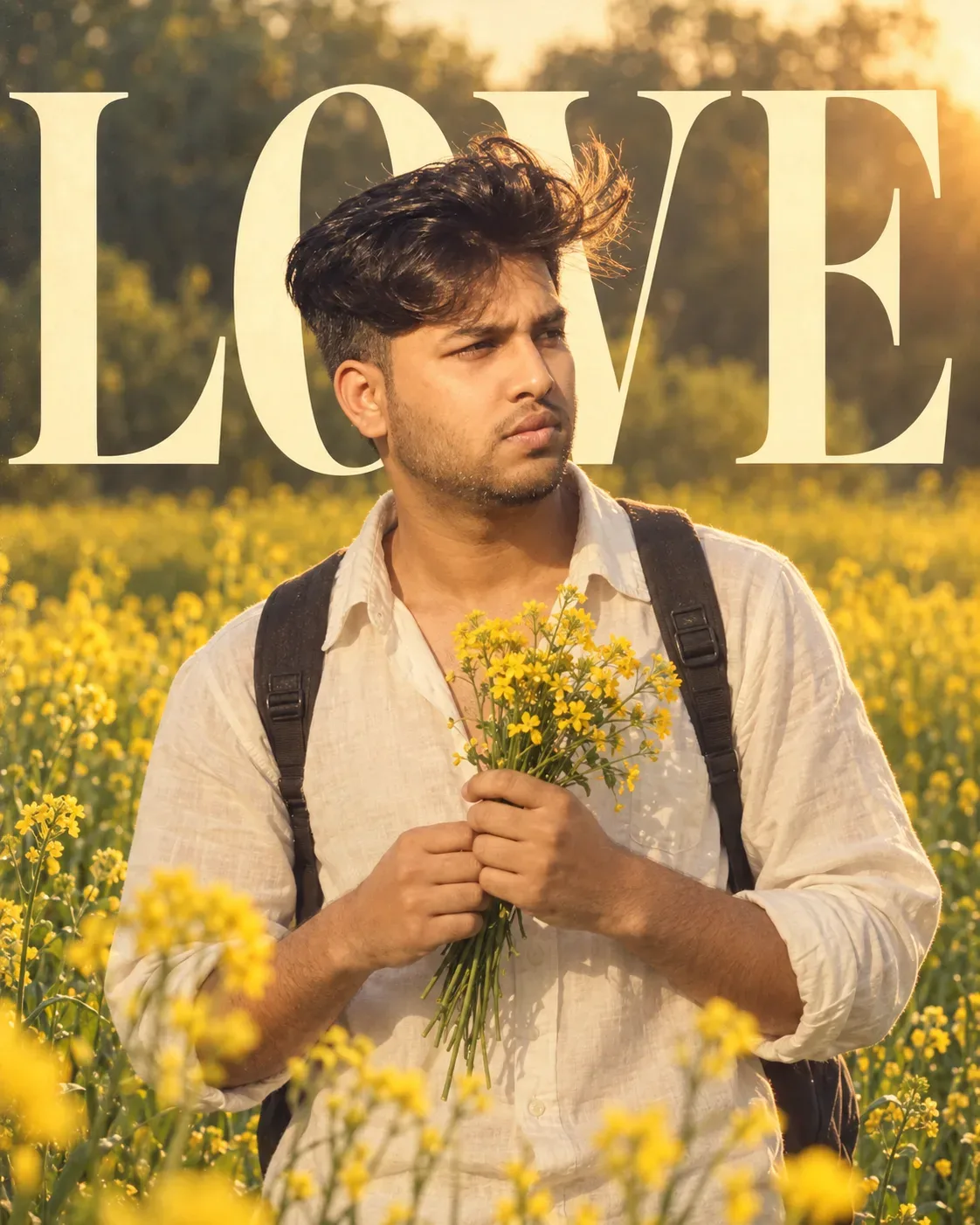
Recreate the same composition, pose, camera angle, framing and overall visual aesthetic of the reference image. Show the boy standing naturally in a beautiful mustard-yellow flower field, wearing a loose light-colored white/off-white button-up shirt with the upper buttons casually open and sleeves naturally rolled up. Add a simple dark backpack with both shoulder straps naturally worn over his shoulders.
The boy should gently hold a small bouquet of yellow mustard flowers with both hands in front of his chest. His fingers must naturally wrap around the stems, with realistic hand anatomy and no extra or duplicated fingers. His head should be slightly tilted downward and to the side, with a soft, peaceful, subtly romantic expression.
Create a cinematic outdoor portrait with a lush green background filled with yellow flowering plants, natural vegetation and soft atmospheric depth. Keep the foreground flowers softly blurred while the boy remains naturally sharp and recognizable.
Use soft golden-hour daylight, gentle backlighting, subtle rim light around the hair and shoulders, warm natural skin tones and soft shadows. Create realistic lens bokeh and shallow depth of field.
The overall visual style should be a premium romantic editorial photograph, natural and understated rather than artificial. Use muted greens, warm yellow flowers, soft cream-white clothing and natural warm skin tones.
Include the large cream/off-white “LOVE” typography behind the boy, matching the reference image's oversized vertical composition and placement. Include only the small text elements that are visibly present in the reference image, with their placement and appearance closely matching the reference. Do not invent or add any additional text, quotes, captions, logos, watermarks or typography.
Make the typography naturally integrated into the composition without covering or distorting the boy.
Ultra-photorealistic professional portrait photography, realistic skin pores, individual hair strands, authentic fabric texture, natural hands and fingers, realistic flower stems and petals, accurate backpack straps, natural body proportions, cinematic depth of field, realistic optical bokeh, subtle atmospheric haze, high-quality lens rendering and natural photographic detail.
Subject height: 6 feet (183 cm).
Image dimension: 1122 × 1402 px.
Avoid pasted-face appearance, face-swap artifacts, artificial head replacement, mismatched skin tone, mismatched lighting, plastic skin, distorted facial features, incorrect identity, unnatural hair, extra fingers, malformed hands, duplicated limbs, floating flowers, distorted backpack straps, excessive HDR, excessive sharpening, CGI appearance or obvious AI artifacts.

Optical Identity & Likeness Preservation: Maintain 100% exact facial identity, bone structure, jawline contours, and natural skin undertone of reference photo without alteration or distortion.What You'll Get
- 🎨 Style: Ai Image
- ✨ Mood: Photography
- 📱 Best For: Photography
- 🤖 Works With: Google Gemini
- 🔥 Popularity: Copied 29 times
- 📅 Added: Sep 14, 2026
Explore Related Collections
Explore Ai Image Prompts — Browse our curated collection of Ai Image prompts tailored for creators. View all Ai Image prompts →
Explore Photography Prompts — Discover more viral Photography ideas for your next AI generation. View all Photography prompts →
Explore Trending Prompts — Explore our extensive library of Trending templates ready to copy and paste. View all Trending prompts →
Frequently asked questions
- How do I use the Love In The Mustard Fields AI Photo Prompt prompt?
- To use this prompt, simply click the "Copy Prompt" button above. Then, open Google Gemini, paste the copied text into the prompt box, and hit generate. You can instantly generate high-quality images without needing any reference photos.
- What is this prompt best used for?
- This specific prompt is highly optimized for creating engaging social media content and digital art. The formula is structured to produce high-contrast, visually appealing results that perform well on visual platforms.
- Can I customize the details of this prompt?
- Yes! While the core structure of the prompt is optimized for Google Gemini, you can easily customize the details. We recommend changing specific keywords like clothing colors, background locations, or the overall mood (e.g., changing "sunny" to "rainy" or "neon") to match your exact vision.