Quick Summary: This verified Google Gemini & Midjourney v6 prompt creates an authentic 90s vintage film aesthetic for Stillness Amid The Crowd Premium Cinematic Fashion Editorial AI Photo Prompt with calibrated lighting, authentic texture physics, and tested 1-click copy-paste formula for instant AI generation without facial distortion.
- Aesthetic
- Ai Image
- Fashion
- Photography
- Trending
- Photography
- Fashion
- Aesthetic
- Ai Image
- Trending
- Viral Prompt
- Gemini Ai
- Bing Image Creator
- Copy Paste
About This Prompt
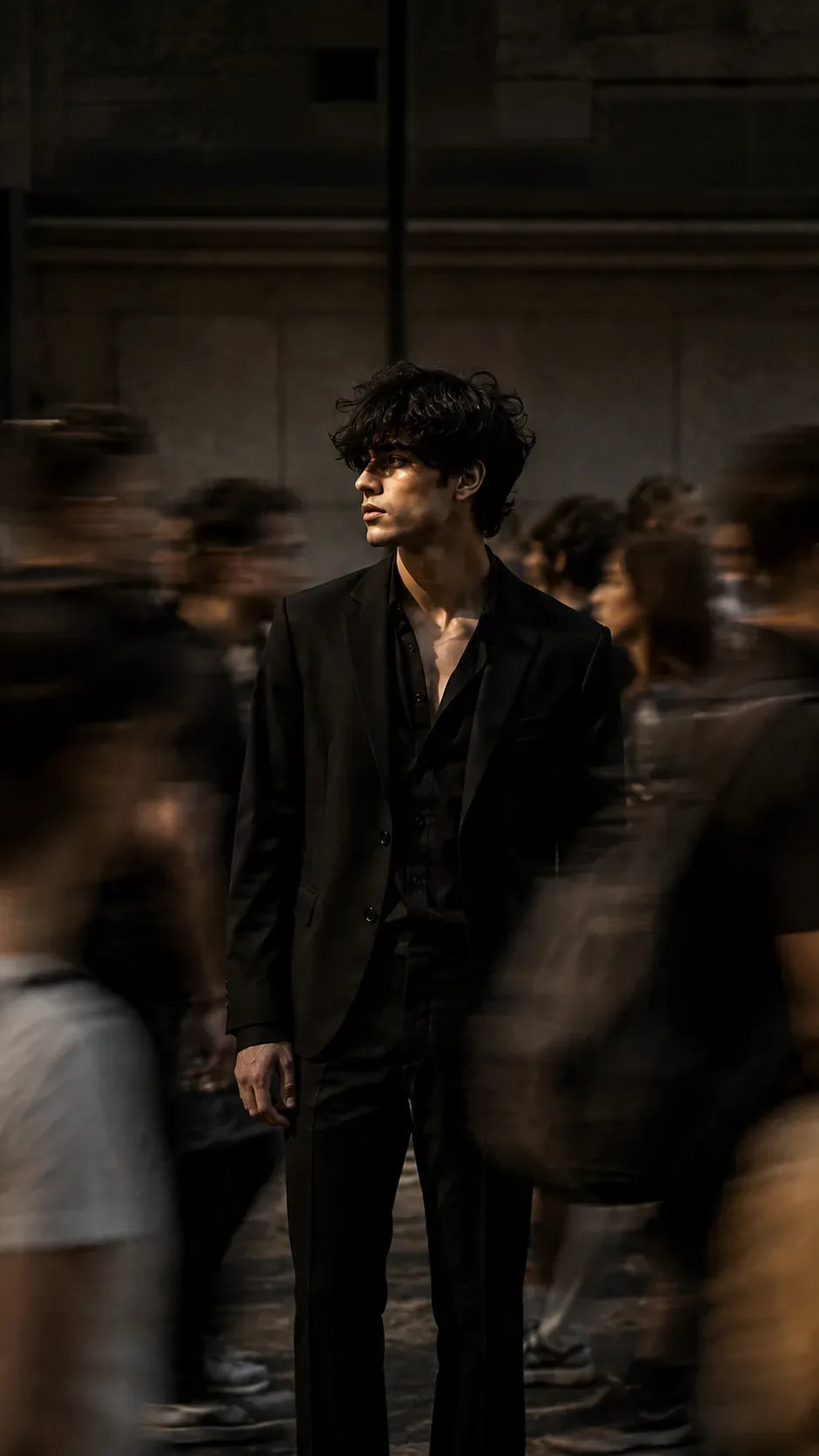
Create a Stillness Amid The Crowd Premium Cinematic Fashion Editorial AI Photo Prompt — a high-quality, photorealistic image with balanced lighting, sharp focus, and intricate details suitable for social media sharing and digital content creation.
For the best results, use this with Google Gemini. Simply copy the prompt text below and paste it into the generator. You can easily customize specific keywords like colors, backgrounds, or subjects to make the final output uniquely yours.
Stillness Amid The Crowd Premium Cinematic Fashion Editorial AI Photo Prompt - Copy Paste AI Prompt
Use the provided image as the primary visual reference and preserve its core composition, subject identity, pose, framing, environment, perspective, and overall cinematic mood. Transform it into an ultra-realistic professional fashion editorial photograph that looks like it was captured by an experienced fashion photographer using a high-end full-frame mirrorless camera.

SUBJECT

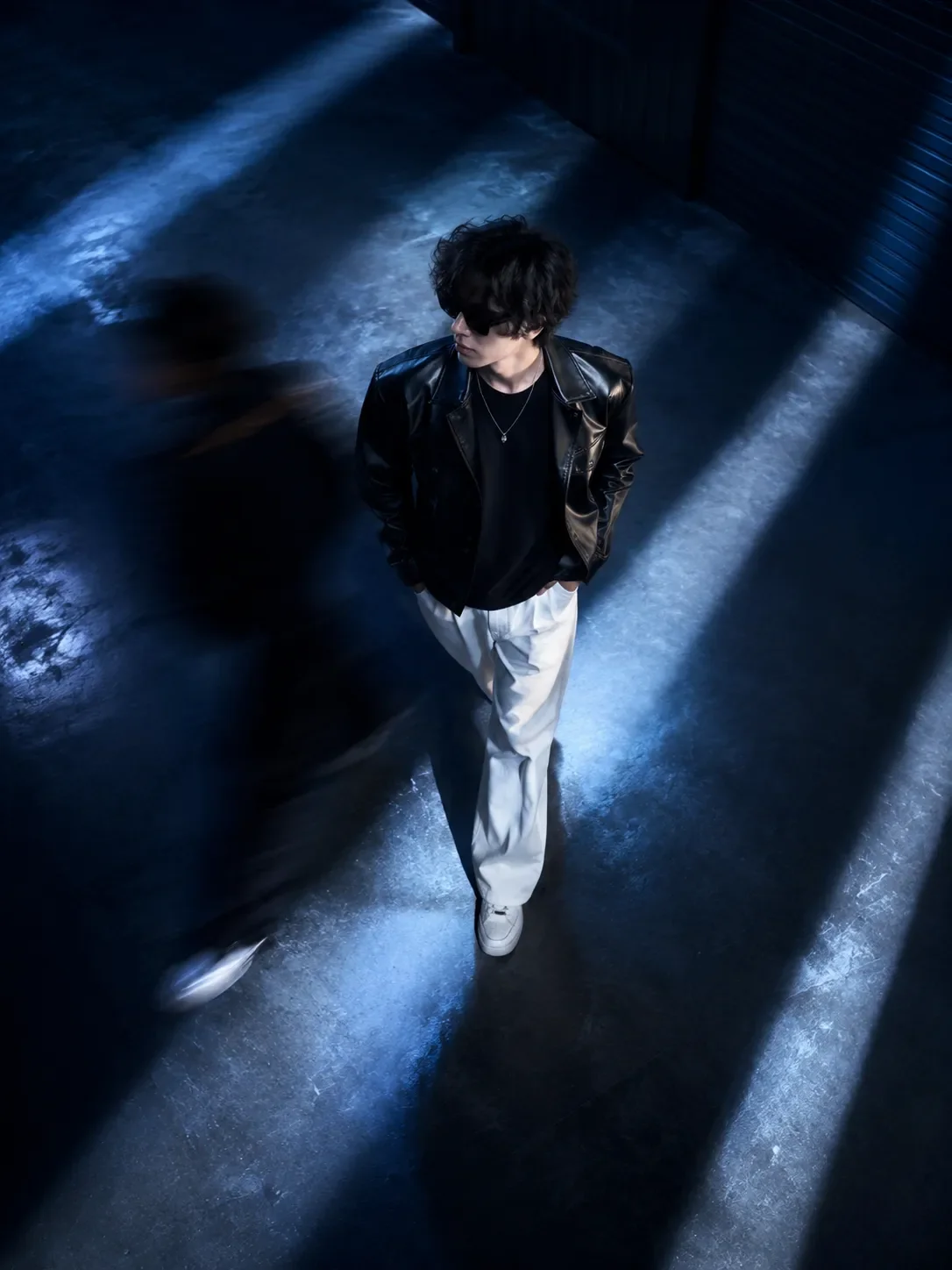
A young adult male fashion model stands completely still at the center of a crowded urban passageway. He has a naturally slim, lean masculine physique with realistic human proportions and relaxed body language.

Preserve the subject's recognizable facial structure from the source image while improving photographic realism. His face should contain natural skin pores, subtle texture, tiny imperfections, realistic fine facial hair, authentic cheek contours, natural lips, realistic nose structure, and believable facial symmetry.

His expression is calm, thoughtful and slightly distant. His gaze is directed naturally toward the left side of the frame, rather than directly at the camera.

His hair is thick, dark black, naturally curly/wavy and slightly messy, with individually defined strands. Avoid overly perfect or artificial hair. Add subtle highlights where the cinematic light naturally touches the curls.

WARDROBE

Keep the sophisticated all-black contemporary menswear aesthetic.

The model wears:

premium black tailored blazer
relaxed black shirt underneath
upper shirt buttons naturally open
elegant dark tailored trousers
extremely subtle thin metallic chain necklace

The clothing must look like real luxury fashion garments, with physically accurate fabric behavior.

Add realistic:

fabric weave
stitching
seams
natural folds
subtle wrinkles
realistic garment weight
accurate shadows between fabric layers
natural interaction between clothing and body

The black clothing should contain visible tonal variation rather than becoming a completely flat black silhouette.

POSE & BODY

Preserve the original relaxed standing pose.

The model remains perfectly still and sharply focused, with naturally positioned shoulders, relaxed arms and realistic hands.

Correct any anatomical inconsistencies while maintaining the original pose.

Hands must have:

five correctly formed fingers
realistic knuckles
natural finger spacing
believable skin texture
physically correct proportions

Do not make the model muscular or exaggerated. Maintain a lean, refined fashion-model physique.

CROWD & MOTION

Preserve the surrounding pedestrians and strengthen the visual storytelling.

Multiple anonymous pedestrians move rapidly around the stationary model in different directions.

Create authentic long-exposure / slow-shutter motion blur on the moving people.

The crowd should show:

horizontal motion streaks
diagonal movement
soft silhouettes
naturally smeared clothing
realistic movement trails
varying blur intensity according to distance and movement speed

The central model must remain exceptionally sharp while the crowd becomes progressively blurred.

Some pedestrians should partially enter the foreground from the left and right edges, creating realistic depth and making the viewer feel surrounded by movement.

Do not make the crowd appear duplicated, cloned or artificially generated.

ENVIRONMENT

Maintain the dark architectural urban setting from the source.

Use a sophisticated concrete and stone architectural passageway with subtle horizontal structural lines and restrained environmental details.

The architecture should remain slightly darker and less visually dominant than the model.

Introduce realistic:

concrete texture
subtle surface imperfections
natural atmospheric depth
soft shadows
slight environmental haze
realistic perspective
subtle reflections where physically appropriate
LIGHTING

Use moody late-afternoon / early-evening cinematic lighting.

A soft directional light illuminates one side of the model's face while the opposite side falls naturally into controlled shadow.

Create subtle highlights across:

cheekbone
nose bridge
jawline
individual curls
blazer edges
shirt collar

Use realistic ambient fill light so that the black clothing still retains detail.

Lighting must look physically photographed, not digitally painted.

Avoid excessive rim lighting, artificial glow, neon illumination or exaggerated cinematic effects.

CAMERA & LENS

Simulate a professional full-frame mirrorless camera.

Recommended photographic characteristics:

Lens: 50mm–85mm
Aperture: approximately f/2–f/2.8
Perspective: natural portrait perspective
Focus: extremely sharp on the central model
Shutter behavior: slow shutter effect for surrounding pedestrians
Depth of field: shallow-to-moderate
Image quality: extremely high resolution
Lens rendering: realistic optical falloff and subtle natural bokeh

The model's eyes, facial texture, hair strands and clothing details should have exceptional micro-detail.

COLOR GRADING

Use a sophisticated editorial color grade built around:

charcoal black + warm gray + muted brown + subtle sepia

Keep saturation restrained.

Create:

rich but detailed blacks
soft cinematic midtones
controlled highlights
natural skin tones
subtle warm highlights
slightly desaturated surroundings
delicate analog-style film grain

The result should resemble a premium Vogue / GQ-style cinematic fashion photograph, while remaining original and not copying any specific photographer.

COMPOSITION

Maintain the vertical 9:16 composition.

Keep the model centered and dominant within the frame.

Preserve enough negative space around the head and upper body.

The visual hierarchy should be:

1. Sharp central model
2. Motion-blurred surrounding crowd
3. Architectural environment
4. Cinematic lighting and atmosphere

The image should communicate the concept:

“One person remains still while the entire world moves around him.”

PHOTOGRAPHIC REALISM

The final result must look like an actual photograph, not AI artwork.

Prioritize:

authentic human skin
realistic pores
natural facial asymmetry
physically accurate anatomy
genuine fabric texture
realistic hair strands
natural shadows
optical depth
authentic motion blur
realistic lens characteristics
subtle film grain
professional exposure
believable environmental perspective

Avoid excessive AI beautification or unrealistic perfection.

FINAL QUALITY TARGET

Create a premium, sophisticated, emotionally cinematic fashion editorial photograph with exceptional realism and professional photographic depth.

The final image should feel like a carefully composed photograph taken by an award-winning fashion photographer during a busy evening in an urban environment.

Preserve the original concept and composition while substantially improving realism, photographic quality, clothing detail, skin texture, lighting, motion blur and overall luxury editorial presentation.                                                          .................................................................................................Negative Prompt -  cartoon, anime, illustration, CGI, 3D render, digital painting, video-game graphics, artificial face, plastic skin, wax skin, excessive skin smoothing, beauty filter, unrealistic pores, airbrushed skin, deformed face, distorted facial proportions, asymmetrical eyes, crossed eyes, malformed eyes, unnatural nose, distorted lips, unrealistic jaw, bad anatomy, oversized head, tiny head, muscular body, exaggerated physique, deformed hands, extra fingers, missing fingers, fused fingers, malformed fingers, extra arms, extra legs, duplicated limbs, duplicated people, cloned pedestrians, floating body parts, broken posture, unnatural joints, distorted clothing, melted fabric, fake fabric, plastic clothing, excessive wrinkles, flat black clothing, incorrect shadows, impossible lighting, neon lighting, excessive rim light, oversaturated colors, extreme HDR, crushed blacks, excessive contrast, excessive sharpening, fake bokeh, artificial depth of field, blurry face, blurry eyes, motion blur on central model, motion-blurred face, distorted pedestrians, recognizable celebrity, celebrity likeness, frozen crowd, perfectly sharp crowd, repetitive crowd, excessive crowd density, chaotic composition, fisheye distortion, wide-angle facial distortion, warped architecture, curved walls, incorrect perspective, unnatural reflections, artificial haze, excessive grain, low resolution, pixelation, compression artifacts, watermark, logo, signature, border, frame, random text, misspelled text, malformed typography, AI artifacts.

Optical Identity & Likeness Preservation: Lock subject's authentic facial identity and natural posture while seamlessly integrating with sharp vehicle reflections and cinematic ambient lighting.What You'll Get
- 🎨 Style: Aesthetic
- ✨ Mood: Photography
- 📱 Best For: Ai Image
- 🤖 Works With: Google Gemini
- 🔥 Popularity: Copied 135 times
- 📅 Added: Sep 14, 2026
Frequently asked questions
- How do I use the Stillness Amid The Crowd Premium Cinematic Fashion Editorial AI Photo Prompt prompt?
- To use this prompt, simply click the "Copy Prompt" button above. Then, open Google Gemini, paste the copied text into the prompt box, and hit generate. You can instantly generate high-quality images without needing any reference photos.
- What is this prompt best used for?
- This specific prompt is highly optimized for creating engaging social media content and digital art. The formula is structured to produce high-contrast, visually appealing results that perform well on visual platforms.
- Can I customize the details of this prompt?
- Yes! While the core structure of the prompt is optimized for Google Gemini, you can easily customize the details. We recommend changing specific keywords like clothing colors, background locations, or the overall mood (e.g., changing "sunny" to "rainy" or "neon") to match your exact vision.
Explore Related Collections
Explore Aesthetic Prompts — Browse our curated collection of Aesthetic prompts tailored for creators. View all Aesthetic prompts →
Explore Ai Image Prompts — Discover more viral Ai Image ideas for your next AI generation. View all Ai Image prompts →
Explore Fashion Prompts — Explore our extensive library of Fashion templates ready to copy and paste. View all Fashion prompts →