Quick Summary: This verified Google Gemini (Imagen 3) & Bing Image Creator prompt creates an intimate cinematic romantic couple aesthetic for Rural Field Male Portrait Leaning On Rustic Tree Trunk In Grey Overshirt AI Photo Prompt with calibrated lighting, authentic texture physics, and tested 1-click copy-paste formula for instant AI generation without facial distortion.
- Photography
- Ai Image
- Trending
- Photography
- Ai Image
- Trending
- Viral Prompt
- Gemini Ai
- Bing Image Creator
- Copy Paste
About This Prompt
This AI prompt generates a Rural Field Male Portrait Leaning On Rustic Tree Trunk In Grey Overshirt AI Photo Prompt — a high-quality, photorealistic image with balanced lighting, sharp focus, and intricate details suitable for social media sharing and digital content creation.
We recommend generating this using Midjourney. Simply copy the prompt text below and paste it into the generator. You can easily customize specific keywords like colors, backgrounds, or subjects to make the final output uniquely yours.
What You'll Get
- 🎨 Style: Photography
- ✨ Mood: Photography
- 📱 Best For: Ai Image
- 🤖 Works With: Midjourney
- 🔥 Popularity: Copied 79 times
- 📅 Added: Sep 14, 2026
Rural Field Male Portrait Leaning On Rustic Tree Trunk In Grey Overshirt AI Photo Prompt - Copy Paste AI Prompt
Detailed AI Image Prompt
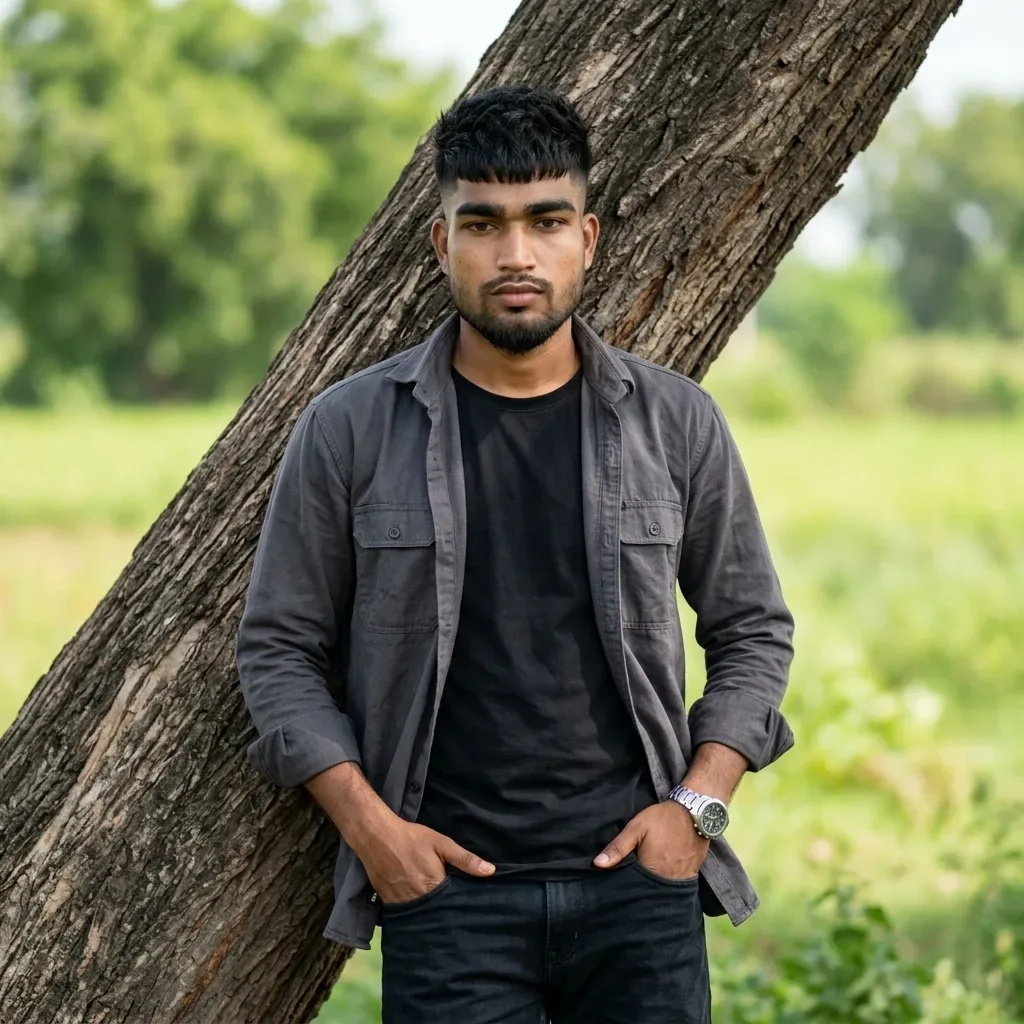
Vertical 1:1 square aspect ratio outdoor portrait of a young man posing casually against a thick, leaning weathered tree trunk in an open natural field.
 * Face, Hair & Body Likeness: Must maintain 100% facial and physical fidelity to the uploaded reference photo. Dense, textured black hair with a short cropped fringe/textured crop on top and faded sides. Neatly trimmed full beard with a connected mustache along the sharp jawline. Natural warm brown skin texture, direct gaze looking at the camera with a calm, confident expression, and a lean, proportional athletic build.
 * Pose & Framing: Medium-close / waist-up shot. The subject stands centered, leaning lightly back against a massive rough-barked, diagonally angled tree branch/trunk, with both hands resting naturally in his front trouser pockets.
 * Outfit & Accessories: Open charcoal-grey/faded slate-grey lightweight button-up collared overshirt layered over a plain solid black crewneck t-shirt, paired with classic dark black denim jeans. Metallic wristwatch with a dark round dial and polished steel bracelet visible on the left wrist.
 * Environment & Background: Rustic outdoor countryside setting with a large textured fallen tree trunk directly behind the subject, vibrant green grass underfoot, and softly blurred background foliage, trees, and distant open fields under a clear daylight sky.
 * Lighting & Camera Style: Soft, diffused natural daytime lighting accentuating skin tones and cloth textures, creamy shallow depth of field (f/2.2 background bokeh) keeping the subject in pin-sharp focus, authentic 35mm DSLR lifestyle portrait photography, 8K ultra-HD clarity.
Face & Body Match Settings
 * Midjourney: Reference photo upload karein aur prompt ke end me add karein: --cref <IMAGE_URL> --cw 100 --ar 1:1 --v 6.1
 * Fooocus / Stable Diffusion: Image ko InstantID ya IP-Adapter Face / FaceID me upload karke reference weight 0.85 – 0.95 set karein.

Optical Identity & Likeness Preservation: Maintain 100% exact facial identity, bone structure, jawline contours, and natural skin undertone of reference photo without alteration or distortion.Explore Related Collections
Explore Photography Prompts — Browse our curated collection of Photography prompts tailored for creators. View all Photography prompts →
Explore Ai Image Prompts — Discover more viral Ai Image ideas for your next AI generation. View all Ai Image prompts →
Explore Trending Prompts — Explore our extensive library of Trending templates ready to copy and paste. View all Trending prompts →
Frequently asked questions
- How do I use the Rural Field Male Portrait Leaning On Rustic Tree Trunk In Grey Overshirt AI Photo Prompt prompt?
- To use this prompt, simply click the "Copy Prompt" button above. Then, open Midjourney, paste the copied text into the prompt box, and hit generate. You can instantly generate high-quality images without needing any reference photos.
- What is this prompt best used for?
- This specific prompt is highly optimized for creating engaging social media content and digital art. The formula is structured to produce high-contrast, visually appealing results that perform well on visual platforms.
- Can I customize the details of this prompt?
- Yes! While the core structure of the prompt is optimized for Midjourney, you can easily customize the details. We recommend changing specific keywords like clothing colors, background locations, or the overall mood (e.g., changing "sunny" to "rainy" or "neon") to match your exact vision.