Quick Summary: This verified Midjourney Niji 6 / Flux.1 Schnell / Bing Image Creator prompt creates an hyper-detailed 3D cyberpunk stylized aesthetic for @Create Image # Miniature Surreal Engineering AI Photo Prompt with calibrated lighting, authentic texture physics, and tested 1-click copy-paste formula for instant AI generation without facial distortion.
About This Prompt
This AI prompt generates a @Create Image # Miniature Surreal Engineering AI Photo Prompt — a high-quality, photorealistic image with balanced lighting, sharp focus, and intricate details suitable for social media sharing and digital content creation.
This prompt works best with your AI generator. Simply copy the prompt text below and paste it into the generator. You can easily customize specific keywords like colors, backgrounds, or subjects to make the final output uniquely yours.
@Create Image # Miniature Surreal Engineering AI Photo Prompt - Copy Paste AI Prompt
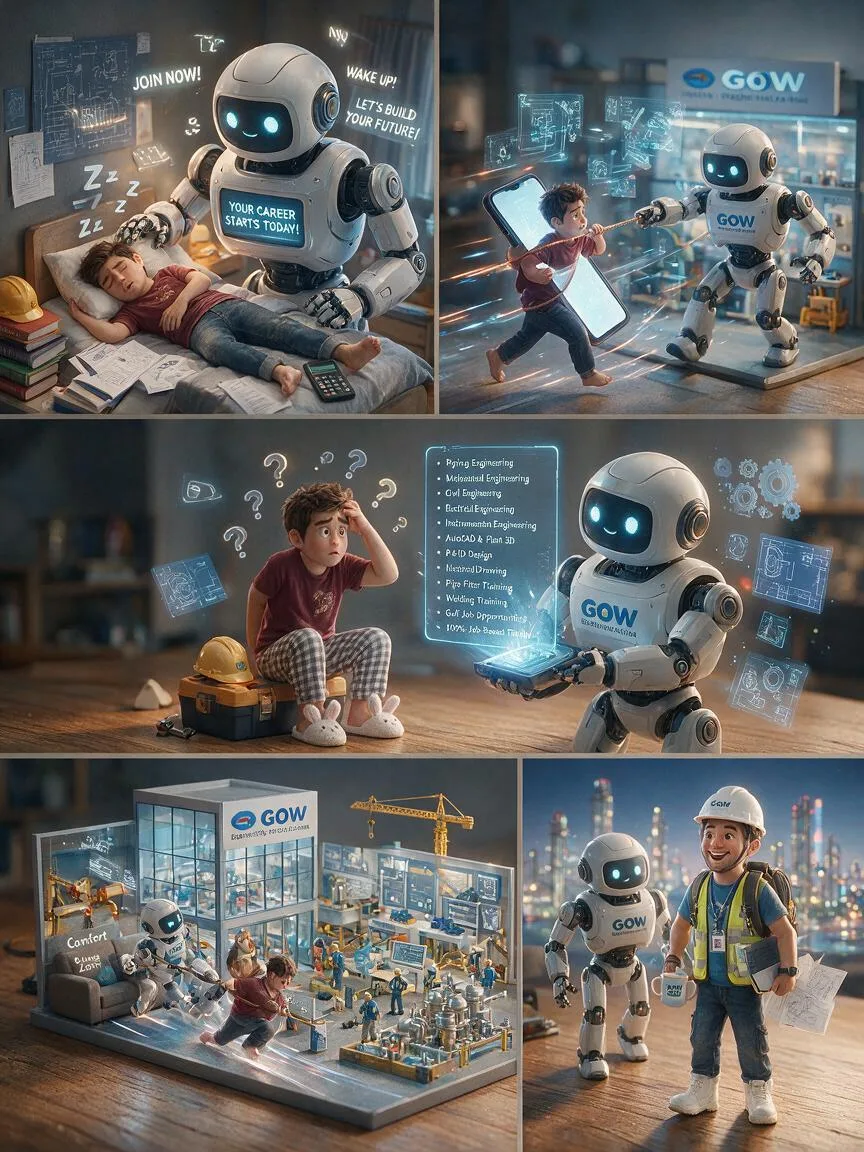
@Create image # Ultra-Realistic Miniature Surreal Engineering Career Journey – GOW Engineering AI Image Generation Prompt ## Prompt: Create an ultra-realistic cinematic miniature surreal storytelling scene featuring a tiny confused engineering graduate interacting with a gigantic anthropomorphic GOW Engineering & Technical Services mascot in a humorous yet inspiring five-panel visual narrative. Hyper-detailed, photorealistic, 8K HDR, Hollywood-quality CGI, physically based rendering (PBR), ray-traced reflections, global illumination, cinematic depth of field, macro photography aesthetics, Pixar-quality realism. The entire story takes place on a warm wooden tabletop transformed into a highly detailed miniature engineering world with industrial training equipment, blueprint elements, tiny construction cranes, pipelines, valves, welding stations, AutoCAD drawings, and Gulf recruitment symbols. Use an extremely shallow depth of field to create a premium miniature diorama effect. --- # Panel 1 – Confused Engineering Graduate A tiny exhausted engineering graduate sleeps on a miniature bed surrounded by scattered engineering textbooks, AutoCAD drawings, safety helmet, calculator, measuring tape, resume papers, and engineering blueprints. He wears a maroon T-shirt with jeans. Beside him stands a gigantic futuristic GOW Engineering Robot Guide, replacing the alarm clock. The robot has:  Friendly digital face  Expressive LED eyes  Mechanical arms  Mechanical legs  Engineering safety helmet  GOW Engineering logo on its chest Its large digital display glows: "YOUR CAREER STARTS TODAY!" Comic sound effects appear:  "JOIN NOW!"  "WAKE UP!"  "LET'S BUILD YOUR FUTURE!" Floating "Zzz..." symbols hover above the student while the robot gently waves. --- # *Panel 2 – Stop Scrolling, Start Learning** The GOW Engineering Robot gently pulls the engineering graduate using a thick safety rope attached around his waist. Instead of pulling him from bed, the graduate desperately clings to a giant glowing smartphone, endlessly scrolling through random job posts and confusing career options. His facial expression shows:  confusion  stress  frustration  career uncertainty The robot confidently points toward the GOW Engineering Training Center visible in the background. Motion blur and glowing engineering holograms emphasize action. --- # Panel 3 – Career Guidance Begins The engineering graduate now sits on a miniature industrial toolbox wearing:  checkered pajama pants  bunny slippers  GOW Engineering helmet beside him One hand scratches his head. Floating question marks and engineering icons appear. The friendly GOW Engineering Robot now holds a holographic projector instead of a megaphone. It proudly displays glowing floating holographic engineering courses:  Piping Engineering  Mechanical Engineering  Civil Engineering  Electrical Engineering  Instrumentation Engineering  AutoCAD & Plant 3D  P&ID Design  Isometric Drawing  Pipe Fitter Training  Welding Training  Gulf Job Opportunities  Interview Preparation  100% Job-Based Training Blueprints, CAD drawings, pipelines, gears and engineering symbols float around them. --- # Panel 4 – Training Journey The cheerful GOW Engineering Robot confidently walks toward a beautiful futuristic miniature GOW Engineering & Technical Services Training Campus. The student still resists slightly while holding onto a comfortable sofa labeled: "Comfort Zone" The robot gently pulls him toward success. The campus includes:  Glass engineering building  Welding practice yard  Industrial piping lab  AutoCAD classroom  Process plant models  Construction cranes  Mechanical workshop  Electrical laboratory  Instrumentation lab  Students wearing PPE  Gulf project mock-up Dynamic motion lines emphasize forward progress. --- # *Panel 5 – Dream Career Achieved** The engineering graduate is now smiling confidently wearing full PPE:  White safety helmet  Safety shoes  Reflective vest  GOW Engineering T-shirt  ID card  Engineering backpack Instead of dragging him, the robot now proudly walks beside him like a mentor. The student carries:  Engineering drawings  Laptop  Coffee mug with GOW Engineering logo Behind them appears a glowing futuristic Gulf skyline featuring:  Oil & Gas refinery  Industrial plants  High-rise buildings  Construction cranes  Offshore platform  Airplane taking off toward the Gulf Floating musical notes, success stars, and glowing career icons surround them. Above them appears a massive hologram: *"WELCOME TO YOUR ENGINEERING CAREER"** --- # Character Design Tiny realistic engineering graduate Highly expressive facial animation Natural skin textures Modern hairstyle Maroon T-shirt Jeans Checkered pajama pants (Panel 3) White PPE safety helmet Reflective safety vest Engineering safety boots GOW Engineering branded clothing Realistic emotions --- # GOW Engineering Robot Guide Design Friendly futuristic engineering robot White and orange industrial body Blue glowing LED eyes Mechanical articulated arms Mechanical legs Engineering helmet Digital display on chest Animated holographic projector Friendly mentor personality GOW Engineering logo prominently displayed Industrial-inspired futuristic design --- # Miniature Environment Warm wooden tabletop Miniature engineering training campus Tiny industrial workshops AutoCAD classroom Piping laboratory Welding sparks Construction cranes Steel structures Process plant models Pipelines Valves Pressure gauges Engineering blueprints Tiny engineering students Industrial machinery Warm golden lighting Tiny floating dust particles Macro photography Beautiful cinematic bokeh --- # Visual Style Ultra-realistic Miniature diorama Hyper-realistic macro photography Pixar-quality cinematic realism Hollywood VFX Photorealistic textures 8K UHD HDR lighting Physically Based Rendering (PBR) Ray-traced reflections Global illumination Volumetric lighting Shallow depth of field Award-winning commercial illustration Premium educational advertisement Humorous yet motivational visual storytelling Cinematic composition Ultra-detailed engineering environment No watermark No logo except GOW Engineering & Technical Services branding No unnecessary text except comic sound effects, holographic engineering course names, and motivational career messages.

Note: Lock subject's authentic facial identity and natural posture while seamlessly integrating with sharp vehicle reflections and cinematic ambient lighting.What You'll Get
- 🎨 Style: Ai Image
- ✨ Mood: Meigen
- 📱 Best For: Trending
- 🤖 Works With: your AI generator
- 🔥 Popularity: Copied 77 times
- 📅 Added: Sep 15, 2026
Explore Related Collections
Explore Ai Image Prompts — Browse our curated collection of Ai Image prompts tailored for creators. View all Ai Image prompts →
Explore Trending Prompts — Discover more viral Trending ideas for your next AI generation. View all Trending prompts →
Frequently asked questions
- How do I use the @Create Image # Miniature Surreal Engineering AI Photo Prompt prompt?
- To use this prompt, simply click the "Copy Prompt" button above. Then, open your AI generator, paste the copied text into the prompt box, and hit generate. You can instantly generate high-quality images without needing any reference photos.
- What is this prompt best used for?
- This specific prompt is highly optimized for creating engaging social media content and digital art. The formula is structured to produce high-contrast, visually appealing results that perform well on visual platforms.
- Can I customize the details of this prompt?
- Yes! While the core structure of the prompt is optimized for your AI generator, you can easily customize the details. We recommend changing specific keywords like clothing colors, background locations, or the overall mood (e.g., changing "sunny" to "rainy" or "neon") to match your exact vision.