Quick Summary: This verified Google Gemini & Midjourney v6 prompt creates an authentic 90s vintage film aesthetic for Cinematic Chiaroscuro Portrait AI Photo Prompt with calibrated lighting, authentic texture physics, and tested 1-click copy-paste formula for instant AI generation without facial distortion.
- Photography
- Ai Image
- Trending
- Photography
- Ai Image
- Trending
- Viral Prompt
- Gemini Ai
- Bing Image Creator
- Copy Paste
About This Prompt
Design a Cinematic Chiaroscuro Portrait AI Photo Prompt — a high-quality, photorealistic image with balanced lighting, sharp focus, and intricate details suitable for social media sharing and digital content creation.
We recommend generating this using Google Gemini. Simply copy the prompt text below and paste it into the generator. You can easily customize specific keywords like colors, backgrounds, or subjects to make the final output uniquely yours.
Cinematic Chiaroscuro Portrait AI Photo Prompt - Copy Paste AI Prompt
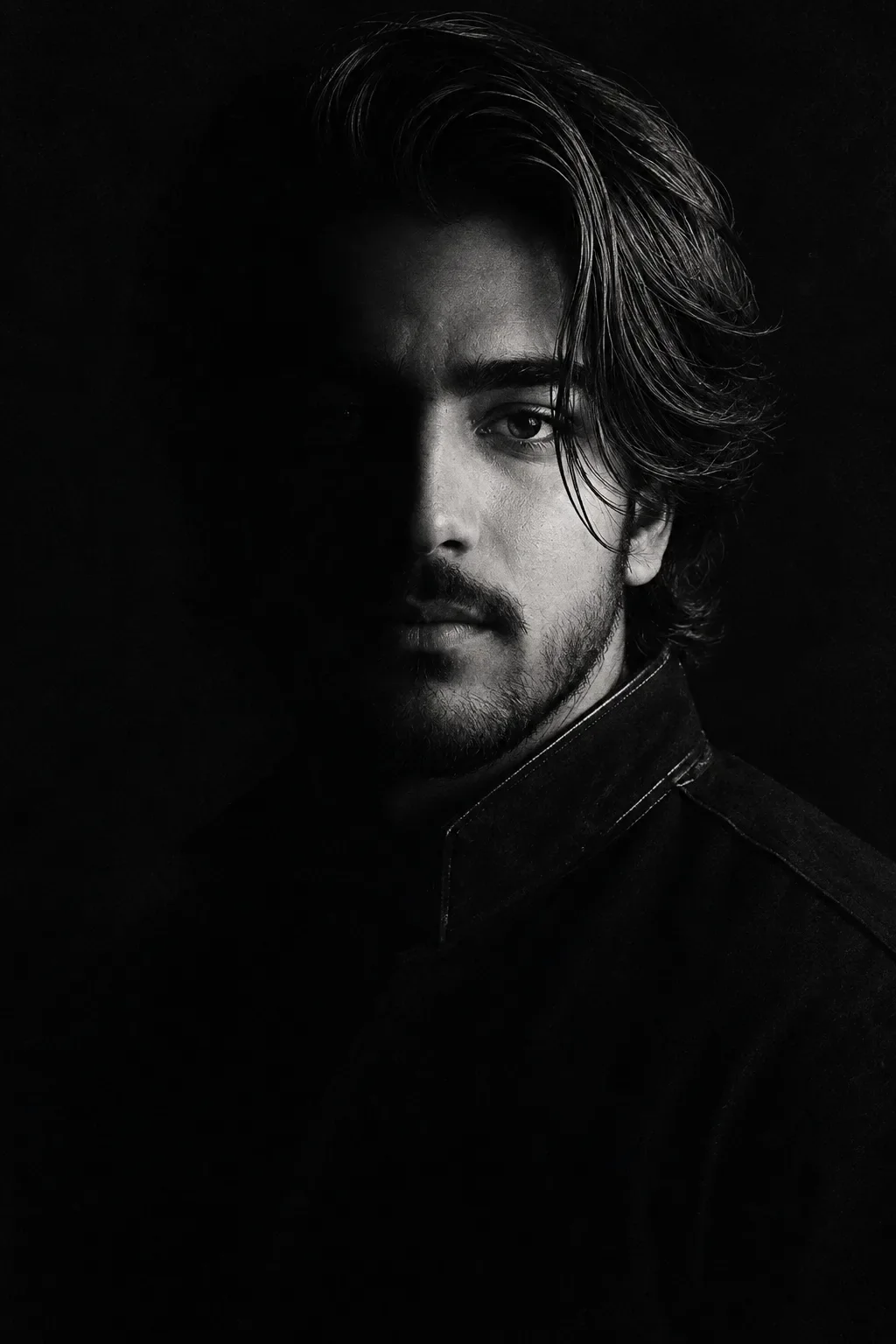
A highly cinematic, dark, monochromatic black-and-white portrait of a stern adult man emerging from deep darkness. He is shown in a three-quarter view, facing slightly toward the camera, with only the right side of his face illuminated while the opposite side disappears almost completely into black shadow. He has a strong angular forehead, deep-set intense eyes, thick eyebrows, a straight prominent nose, defined cheekbones, a trimmed full beard and mustache, and a serious, brooding expression.
The lighting is extremely low-key and dramatic, using a single narrow, soft directional light from the upper right/front to sculpt the facial features. Strong chiaroscuro creates sharp tonal separation between the illuminated facial planes and the surrounding darkness. The visible eye catches a tiny highlight, creating an intense, mysterious gaze.
He wears a dark, high-collared military-inspired or formal garment that blends almost seamlessly into the black background. Only thin highlights along the collar, shoulder, and upper edge of the clothing are visible. The body and lower portion of the image gradually dissolve into complete darkness.
The composition is vertically oriented, with the man's head positioned slightly above center and his body fading into the lower black area. The background is completely black, empty, and featureless. The image has a gritty vintage photographic quality with heavy film grain, subtle dust and texture, deep crushed blacks, muted gray highlights, rough analog contrast, and an old archival portrait aesthetic.
Extremely realistic facial anatomy, natural skin texture, realistic hair strands, subtle imperfections, dramatic chiaroscuro, deep shadows, high contrast, minimal composition, mysterious atmosphere, haunting mood, cinematic portrait photography, black-and-white film photography, 35mm analog film grain, soft focus around the shadows, finely controlled highlights, no visible environment, no text, no objects, no color.
Aspect ratio: 2:3 portrait orientation. {Keep the uploaded image exactly the same}

Optical Identity & Likeness Preservation: Lock subject's 1:1 facial likeness from reference image while seamlessly blending with authentic 35mm analog film grain, vintage color science, and classic studio shadows.What You'll Get
- 🎨 Style: Photography
- ✨ Mood: Photography
- 📱 Best For: Ai Image
- 🤖 Works With: Google Gemini
- 🔥 Popularity: Copied 361 times
- 📅 Added: Sep 14, 2026
Explore Related Collections
Explore Photography Prompts — Browse our curated collection of Photography prompts tailored for creators. View all Photography prompts →
Explore Ai Image Prompts — Discover more viral Ai Image ideas for your next AI generation. View all Ai Image prompts →
Explore Trending Prompts — Explore our extensive library of Trending templates ready to copy and paste. View all Trending prompts →
Frequently asked questions
- How do I use the Cinematic Chiaroscuro Portrait AI Photo Prompt prompt?
- To use this prompt, simply click the "Copy Prompt" button above. Then, open Google Gemini, paste the copied text into the prompt box, and hit generate. You can instantly generate high-quality images without needing any reference photos.
- What is this prompt best used for?
- This specific prompt is highly optimized for creating engaging social media content and digital art. The formula is structured to produce high-contrast, visually appealing results that perform well on visual platforms.
- Can I customize the details of this prompt?
- Yes! While the core structure of the prompt is optimized for Google Gemini, you can easily customize the details. We recommend changing specific keywords like clothing colors, background locations, or the overall mood (e.g., changing "sunny" to "rainy" or "neon") to match your exact vision.