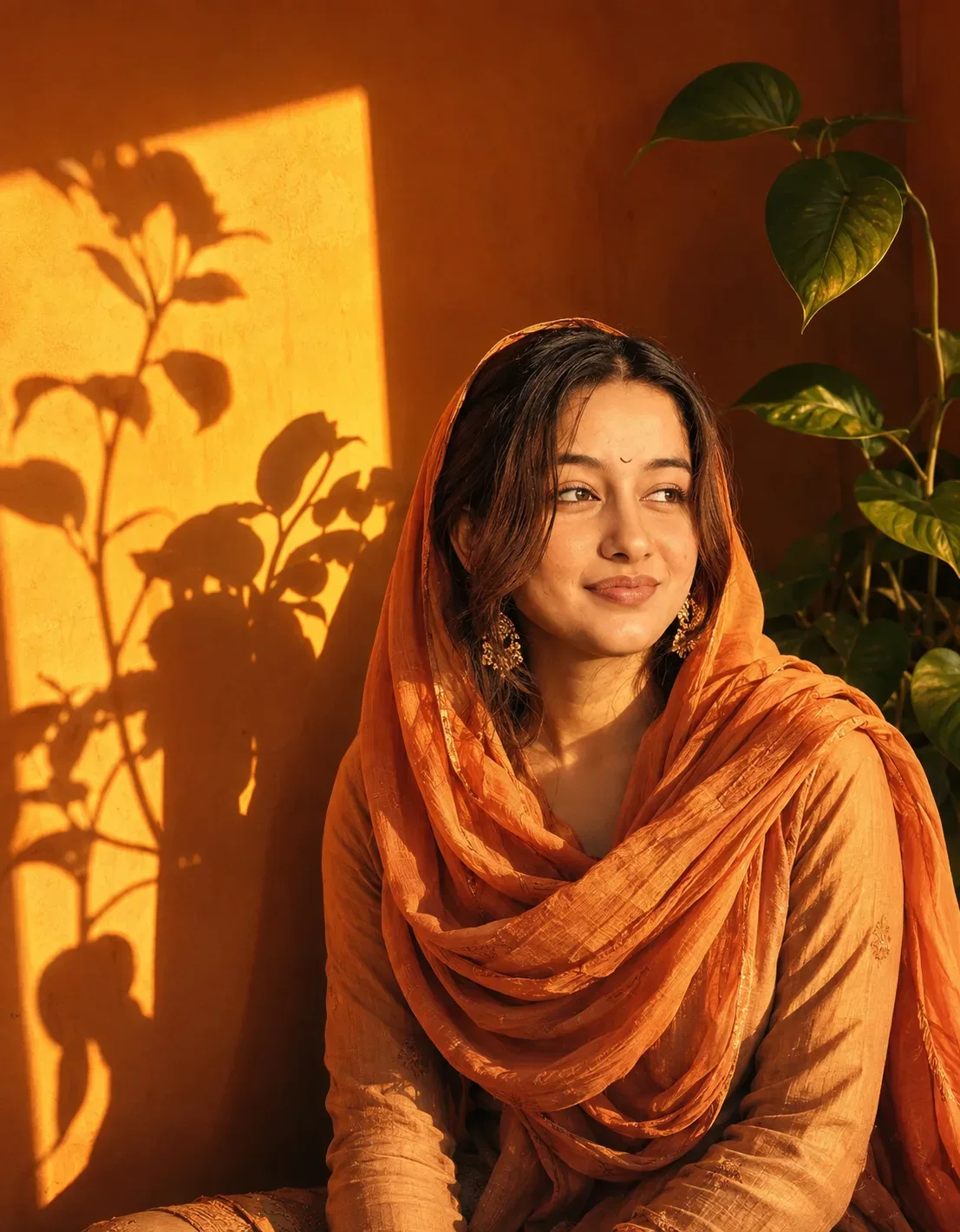
Quick Summary: This verified Google Gemini & Midjourney v6 prompt creates an authentic 90s vintage film aesthetic for Golden Sunlit Portrait With Plant Shadows AI Photo Prompt with calibrated lighting, authentic texture physics, and tested 1-click copy-paste formula for instant AI generation without facial distortion.
- Photography
- Ai Image
- Trending
- Photography
- Ai Image
- Trending
- Viral Prompt
- Gemini Ai
- Bing Image Creator
- Copy Paste
Golden Sunlit Portrait With Plant Shadows AI Photo Prompt - Copy Paste AI Prompt
Use the uploaded user photo as the ONLY and STRICT source of the human subject’s identity and facial appearance. Preserve the user’s exact recognizable identity with maximum fidelity: facial structure, facial proportions, face shape, forehead, eyebrows, natural eye shape, nose, lips, mouth structure, jawline, cheekbones, chin, skin tone, natural skin texture, hairline, hair characteristics, facial hair if present, age, and every distinctive facial characteristic. Do not replace, redesign, beautify, slim, reshape, age, de-age, or reinterpret the user’s face. The final person must unmistakably remain the same individual from the uploaded photo. The reference image must control the expression, emotion, gaze, head position, body pose, styling, environment, composition, lighting, colors, and photographic treatment, but NEVER the identity. Recreate the reference as a highly photorealistic cinematic portrait of the user seated or positioned in a similar relaxed upright three-quarter pose, with the upper body occupying the center-right and lower-right portion of the frame. The subject faces toward the left side of the image in a strong three-quarter profile, with the head turned noticeably left and slightly tilted upward. Reconstruct the reference expression precisely: calm, contemplative, serene, slightly introspective, with a composed closed-mouth expression and relaxed facial muscles. The eyes should be naturally open and directed upward and toward the upper-left area of the scene rather than toward the camera, conveying quiet thoughtfulness and peaceful attention. Preserve the exact reference head angle, neck position, eye direction, mouth position, eyebrow relaxation, and emotional atmosphere while applying them naturally to the user’s own face. Frame the image as a vertical close-to-medium portrait, approximately 4:5 aspect ratio, with the head positioned around the upper-middle/right region and the torso extending toward the bottom-right edge. Use an eye-level to slightly low camera perspective, approximately a 50mm portrait-lens look, with natural perspective and subtle shallow depth of field. The composition should feel intimate and editorial rather than tightly cropped, leaving visible warm-toned negative space and illuminated wall area on the left side. Recreate the warm indoor environment from the reference: a rich burnt-orange, amber, and deep ochre colored wall forming the background, with a bright rectangular patch of golden sunlight entering from the left side. The sunlight creates a strong rectangular illuminated area on the wall behind the subject, transitioning from brilliant yellow-gold in the lit region to deep orange-brown in the surrounding shadow areas. Within the illuminated wall, reproduce distinct botanical shadows cast by nearby plants: recognizable silhouettes of leaves, stems, rounded foliage, and a tall flower-like or broad-leaf plant shadow extending vertically upward. The shadows should appear naturally projected across the bright yellow wall, with soft but clearly readable edges and varying opacity. Include a real green houseplant on the right side behind the subject, with a slender upright stem and several large glossy heart-shaped/oval tropical leaves extending upward and outward. One prominent leaf should reach toward the upper-right area, with additional foliage around the mid-right and lower-right background. Keep the plant slightly out of focus compared with the face while retaining realistic leaf texture and natural highlights. Recreate the dramatic late-afternoon/golden-hour lighting: intense warm sunlight entering from the left, illuminating the subject’s face, scarf, shoulder, and clothing with saturated golden-orange highlights while leaving portions of the face and body in rich cinematic shadow. The light should sculpt the facial contours naturally, producing strong but believable chiaroscuro across the forehead, nose, cheek, jawline, and neck. Preserve realistic skin texture and pores; do not make the skin plastic, overly smooth, excessively airbrushed, or artificially glossy. The illuminated areas should have a warm amber-gold glow with subtle orange reflections, while shadow areas remain deep reddish-brown without losing facial detail. Recreate the reference wardrobe styling while adapting it naturally to the user’s identity and gender presentation: a flowing warm orange/coral headscarf or hijab wrapped elegantly around the head and neck, with layered folds of fabric gathered naturally around the shoulders and chest. The fabric should have realistic woven texture, soft folds, subtle creases, and luminous golden-orange highlights where struck by sunlight. If the user’s identity is male, female, or otherwise different from the reference, retain the user’s identity and gender presentation while adapting the reference’s orange scarf styling naturally and respectfully rather than changing the person into the reference individual. Include an elegant warm-toned long-sleeve garment beneath the scarf, with natural fabric folds and realistic tailoring. Recreate the decorative dangling earrings visible near the ears as delicate ornate gold-toned jewelry with intricate texture and subtle highlights, while keeping any identity-specific accessories from the uploaded photo only when they do not conflict with the reference styling. The scarf should frame the user’s actual face without altering facial proportions or obscuring distinctive identity characteristics. Pay special attention to the scarf’s placement: it wraps around the crown and sides of the head, follows the jaw and neck, then drapes in multiple soft layered folds across the upper chest and shoulders, with a loose flowing section extending toward the right side. Make the fabric physically believable, with gravity-driven folds and realistic contact against the neck and shoulders. The background should remain simple and uncluttered, dominated by warm orange architecture/wall surfaces, with no distracting objects beyond the plant and botanical shadows. Reproduce the strong visual contrast between the brilliant rectangular sunlight on the left wall and the darker orange surrounding wall. The botanical shadows should visually connect the real plant to the projected silhouettes, creating a poetic sunlit interior atmosphere. Use cinematic warm color grading dominated by amber, orange, golden yellow, and deep burnt sienna tones, with subtle tonal variation and natural color separation. The overall image should feel like a premium editorial fashion photograph with an artistic fine-art quality, combining realistic photography with dramatic sunlight and shadow design. Use high dynamic range while preserving natural contrast, realistic skin tones within the warm lighting, detailed fabric texture, realistic plant leaves, physically accurate shadows, and nuanced highlights. Add subtle filmic grain and gentle analog texture, but keep the image highly clean, sharp, and photorealistic. Use shallow depth of field with the user’s face as the primary focus, while the background plant and distant wall details gradually soften. Avoid excessive bokeh that would destroy the recognizable botanical shadows. The face must remain extremely detailed and naturally integrated into the lighting, with realistic catchlights, eyelashes, skin pores, subtle facial texture, and accurate anatomical proportions. Do not copy the reference person’s facial identity, facial proportions, ethnicity, or unique features. Do not blend the two faces. The uploaded user’s identity is absolute and must remain unchanged. Only transfer the reference subject’s expression, gaze, head angle, pose, styling, lighting, and environment. Recreate the reference composition as closely as possible: warm orange wall filling the background, bright rectangular golden sunlight occupying the left-middle area, botanical silhouettes projected across that illuminated section, the real green plant rising behind the subject on the right, and the user positioned prominently on the center-right in a contemplative upward-left gaze. Maintain natural anatomical proportions, realistic shoulders and neck, believable posture, physically correct light direction, accurate contact shadows, realistic fabric behavior, and coherent perspective. The final image should look like a professionally photographed cinematic editorial portrait captured indoors during intense golden-hour sunlight, not an illustration or artificial AI render. Preserve subtle imperfections and natural photographic detail. No distorted anatomy, extra fingers, duplicated jewelry, malformed ears, warped facial features, unnatural eyes, asymmetrical facial structure caused by generation, excessive smoothing, beauty-filter effects, exaggerated makeup, unrealistic skin, artificial plastic fabric, floating objects, or inconsistent shadows. If any text appears in the reference composition, treat it only as a secondary graphic element and do not allow typography to interfere with the subject’s face or primary photographic composition. Final output: ultra-photorealistic, cinematic, editorial-quality vertical portrait, warm golden-orange palette, dramatic natural sunlight, botanical shadows, realistic green houseplant, elegant orange hijab styling, contemplative upward-left gaze, precise reference head pose and expression, shallow natural depth of field, authentic skin texture, high detail, realistic optics, subtle film grain, and absolute preservation of the uploaded user’s identity.

Optical Identity & Likeness Preservation: Strictly retain 100% exact facial likeness, natural cheekbone contours, true skin undertone, and authentic gaze from source image without generic face replacement.👤Customize in Face Consistency Studio
Lock 100% exact facial identity, bone structure & eye shape in Gemini & Bing.
Technical Prompt Parameters (Vintage Film & Retro Polaroid)
| Parameter | Configuration | Output Impact |
|---|---|---|
| Target AI Engine | Google Gemini & Midjourney v6 | Preserves organic analog warmth, natural color saturation, and retro lighting response. |
| Recommended Aspect Ratio | 4:5 (Classic Film) or 1:1 (Square Polaroid) | Faithful recreation of vintage paper print dimensions and nostalgic photo albums. |
| Camera & Lens Settings | 35mm Leica M6, Kodak Portra 400, f/2.8, subtle chromatic dispersion | Renders genuine analog grain, gentle halation, and authentic film stock color science. |
| Lighting Style | Direct camera flash with soft falloff or warm golden hour sunset flare | Creates natural retro exposure highlights without artificial digital gloss. |
| Negative Constraints | digital sheen, oversaturated HDR, plastic skin, neon light, CGI 3D, modern watermark | Eliminates hyper-digital smoothness to maintain true photochemical aesthetic. |
| Reference Photo | Upload a daylight selfie; avoid heavy ring-light filters for best film look. | Upload front-facing reference photo for face matching. |
How to use this prompt
- Copy the prompt, open Google Gemini or Bing Image Creator, attach your reference photo, and generate instant 8K results.
How to get better results from Golden Sunlit Portrait With Plant Shadows AI Photo Prompt
Free 1-click copy golden sunlit portrait with plant shadows ai photo prompt for Google Gemini and Bing Image Creator. Authentic photography aesthetic, realistic lighting, and instant camera settings. Use it as a copy-ready starting point, then adjust the subject, scene, tone and output format for your own result.
- Photography
- Ai Image
- Trending
- Viral Prompt
- Gemini Ai
- Bing Image Creator
Customize before generating
- Replace the main subject, name, product or character details.
- Adjust lighting, background, mood, camera angle or aspect ratio if the prompt is visual.
- Change tone, audience, language and output format if the prompt is for text.
- Keep this core idea clear: Use the uploaded user photo as the ONLY and STRICT source of the human subject’s identity and facial appearance. Preserve the user’s exact recognizable identity...
Quick variations to try
- Make Golden Sunlit Portrait With Plant Shadows AI Photo Prompt more cinematic with stronger lighting and richer background detail.
- Turn Golden Sunlit Portrait With Plant Shadows AI Photo Prompt into a cleaner mobile-first version for social media posts or profile use.
- Create a premium version of Golden Sunlit Portrait With Plant Shadows AI Photo Prompt with sharper style, higher detail and a more polished final output.