Quick Summary: This verified Midjourney Niji 6 / Flux.1 Schnell / Bing Image Creator prompt creates an hyper-detailed 3D cyberpunk stylized aesthetic for SHOPPING AI Photo Prompt with calibrated lighting, authentic texture physics, and tested 1-click copy-paste formula for instant AI generation without facial distortion.
- Photography
- Ai Image
- Trending
- Photography
- Ai Image
- Trending
- Viral Prompt
- Gemini Ai
- Bing Image Creator
- Copy Paste
SHOPPING AI Photo Prompt - Copy Paste AI Prompt
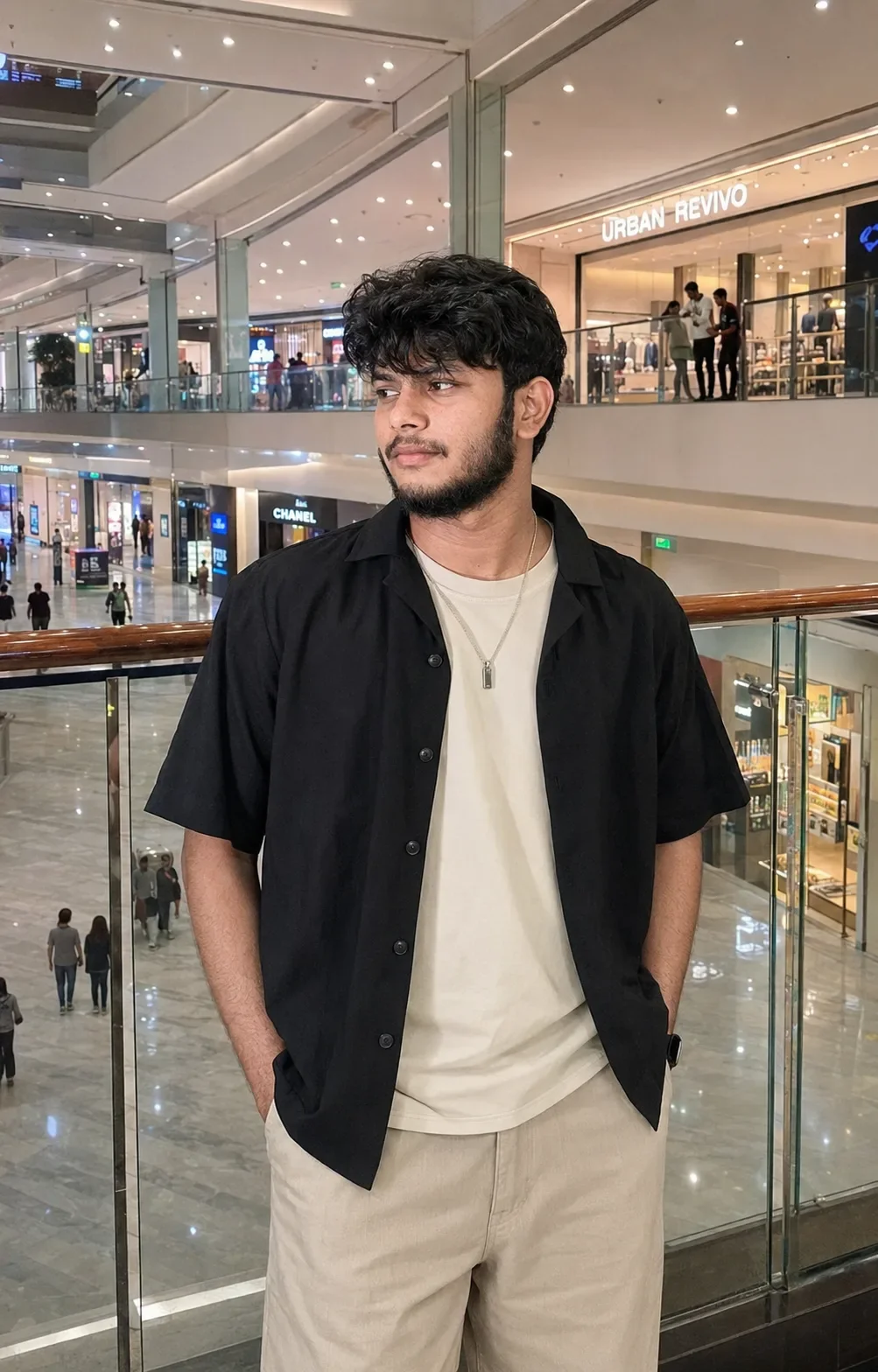
Create an ultra-realistic, premium vertical lifestyle fashion photograph of a young adult male standing inside a large modern luxury shopping mall, closely matching the reference image in composition, pose, clothing, hairstyle, lighting, background architecture, camera perspective and overall photographic mood.

Subject & Appearance

A young adult male with a naturally slim-to-average physique and realistic human proportions, standing casually beside a glass-and-metal mall railing.

He has thick, straight-to-slightly-wavy black hair, medium length on top with dense natural volume. The hairstyle has a soft rounded shape, slightly parted and naturally falling forward over the forehead, with textured fringe reaching toward the eyebrows. Include subtle individual strands, realistic flyaways and natural hair density. The sides are moderately shorter while the top remains full.

His face is turned toward the right side of the frame, looking naturally into the distance rather than directly at the camera. His expression is calm, relaxed and subtly thoughtful, with closed relaxed lips and a natural neutral gaze.

Facial features should remain realistic and naturally proportioned: softly defined jawline, natural cheek structure, proportional nose, realistic lips, dark eyebrows and authentic eyes. Preserve subtle facial asymmetry rather than creating an overly perfect AI face.

Skin Realism

Natural youthful skin with:

subtle pores

realistic fine texture

gentle tonal variation

natural under-eye detail

realistic highlights and shadows

authentic lips

physically accurate eye reflections

No plastic skin, beauty filter or excessive retouching.

Hairstyle Detail

The hair is a major visual feature. Make it dense, soft and naturally voluminous, with slightly separated front strands and a gentle fringe across the forehead.

Individual strands should catch small amounts of ambient mall lighting. Avoid perfectly uniform or artificially sculpted hair.

Outfit

The subject wears a layered minimalist street-fashion outfit:

Outer layer: an oversized black short-sleeve open button-up shirt, relaxed fit with a soft drape. The shirt has a simple collar, dark buttons and natural fabric folds. Sleeves fall loosely around the upper arms.

Inner layer: a plain off-white/cream crew-neck T-shirt, visible beneath the open black shirt. The T-shirt has a relaxed fit and realistic cotton texture.

Bottom: loose light beige/cream wide-leg trousers, high-to-mid rise with a relaxed silhouette. The trousers have natural fabric wrinkles around the waist, pockets and upper legs.

Accessories

A thin silver necklace hangs naturally around the neck, with a small rectangular/vertical metallic pendant resting over the cream T-shirt.

The pendant should have realistic metallic reflections without becoming excessively shiny.

No additional unnecessary jewelry or accessories.

Pose

Casual, effortless standing pose beside the mall railing.

The subject:

stands slightly angled toward the camera

turns his head toward the right

looks away from the camera

keeps shoulders relaxed

places both hands naturally inside his trouser pockets

allows the black overshirt to hang naturally open

maintains a relaxed fashion-editorial posture

The pose should feel spontaneous and candid, not like a stiff studio model pose.

Location & Background

A large, upscale multi-level shopping mall interior.

Behind the subject is a glass balcony railing with a dark wooden/metal handrail. Multiple floors of the shopping center are visible in the background.

Include:

polished reflective flooring

glass balustrades

modern structural columns

bright recessed ceiling lights

luxury retail storefronts

illuminated shop signage

distant shoppers walking casually

escalator/store areas and lower-level retail visible through the railing

subtle reflections on glass surfaces

The background should strongly communicate a real modern shopping mall while keeping the subject as the primary focal point.

Storefront Background

In the upper-right background, include a contemporary clothing-store facade with a bright illuminated sign reading “URBAN REVIVO”, matching the placement and scale of the reference.

Other distant signs and mall signage can appear softly in the background but should remain secondary and not distract from the subject.

Background People

Add a small number of naturally positioned shoppers in the distance.

They should appear:

slightly out of focus

naturally dressed

walking or standing casually

varied in posture

realistically scaled relative to the environment

Do not make background people unusually sharp or prominent.

Lighting

Use realistic bright indoor shopping-mall illumination.

The mall is lit by a combination of:

soft overhead recessed lights

storefront illumination

neutral-white ambient lighting

subtle reflected light from polished surfaces

The subject should receive soft, even illumination across the face and clothing, with gentle shadows around the jaw, neck and shirt folds.

Avoid dramatic studio lighting or artificial cinematic spotlights.

Camera & Composition

Use a vertical 4:5 portrait composition, closely matching the reference framing.

Frame the subject approximately from the top of his hair to the upper/mid-thigh area.

The subject occupies the central-right portion of the frame, while the mall architecture fills the surrounding space.

Camera approximately at chest-to-eye level with a natural perspective similar to a modern smartphone or mirrorless camera.

Use a 50–60mm equivalent perspective, avoiding exaggerated wide-angle distortion.

Keep the subject sharp while allowing the distant mall environment and shoppers to fall into a gentle natural softness.

Photographic Character

The image should resemble a genuine modern smartphone lifestyle photograph, not a studio campaign.

Use:

realistic exposure

moderate HDR

natural highlight roll-off

subtle computational photography

authentic indoor white balance

realistic glass reflections

natural shadow gradients

slight photographic softness

high-resolution facial and clothing detail

Do not make the image excessively cinematic or artificially sharpened.

Color Palette

Keep the color palette sophisticated and realistic:

black overshirt

warm cream/off-white T-shirt

light beige trousers

natural skin tones

neutral gray architectural elements

warm wood railing

soft white mall lighting

muted storefront colors

Maintain realistic saturation and contrast.

Realism Details

Prioritize:

individual hair strands

realistic skin pores

authentic facial texture

natural hands and fingers

realistic fabric weave

natural shirt folds

believable trouser wrinkles

physically accurate necklace reflections

realistic glass reflections

polished floor reflections

correctly scaled background shoppers

realistic retail lighting

accurate perspective and depth

The final result should look like an authentic candid photograph taken inside a real premium shopping mall.

Negative Prompt

cartoon, anime, illustration, painting, CGI, 3D render, artificial face, plastic skin, wax skin, beauty filter, excessive retouching, unnatural facial symmetry, distorted anatomy, oversized head, tiny body, malformed hands, extra fingers, missing fingers, distorted necklace, floating jewelry, incorrect clothing, tight clothing, muscular exaggeration, fake hair, helmet hair, perfectly symmetrical hair, excessive bokeh, fisheye lens, wide-angle distortion, warped architecture, duplicated people, duplicated subject, distorted storefronts, unrealistic reflections, dramatic studio lighting, harsh flash, extreme HDR, oversaturated colors, orange skin, excessive sharpening, blurry face, low resolution, watermark, random text, misspelled signage, artificial-looking mall, unrealistic shadows.

FINAL VISUAL GOAL: A highly realistic premium young-adult fashion portrait inside a sophisticated multi-level shopping mall, featuring voluminous black hair, black open short-sleeve shirt, cream T-shirt, loose beige trousers, thin silver pendant necklace, hands in pockets, calm side-facing expression, glass mall railing, distant shoppers, bright retail stores and realistic modern smartphone-camera aesthetics.

Optical Identity & Likeness Preservation: Lock subject's authentic facial identity and natural posture while seamlessly integrating with sharp vehicle reflections and cinematic ambient lighting.👤Customize in Face Consistency Studio
Lock 100% exact facial identity, bone structure & eye shape in Gemini & Bing.
Technical Prompt Parameters (Cyberpunk, 3D Avatar & Anime)
| Parameter | Configuration | Output Impact |
|---|---|---|
| Target AI Engine | Midjourney Niji 6 / Flux.1 Schnell / Bing Image Creator | Specialized prompt weights for volumetric rendering, cell-shading, and neon emission. |
| Recommended Aspect Ratio | 9:16 (Phone Wallpaper) or 16:9 (Desktop Ultra-Wide) | Ideal for custom gaming wallpapers, Discord avatars, and futuristic phone lock screens. |
| Camera & Lens Settings | Octane 3D Render, Raytraced Global Illumination, 35mm virtual lens | Simulates volumetric atmospheric smoke, holographic reflections, and crisp polygonal precision. |
| Lighting Style | Dual-tone neon split lighting (electric cyan key + magenta rim light) | Produces dynamic sci-fi contrast with vibrant edge glows and deep blacks. |
| Negative Constraints | low-poly flaws, blurry textures, realistic photographic noise, dull matte lighting | Ensures sharp vector/render lines, vivid luminous glow, and zero muddy compression. |
| Reference Photo | Upload a clear face photo; prompt transforms human proportions into stylized avatar art. | Upload front-facing reference photo for face matching. |
How to use this prompt
- Copy the prompt, open Google Gemini or Bing Image Creator, attach your reference photo, and generate instant 8K results.
How to get better results from SHOPPING AI Photo Prompt
Free 1-click copy shopping ai photo prompt for Google Gemini and Bing Image Creator. Authentic photography aesthetic, realistic lighting, and instant camera settings. Use it as a copy-ready starting point, then adjust the subject, scene, tone and output format for your own result.
- Photography
- Ai Image
- Trending
- Viral Prompt
- Gemini Ai
- Bing Image Creator
Customize before generating
- Replace the main subject, name, product or character details.
- Adjust lighting, background, mood, camera angle or aspect ratio if the prompt is visual.
- Change tone, audience, language and output format if the prompt is for text.
- Keep this core idea clear: Create an ultra-realistic, premium vertical lifestyle fashion photograph of a young adult male standing inside a large modern luxury shopping mall, closely matching...
Quick variations to try
- Make SHOPPING AI Photo Prompt more cinematic with stronger lighting and richer background detail.
- Turn SHOPPING AI Photo Prompt into a cleaner mobile-first version for social media posts or profile use.
- Create a premium version of SHOPPING AI Photo Prompt with sharper style, higher detail and a more polished final output.