Quick Summary: This verified Google Gemini & Midjourney v6 prompt creates an authentic 90s vintage film aesthetic for "janmashtami Kanha Janm Divine Family Blessing" AI Photo Prompt with calibrated lighting, authentic texture physics, and tested 1-click copy-paste formula for instant AI generation without facial distortion.
- Illustration 3d
- Ai Image
- Trending
- Illustration 3d
- Ai Image
- Trending
- Viral Prompt
- Gemini Ai
- Bing Image Creator
- Copy Paste
About This Prompt
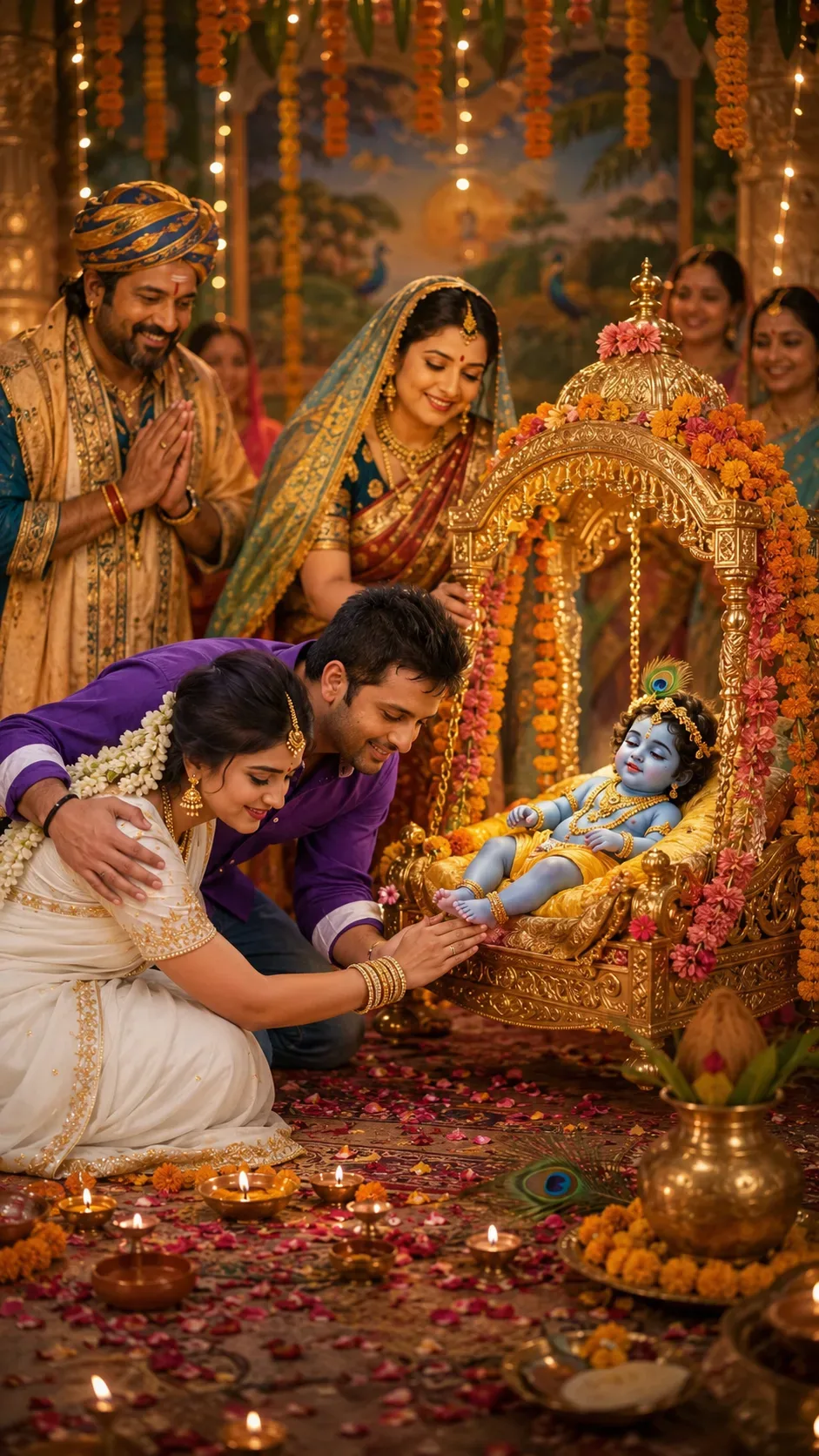
Design a "janmashtami Kanha Janm Divine Family Blessing" AI Photo Prompt — a high-quality, photorealistic image with balanced lighting, sharp focus, and intricate details suitable for social media sharing and digital content creation.
Optimized specifically for Google Gemini. Simply copy the prompt text below and paste it into the generator. You can easily customize specific keywords like colors, backgrounds, or subjects to make the final output uniquely yours.
What You'll Get
- 🎨 Style: Illustration 3d
- ✨ Mood: Illustration 3d
- 📱 Best For: Ai Image
- 🤖 Works With: Google Gemini
- 🔥 Popularity: Copied 34 times
- 📅 Added: Sep 14, 2026
"janmashtami Kanha Janm Divine Family Blessing" AI Photo Prompt - Copy Paste AI Prompt
IDENTITY LOCK: Do not change either subject's (the couple's) facial
bone structure, eye shape and color, nose shape, lip shape, jawline,
or skin tone in any way — keep both 100% identical to the original
uploaded photo. Body build and proportions unchanged for both
individuals. Non-negotiable.

CHARACTER IDENTITY SEPARATION (critical): There are exactly two
distinct identity groups in this image and they must never mix or
swap:
Group 1 — the real couple from the uploaded photo, appearing ONLY in
the foreground bowing toward the palki. Their faces must not appear
anywhere else in the image.
Group 2 — the devotional characters (baby Krishna, Mata Yashoda,
Nandlal ji, and background family members), rendered as separate,
distinct, traditional devotional-art style figures with their own
faces — completely different from the couple's faces. Do not blend,
morph, or transfer any facial features between the two groups.

SCENE CONCEPT: A divine Janmashtami tableau depicting the sacred
moment of Kanha ji's (baby Krishna's) birth celebration. Infant
Krishna rests in an ornately decorated golden palki (cradle), gently
swinging, surrounded by a soft divine glow. Mata Yashoda stands close
beside the palki with a nurturing, joyful expression, gently rocking
it; Nandlal ji (Nanda Maharaj) stands near her, hands folded in
blessing; a few family members are present in the background, softly
blurred, dressed in traditional festive attire, watching the moment
with devotion. Krishna, Yashoda, and Nandlal should be rendered in a
traditional, respectful Indian devotional-art style (as seen in
temple art or classical festival illustrations) — divine, serene,
artistically stylized rather than hyper-photographic — to honor their
sacred depiction.

COUPLE'S ROLE & POSE: The real couple is positioned respectfully in
the foreground, bent slightly forward together, gently touching Kanha
ji's feet in a traditional aashirwad (blessing) gesture — hands
reaching softly toward the palki's base, heads slightly bowed in
devotion. Their bodies angled naturally toward each other and the
palki, one partner's hand resting lightly on the other's back for
support while bowing, natural weight shift forward, knees softly
bent — not a stiff or frozen bow.

EXPRESSION: Both partners show quiet devotion and warmth — soft,
genuine reverence in their eyes, gentle closed-mouth smiles, faces
tilted slightly downward toward Kanha ji rather than at the camera.

ANATOMY ACCURACY (critical, check before finalizing): Every person in
the scene — the couple, Yashoda, Nandlal, and background figures —
must have exactly two arms, two hands, and exactly five fingers per
hand, with no fused, missing, extra, or elongated fingers. Every
person must have exactly two legs and two feet, correctly connected
at natural joints, with no extra or merged limbs. Hands touching the
palki or Kanha ji's feet must show natural, anatomically correct
finger placement — fingers gently curled, not flat or fused together.
Re-verify hand and leg count and structure for every figure in the
image before finalizing.

LIGHTING SETUP (as a real photographer would dial it in): Key light —
a warm divine golden glow emanating softly from around baby Krishna
and the palki, acting as the primary light source from center-front,
low and warm. Fill — soft diya and fairy-light glow from the
surrounding decorations, balancing the central glow at roughly a 2:1
ratio so shadows stay soft. Rim light — string lights and hanging
diyas behind the family create a soft golden edge-glow along the
couple's hair and shoulders. Catchlights in both the couple's eyes
should be warm and soft, reflecting the divine golden glow.

LENS & OPTICS: Simulate a 35mm lens at f/2.8 to comfortably include
the palki, Yashoda, Nandlal, and the couple in one balanced frame —
gentle background compression, background family and decorations
rendered as soft bokeh, sharp focus maintained on the couple and
Kanha ji, faint natural vignette at the corners.

FILM/COLOR SCIENCE: Warm festive film response — golden highlights
bloom softly rather than clipping, shadows lifted gently rather than
crushed black, rich gold-peacock-blue-maroon palette across the
scene, skin tones of the couple staying natural and true against the
divine warm glow.

SET DETAILING (peak detail): Ornately carved and gilded palki with
intricate patterns, marigold garlands and mango-leaf toran hanging
around the scene, scattered rose petals on the floor, peacock
feathers, small clay diyas glowing around the palki's base, traditional
brass kalash nearby, richly embroidered festive textiles on Yashoda
and Nandlal ji's attire with fine gold thread work, softly glowing
ambient dust/light particles in the air for a sacred atmosphere.

RETOUCH PIPELINE: Frequency-separation-style retouching on the couple
— smooth tonal transitions on skin while fully preserving fine pore-
level texture and natural color variation under the warm divine
lighting. Subtle dodge-and-burn to retain natural facial planes for
both subjects, no flattened or plastic-looking skin.

FINISHING: Fine film grain overlay at low opacity, soft cinematic
color grading, no digital sharpening halos, naturally balanced
composition with the palki as the visual centerpiece and the couple
respectfully positioned below it.

FINAL CHECK: Ensure zero facial distortion for the couple, correct
anatomically accurate hands and legs for every figure (no extra or
missing digits/limbs), no identity mixing between the couple and the
devotional characters, and consistent shadow/light-source logic
radiating outward from the divine glow at the palki.

Optical Identity & Likeness Preservation: Preserve authentic facial proportions, eye alignment, natural expressions, and true bone structure of both subjects from reference photo 1:1 without distortion.Explore Related Collections
Explore Illustration 3d Prompts — Browse our curated collection of Illustration 3d prompts tailored for creators. View all Illustration 3d prompts →
Explore Ai Image Prompts — Discover more viral Ai Image ideas for your next AI generation. View all Ai Image prompts →
Explore Trending Prompts — Explore our extensive library of Trending templates ready to copy and paste. View all Trending prompts →
Frequently asked questions
- How do I use the "janmashtami Kanha Janm Divine Family Blessing" AI Photo Prompt prompt?
- To use this prompt, simply click the "Copy Prompt" button above. Then, open Google Gemini, paste the copied text into the prompt box, and hit generate. You can instantly generate high-quality images without needing any reference photos.
- What is this prompt best used for?
- This specific prompt is highly optimized for creating engaging social media content and digital art. The formula is structured to produce high-contrast, visually appealing results that perform well on visual platforms.
- Can I customize the details of this prompt?
- Yes! While the core structure of the prompt is optimized for Google Gemini, you can easily customize the details. We recommend changing specific keywords like clothing colors, background locations, or the overall mood (e.g., changing "sunny" to "rainy" or "neon") to match your exact vision.