Quick Summary: This verified Google Gemini & Bing Image Creator (DALL-E 3) prompt creates an rich traditional Indian cultural aesthetic for Sukoon-e-haram Makkah Mein Ibadat AI Photo Prompt with calibrated lighting, authentic texture physics, and tested 1-click copy-paste formula for instant AI generation without facial distortion.
- Photography
- Ai Image
- Trending
- Photography
- Ai Image
- Trending
- Viral Prompt
- Gemini Ai
- Bing Image Creator
- Copy Paste
About This Prompt
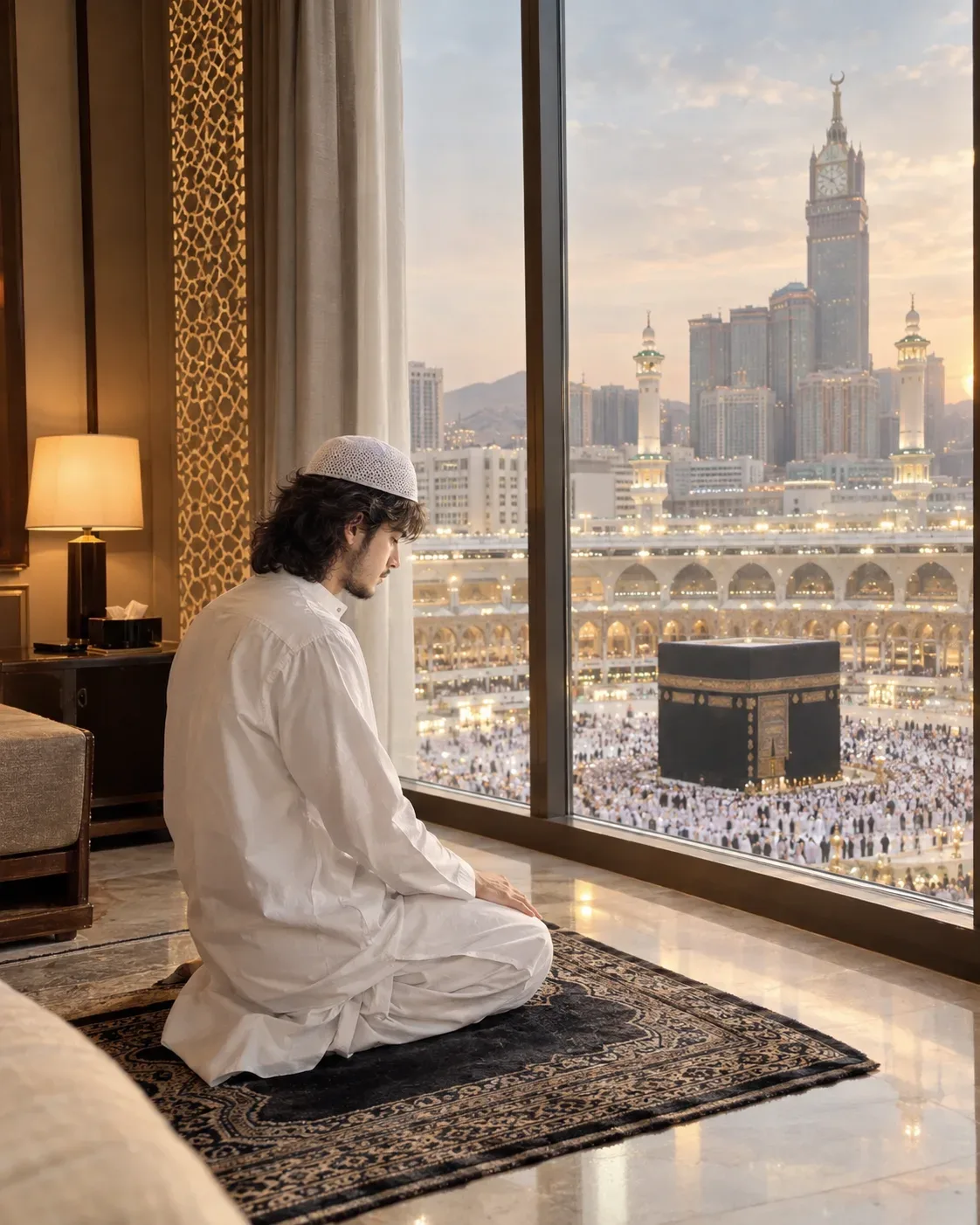
Use this prompt to generate a Sukoon-e-haram Makkah Mein Ibadat AI Photo Prompt — a high-quality, photorealistic image with balanced lighting, sharp focus, and intricate details suitable for social media sharing and digital content creation.
We recommend generating this using Google Gemini. Simply copy the prompt text below and paste it into the generator. You can easily customize specific keywords like colors, backgrounds, or subjects to make the final output uniquely yours.
Sukoon-e-haram Makkah Mein Ibadat AI Photo Prompt - Copy Paste AI Prompt
Create an ultra-realistic, cinematic and deeply respectful photograph using the uploaded photo as the primary identity reference for the young man.

Preserve the man's recognizable facial identity and natural appearance. Keep his facial structure, eyes, eyebrows, nose, lips, jawline, skin tone, hairstyle, hair texture and overall proportions consistent with the uploaded reference. Do not beautify, reshape, replace or significantly alter his recognizable facial features.

SCENE:
Show the young man peacefully performing Salah inside a luxurious hotel room in Makkah, Saudi Arabia. He is praying respectfully on a beautiful traditional prayer rug, facing the Kaaba Mubarak.

The man is wearing a traditional elegant white shalwar kameez, NOT a suit, NOT a sherwani and NOT western clothing. The shalwar should be loose and natural with realistic cotton fabric texture, subtle folds and authentic South Asian styling. He may wear a simple white prayer cap.

Through a large floor-to-ceiling hotel window directly in front of him, the magnificent Kaaba Mubarak is clearly visible in the distance, surrounded by the beautiful architecture of Masjid al-Haram. The Kaaba should be recognizable, proportionally realistic and respectfully presented.

POSE:
Show the man in a natural and respectful Salah position, with anatomically correct posture and hands. His body should be oriented toward the Kaaba. The scene should communicate humility, peace and devotion.

HOTEL INTERIOR:
Elegant luxury Makkah hotel interior with cream and warm beige marble, subtle Islamic geometric details, sophisticated curtains, soft furnishings and a large panoramic window overlooking Masjid al-Haram. Keep the interior refined, peaceful and uncluttered.

LIGHTING:
Soft warm-white natural light coming through the window, gentle golden highlights, subtle ambient hotel lighting and realistic shadows. The Kaaba and Haram should appear beautifully illuminated without excessive artificial glow.

PHOTOGRAPHY:
Ultra-photorealistic professional photography, cinematic travel photography, realistic skin texture, individual hair strands, highly detailed white shalwar kameez fabric, realistic marble reflections, natural depth of field, realistic atmospheric perspective, HDR-quality dynamic range, premium DSLR photography, 50mm lens look, sharp subject and realistic background detail.

COLOR GRADING:
Elegant warm whites, cream, beige, soft gold and natural black tones. Clean, peaceful and slightly cinematic color grading with realistic skin tones.

MOOD:
Spiritual, peaceful, humble, emotional, serene and deeply respectful. The image should feel like a genuine professional photograph captured during a quiet moment of worship.

COMPOSITION:
Vertical 4:5 composition, full-body or three-quarter view, man positioned in the foreground and Kaaba clearly visible through the large window. Balanced composition with enough negative space and realistic scale between the man, hotel room and Haram.

IMPORTANT:
Traditional white shalwar kameez only. No suit, no blazer, no western formalwear. No fantasy effects, no angels, no halos and no excessive glowing effects. Keep the Kaaba and Masjid al-Haram architecture realistic and respectful.

NEGATIVE PROMPT:
suit, blazer, sherwani, western clothing, jeans, t-shirt, female, woman, couple, extra person near subject, distorted face, changed identity, artificial face, plastic skin, excessive beauty retouching, unrealistic anatomy, extra fingers, malformed hands, duplicated limbs, incorrect prayer posture, distorted Kaaba, distorted mosque architecture, fantasy effects, angels, halo, excessive glow, CGI, cartoon, anime, 3D render, oversaturated colors, excessive HDR, blur, watermark, logo, text, typography.

OUTPUT:
Ultra-realistic 4K/8K-quality cinematic photograph, vertical 4:5 composition, premium professional photography, authentic traditional South Asian shalwar kameez, realistic Makkah hotel interior with the Kaaba Mubarak clearly visible.
```

Optical Identity & Likeness Preservation: Preserve authentic facial proportions, eye alignment, natural expressions, and true bone structure of both subjects from reference photo 1:1 without distortion.What You'll Get
- 🎨 Style: Photography
- ✨ Mood: Photography
- 📱 Best For: Ai Image
- 🤖 Works With: Google Gemini
- 🔥 Popularity: Copied 18 times
- 📅 Added: Sep 14, 2026
Frequently asked questions
- How do I use the Sukoon-e-haram Makkah Mein Ibadat AI Photo Prompt prompt?
- To use this prompt, simply click the "Copy Prompt" button above. Then, open Google Gemini, paste the copied text into the prompt box, and hit generate. You can instantly generate high-quality images without needing any reference photos.
- What is this prompt best used for?
- This specific prompt is highly optimized for creating engaging social media content and digital art. The formula is structured to produce high-contrast, visually appealing results that perform well on visual platforms.
- Can I customize the details of this prompt?
- Yes! While the core structure of the prompt is optimized for Google Gemini, you can easily customize the details. We recommend changing specific keywords like clothing colors, background locations, or the overall mood (e.g., changing "sunny" to "rainy" or "neon") to match your exact vision.
Explore Related Collections
Explore Photography Prompts — Browse our curated collection of Photography prompts tailored for creators. View all Photography prompts →
Explore Ai Image Prompts — Discover more viral Ai Image ideas for your next AI generation. View all Ai Image prompts →
Explore Trending Prompts — Explore our extensive library of Trending templates ready to copy and paste. View all Trending prompts →