Quick Summary: This verified Google Gemini & Midjourney v6 prompt creates an authentic 90s vintage film aesthetic for Noir Swordsman In The Light AI Photo Prompt with calibrated lighting, authentic texture physics, and tested 1-click copy-paste formula for instant AI generation without facial distortion.
- Photography
- Ai Image
- Trending
- Photography
- Ai Image
- Trending
- Viral Prompt
- Gemini Ai
- Bing Image Creator
- Copy Paste
About This Prompt
This AI prompt generates a Noir Swordsman In The Light AI Photo Prompt — a high-quality, photorealistic image with balanced lighting, sharp focus, and intricate details suitable for social media sharing and digital content creation.
This prompt works best with Google Gemini. Simply copy the prompt text below and paste it into the generator. You can easily customize specific keywords like colors, backgrounds, or subjects to make the final output uniquely yours.
What You'll Get
- 🎨 Style: Photography
- ✨ Mood: Photography
- 📱 Best For: Ai Image
- 🤖 Works With: Google Gemini
- 🔥 Popularity: Copied 93 times
- 📅 Added: Sep 14, 2026
Noir Swordsman In The Light AI Photo Prompt - Copy Paste AI Prompt
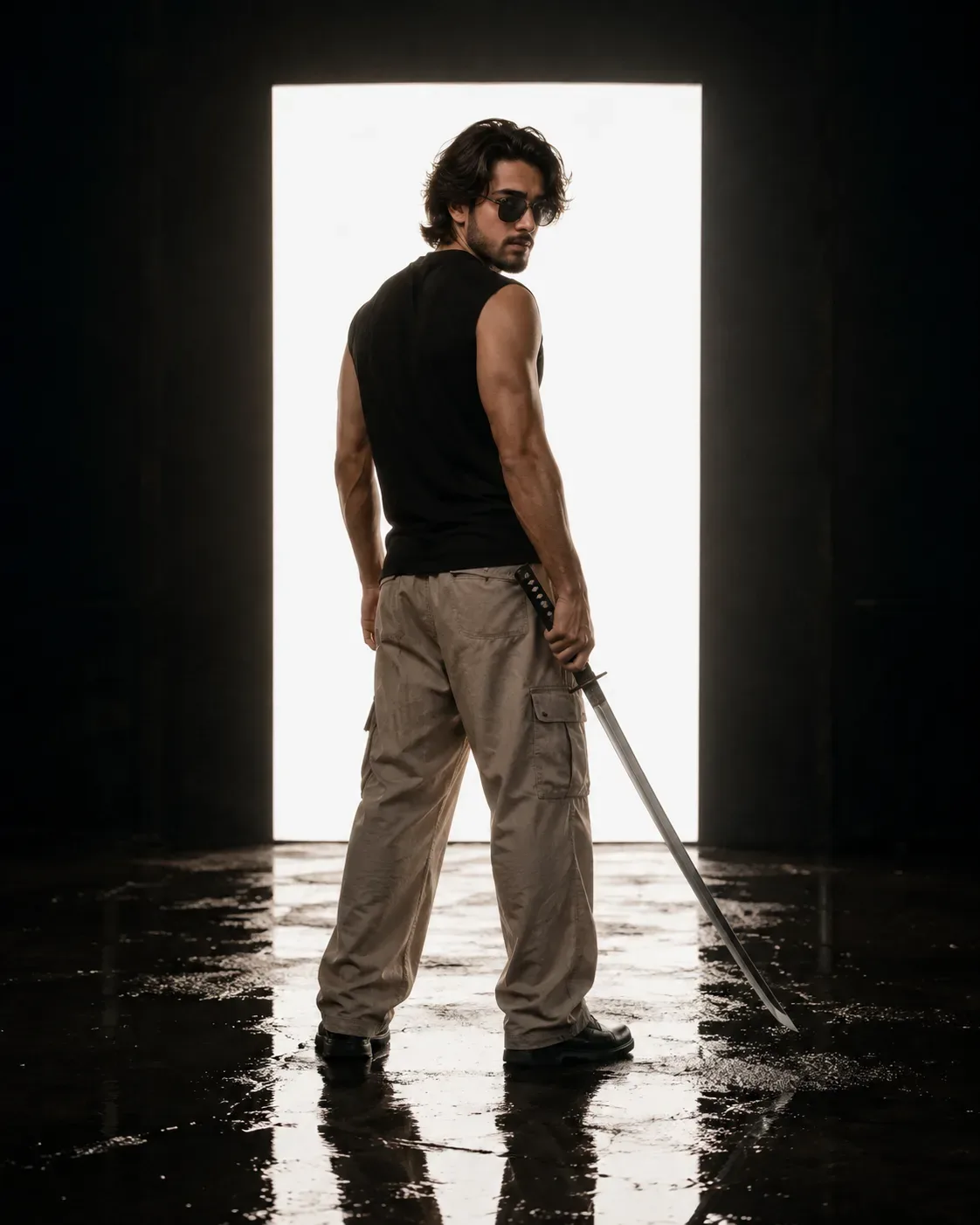
Create a highly cinematic, ultra-realistic **full-body fashion portrait of a handsome young adult man** standing in a dark minimalist studio, photographed from a slightly low rear three-quarter angle.

The man is positioned almost completely with his **back toward the camera**, while his head is turned over his shoulder to look back toward the viewer. He has thick, medium-length **dark brown/black wavy hair**, naturally voluminous and slightly messy, with layered strands sweeping backward. He has a well-groomed dark beard and mustache, strong masculine facial features, a defined jawline, and a calm, intense, mysterious expression.

He wears **dark rectangular sunglasses** with a subtle reflective surface.

His outfit consists of a simple **black sleeveless shirt or fitted sleeveless top**, exposing his muscular arms and shoulders, paired with loose-fitting **beige/khaki cargo-style trousers** with realistic fabric wrinkles and large relaxed folds. He wears simple dark footwear.

In his right hand, he holds a **long traditional-style sword**, with the blade extending diagonally downward toward the floor. The sword has a dark wrapped handle and metallic reflective blade. Keep the sword clearly visible as a visual fashion/character prop, without emphasizing combat action.

### Pose

He stands naturally with his feet apart and his body facing away from the camera. One arm hangs naturally beside his body while the other hand grips the sword handle near his hip. His shoulders and back create a strong masculine silhouette.

His head is turned back over his shoulder, allowing the viewer to see part of his profile and face. His gaze is directed toward the camera through the sunglasses, creating a **cool, intimidating, mysterious editorial mood**.

### Environment

Place him inside a **dark industrial studio or black cinematic room** with a completely black/charcoal surrounding environment.

Behind him is a huge perfectly rectangular **bright white illuminated light panel/window**, creating an intense high-contrast backlight. The glowing white rectangle forms a dramatic halo-like geometric frame around his upper body and sharply separates his silhouette from the dark surroundings.

The floor is **dark, glossy, and wet**, reflecting the bright rectangular light and portions of the man's legs and shoes. Subtle puddles and irregular wet patches create realistic reflections across the floor.

### Lighting

Use extremely dramatic **cinematic chiaroscuro lighting**.

The giant white rectangular light source behind the subject creates a strong glowing rim around his hair, shoulders, arms, and clothing. His front and side surfaces remain comparatively dark but retain detailed skin and fabric texture.

Add subtle warm highlights to his skin and hair while maintaining an overall dark, moody color palette. The wet floor catches fragmented reflections of the white light, producing a sophisticated cinematic atmosphere.

### Photography Style

Ultra-realistic professional fashion photography, cinematic character portrait, dark luxury editorial aesthetic, dramatic backlighting, high contrast, realistic skin texture, detailed individual hair strands, realistic fabric folds, physically accurate reflections, natural anatomy, subtle film grain, shallow atmospheric depth, high dynamic range, crisp subject separation, moody black-and-white-to-warm neutral tonal balance.

The image should feel like a **luxury menswear campaign mixed with a modern samurai-inspired cinematic character poster**, sophisticated and photorealistic rather than fantasy or cartoon.

**Camera:** full-body portrait, slightly low camera angle, 50mm cinematic lens, strong subject isolation.

**Composition:** centered subject, vertical framing, large glowing rectangular light source directly behind him, dark negative space surrounding the illuminated rectangle, wet reflective floor occupying the lower portion of the image.

**Aspect ratio:** **4:5 vertical**. Keep the reference image exactly the same

**Negative prompt:** cartoon, anime, CGI appearance, exaggerated muscles, distorted anatomy, extra limbs, malformed hands, duplicate sword, multiple people, colorful background, excessive saturation, blurry face, overexposed subject, text, logo, watermark, fantasy armor, cluttered environment.

Optical Identity & Likeness Preservation: Lock subject's authentic facial identity and natural posture while seamlessly integrating with sharp vehicle reflections and cinematic ambient lighting.Explore Related Collections
Explore Photography Prompts — Browse our curated collection of Photography prompts tailored for creators. View all Photography prompts →
Explore Ai Image Prompts — Discover more viral Ai Image ideas for your next AI generation. View all Ai Image prompts →
Explore Trending Prompts — Explore our extensive library of Trending templates ready to copy and paste. View all Trending prompts →
Frequently asked questions
- How do I use the Noir Swordsman In The Light AI Photo Prompt prompt?
- To use this prompt, simply click the "Copy Prompt" button above. Then, open Google Gemini, paste the copied text into the prompt box, and hit generate. You can instantly generate high-quality images without needing any reference photos.
- What is this prompt best used for?
- This specific prompt is highly optimized for creating engaging social media content and digital art. The formula is structured to produce high-contrast, visually appealing results that perform well on visual platforms.
- Can I customize the details of this prompt?
- Yes! While the core structure of the prompt is optimized for Google Gemini, you can easily customize the details. We recommend changing specific keywords like clothing colors, background locations, or the overall mood (e.g., changing "sunny" to "rainy" or "neon") to match your exact vision.