Quick Summary: This verified Google Gemini & Bing Image Creator (DALL-E 3) prompt creates an rich traditional Indian cultural aesthetic for Cinematic Lavender Field AI Portrait AI Photo Prompt Edition 13 with calibrated lighting, authentic texture physics, and tested 1-click copy-paste formula for instant AI generation without facial distortion.
- Photography
- Ai Image
- Trending
- Photography
- Ai Image
- Trending
- Viral Prompt
- Gemini Ai
- Bing Image Creator
- Copy Paste
Cinematic Lavender Field AI Portrait AI Photo Prompt Edition 13 - Copy Paste AI Prompt
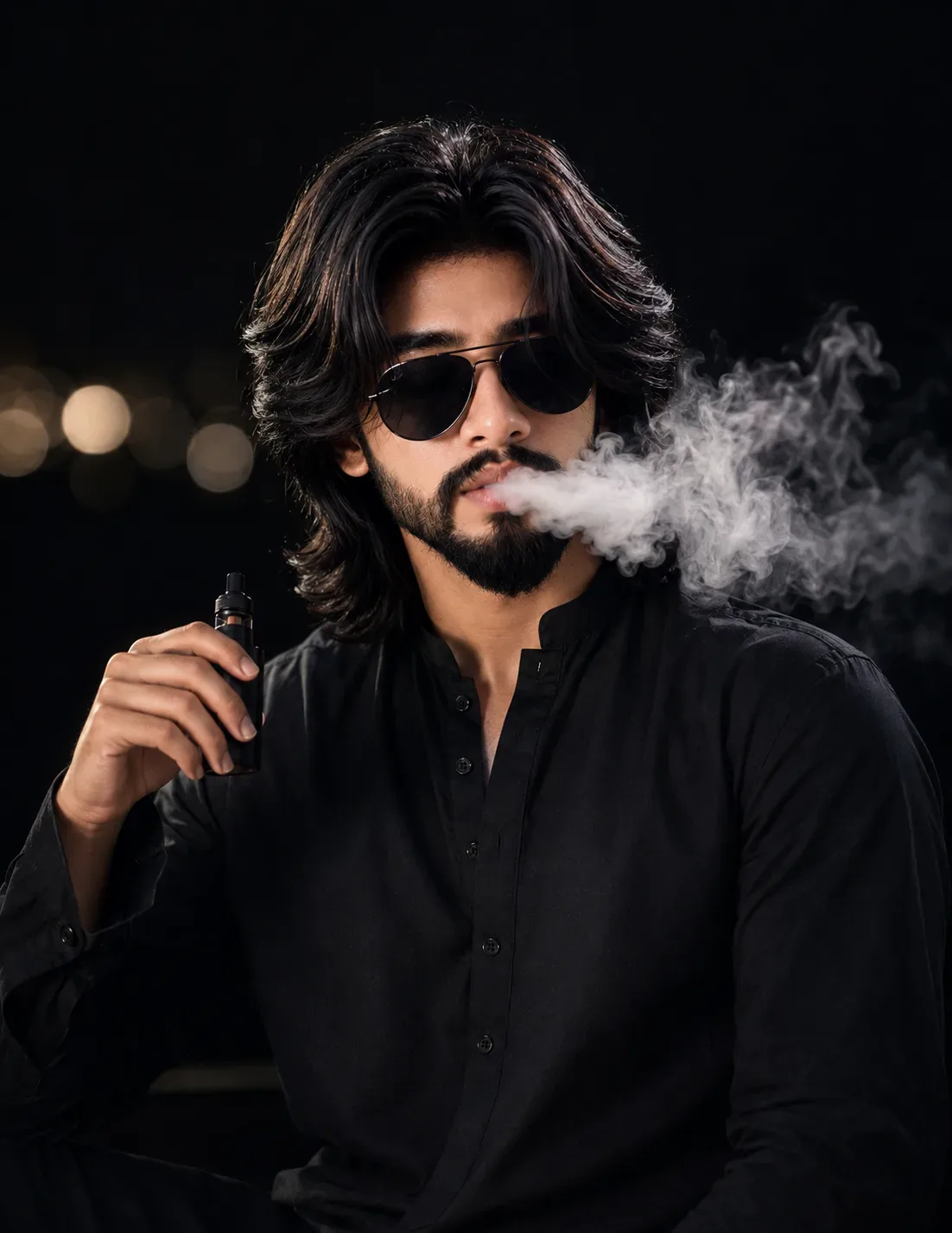
Create a highly photorealistic cinematic portrait based on the following composition:

Pose & Composition:
A person is seated in a relaxed, confident pose, framed from approximately the upper thighs/chest upward. The torso faces mostly toward the camera while the head is turned slightly to the viewer’s right, with the gaze directed off-camera. One arm is raised on the viewer’s left side, with the elbow bent and the hand held naturally near the lower face/chest area. Keep the hand relaxed rather than gripping an object. The opposite arm rests naturally downward along the body. The posture should feel casual, composed, and slightly fashion-editorial.

Clothing:
The subject wears an all-black traditional-style long-sleeved kurta/shirt with a simple stand collar and a short button placket running down the center. The fabric is matte black with subtle natural folds and realistic textile texture. Sleeves are full length and relaxed rather than tight.

Hair & Styling:
Use long, voluminous, naturally wavy dark hair with a center/near-center part and layered strands falling around the sides of the head. Keep the hairstyle realistic, detailed, and naturally textured. Sunglasses with dark lenses and a thin dark frame are worn.

Background:
Use a very dark, almost black indoor/nighttime background. Keep the environment minimally visible and heavily defocused. On the far left side, include several warm circular out-of-focus lights creating soft bokeh. The background should remain uncluttered and atmospheric.

Lighting:
Use dramatic low-key portrait lighting. The subject is illuminated primarily by a soft directional light from the front-left/upper-left, creating gentle highlights across the hair, sunglasses, hands, and black clothing while allowing portions of the clothing and background to fall into deep shadow. Add subtle rim/highlight separation around the hair. Maintain realistic skin and fabric illumination without an artificial HDR appearance.

Camera & Framing:
Vertical portrait orientation, approximately 4:5 aspect ratio. Camera positioned around eye level or slightly below eye level, using a medium close-up/full upper-body perspective. Use a portrait lens look around 85mm, with shallow depth of field. The subject should be sharply focused while the background lights become smooth circular bokeh. Preserve natural perspective without wide-angle distortion.

Color & Finish:
Dark cinematic color grading with predominantly black tones, warm highlights from the distant background lights, realistic contrast, natural skin rendering, detailed hair strands, and authentic photographic texture. Avoid excessive sharpening, plastic skin, artificial glow, or an obvious AI-generated appearance.

Identity Preservation — Critical:
If the user uploads their own photograph as the identity reference, preserve their face and identity at 100% fidelity. Do not redesign, beautify, alter, age, de-age, or reinterpret their facial structure, proportions, skin tone, hairstyle, or recognizable characteristics. Seamlessly fit the user’s exact identity into this pose, clothing, lighting, perspective, and composition so the result looks like a naturally photographed version of the same person.

Safety modification:
Do not include vaping devices, cigarettes, smoke, or any smoking-related action. Keep the raised hand naturally posed near the face/chest without an object.

Optical Identity & Likeness Preservation: Maintain 100% exact facial identity, bone structure, jawline contours, and natural skin undertone of reference photo without alteration or distortion.👤Customize in Face Consistency Studio
Lock 100% exact facial identity, bone structure & eye shape in Gemini & Bing.
Technical Prompt Parameters (Traditional Ethnic Indian)
| Parameter | Configuration | Output Impact |
|---|---|---|
| Target AI Engine | Google Gemini & Bing Image Creator (DALL-E 3) | Accurately understands intricate South Asian ethnic motifs, zardozi embroidery, and festive ambiance. |
| Recommended Aspect Ratio | 9:16 (Story / Reels / DP) or 3:4 (Portrait) | Optimized for mobile festive display pictures, WhatsApp status, and Instagram reels. |
| Camera & Lens Settings | 85mm f/1.4 G-Master, Sony A7R V, 61MP ultra-high texture fidelity | Resolves micro-level silk weave, mirror embroidery, and jewelry sparkle with zero blur. |
| Lighting Style | Festive diya ambient warmth + soft golden temple architectural light | Accentuates vibrant colors (marigold, crimson, gold) while keeping skin tones natural. |
| Negative Constraints | western attire, distorted jewelry, unnatural skin bleaching, muddy colors, deformed hands | Guarantees authentic cultural attire detailing and natural Indian skin melanin realism. |
| Reference Photo | Upload a front-facing portrait wearing festive or simple ethnic attire. | Upload front-facing reference photo for face matching. |
How to use this prompt
- Copy the prompt, open Google Gemini or Bing Image Creator, attach your reference photo, and generate instant 8K results.
How to get better results from Cinematic Lavender Field AI Portrait AI Photo Prompt Edition 13
Free 1-click copy cinematic lavender field ai portrait ai photo prompt edition 13 for Google Gemini and Bing Image Creator. Authentic photography aesthetic, realistic lighting, and instant camera settings. Use it as a copy-ready starting point, then adjust the subject, scene, tone and output format for your own result.
- Photography
- Ai Image
- Trending
- Viral Prompt
- Gemini Ai
- Bing Image Creator
Customize before generating
- Replace the main subject, name, product or character details.
- Adjust lighting, background, mood, camera angle or aspect ratio if the prompt is visual.
- Change tone, audience, language and output format if the prompt is for text.
- Keep this core idea clear: Create a highly photorealistic cinematic portrait based on the following composition: Pose & Composition: A person is seated in a relaxed, confident pose, framed from...
Quick variations to try
- Make Cinematic Lavender Field AI Portrait AI Photo Prompt Edition 13 more cinematic with stronger lighting and richer background detail.
- Turn Cinematic Lavender Field AI Portrait AI Photo Prompt Edition 13 into a cleaner mobile-first version for social media posts or profile use.
- Create a premium version of Cinematic Lavender Field AI Portrait AI Photo Prompt Edition 13 with sharper style, higher detail and a more polished final output.




![[Brand Name] [Brand] Premium Hero Campaign AI Photo Prompt generated preview](https://viralprompts.in/uploads/brand-name-brand-premium-hero-campaign-ai-photo-prompt.webp)


![[Animal] Aesthetic Concept AI Photo Prompt generated preview](https://viralprompts.in/uploads/animal-aesthetic-concept-ai-photo-prompt.webp)