Quick Summary: This verified Google Gemini & Midjourney v6 prompt creates an authentic 90s vintage film aesthetic for Brutalist Editorial Magazine Poster AI Photo Prompt Edition 35 with calibrated lighting, authentic texture physics, and tested 1-click copy-paste formula for instant AI generation without facial distortion.
- Photography
- Ai Image
- Trending
- Photography
- Ai Image
- Trending
- Viral Prompt
- Gemini Ai
- Bing Image Creator
- Copy Paste
Brutalist Editorial Magazine Poster AI Photo Prompt Edition 35 - Copy Paste AI Prompt
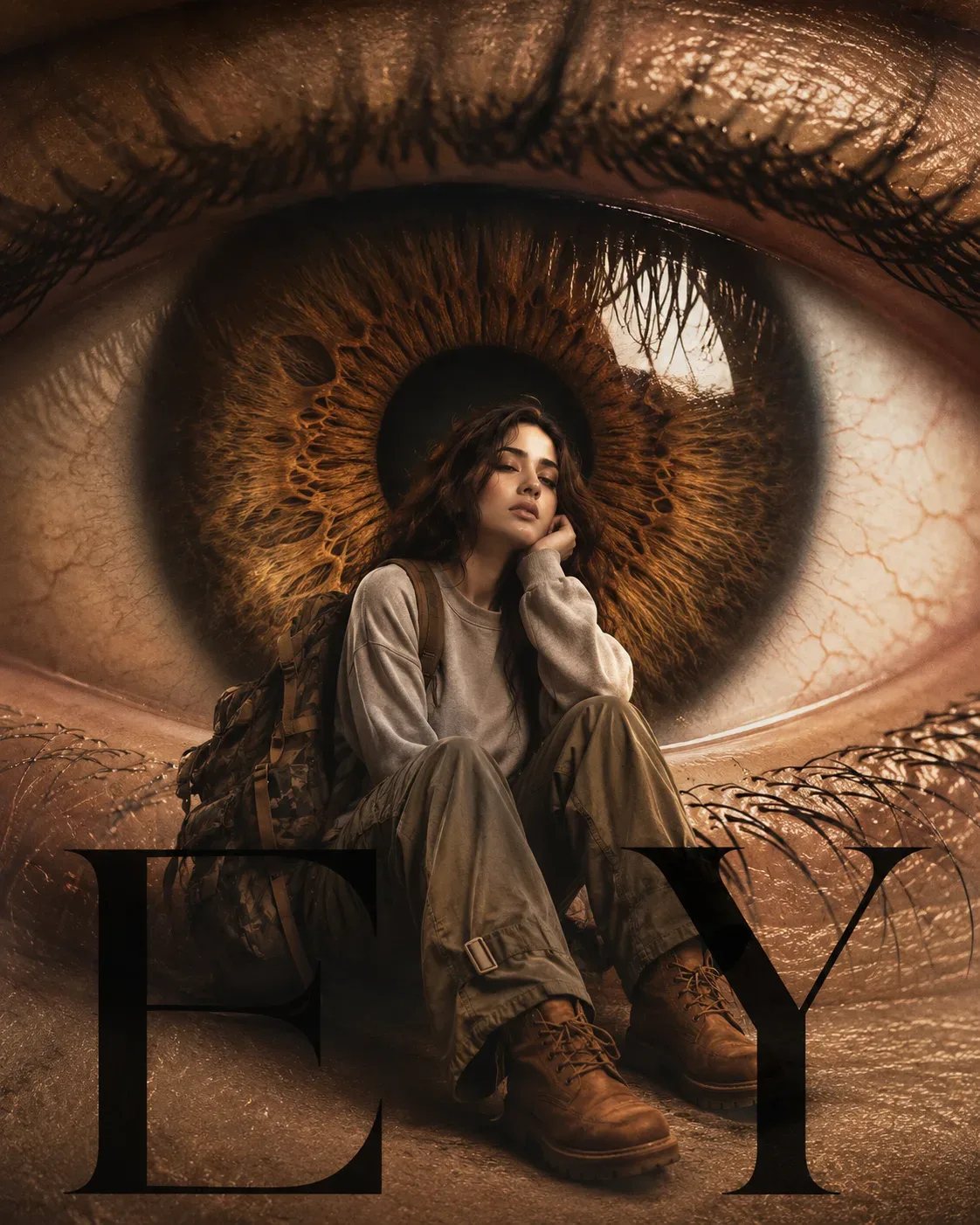
Create a surreal high-fashion editorial photograph in a vertical 4:5 composition, closely matching the reference image.

IMPORTANT IDENTITY INSTRUCTION:
Use the uploaded person as the ONLY identity reference for the human subject. Preserve the person's exact facial identity, facial proportions, face shape, eyes, eyebrows, nose, lips, jawline, cheekbones, skin tone, hairstyle, hair texture, hairline, and all distinctive facial characteristics. Do not replace the person with the reference model. The reference image is used ONLY for composition, visual concept, styling, color palette, lighting, typography, and surreal photographic treatment.

COMPOSITION:
Create a giant extreme close-up of a realistic human eye filling almost the entire background. The eye should dominate the frame from edge to edge, with the iris positioned centrally behind the subject. Show highly detailed brown/hazel iris fibers radiating naturally from the pupil, a deep almost-black circular pupil, realistic moisture, subtle reflections, detailed eyelashes, and natural skin texture around the eyelids.

Place the uploaded person as a smaller full-body fashion subject sitting directly in front of the giant iris, approximately centered in the lower-middle portion of the frame. The person sits in a relaxed, slightly introspective pose with one hand supporting the cheek/chin. Keep the body proportions realistic and natural.

FASHION STYLING:
Dress the person in an oversized light-gray sweatshirt or long-sleeve sweater paired with loose, baggy olive-gray cargo trousers. Add rugged tan/brown lace-up work boots with thick soles. Place a large dark camouflage backpack over the person's back and shoulders, with realistic fabric texture, straps, buckles, folds, and tan/brown leather-like trim.

The outfit should feel like contemporary streetwear mixed with outdoor fashion and minimalist editorial styling.

POSE:
The subject sits casually with knees bent and raised, body turned slightly sideways while looking toward the camera. One elbow rests near the knee and one hand supports the side of the face. The expression is calm, slightly melancholic, thoughtful, and emotionally detached.

SURREAL SCALE:
Make the giant eye dramatically oversized compared with the person. The person should appear miniature, almost as if sitting inside or directly in front of the enormous eye. The surreal contrast between the tiny fashion subject and gigantic realistic eye is the central visual concept.

TYPOGRAPHY:
At the bottom of the image, overlay enormous bold black serif typography reading:

"EY"

The letters should be partially behind/overlapping the subject's lower body and boots, creating a layered fashion-editorial poster effect. Use an elegant high-contrast fashion-magazine serif font, extremely large scale, black, crisp and slightly transparent where appropriate.

VISUAL DETAILS:
- hyper-realistic human eye
- extremely detailed iris fibers
- realistic eyelashes
- glossy wet eye highlights
- subtle skin pores and fine lines
- warm brown, beige, cream, and muted olive color palette
- soft vintage photographic tonality
- subtle film grain
- slightly faded analog texture
- warm editorial color grading
- realistic shadows beneath the seated subject
- natural contact between boots, clothing, backpack, and ground
- sophisticated fashion photography
- surreal conceptual advertising aesthetic
- premium magazine campaign quality
- slightly dreamy but photorealistic atmosphere

BACKGROUND:
The entire background should effectively be the enlarged human eye. Preserve the natural warm skin surrounding the eye and dense eyelashes around the upper and lower eyelids. Add subtle organic skin creases and fine reddish-brown veins for realism. The iris should remain the strongest visual element behind the subject.

LIGHTING:
Use soft diffused studio lighting with warm highlights. Illuminate the subject naturally while maintaining enough contrast to separate the person from the enormous eye. Add realistic highlights to the hair, boots, backpack, and clothing. Avoid harsh artificial lighting.

CAMERA:
High-end editorial photography, realistic DSLR/mirrorless image quality, shallow-to-moderate depth of field, extremely sharp subject and iris details, natural perspective, subtle lens softness, professional fashion campaign composition.

COLOR PALETTE:
Warm brown, hazel, beige, cream, muted gray, olive green, dark brown, and black. Keep colors sophisticated and slightly desaturated with a vintage editorial finish.

FINAL RESULT:
A surreal luxury fashion poster combining an enormous photorealistic human eye with a miniature seated fashion model. The image should look like an authentic high-end conceptual fashion advertisement photographed in-camera, not an illustration or CGI composition.

Negative prompt:
cartoon, anime, illustration, painting, 3D render, CGI, artificial eye, unrealistic iris, distorted face, altered identity, different person, deformed anatomy, extra fingers, extra limbs, malformed hands, duplicate subject, plastic skin, oversaturated colors, excessive makeup, blurry face, low resolution, unrealistic backpack, floating objects, bad typography, misspelled text, warped letters, excessive visual clutter.

Aspect ratio: 4:5
Style: photorealistic surreal fashion editorial
Quality: ultra-detailed, cinematic, premium magazine photography

Optical Identity & Likeness Preservation: Lock subject's authentic facial identity and natural posture while seamlessly integrating with sharp vehicle reflections and cinematic ambient lighting.👤Customize in Face Consistency Studio
Lock 100% exact facial identity, bone structure & eye shape in Gemini & Bing.
Technical Prompt Parameters (Vintage Film & Retro Polaroid)
| Parameter | Configuration | Output Impact |
|---|---|---|
| Target AI Engine | Google Gemini & Midjourney v6 | Preserves organic analog warmth, natural color saturation, and retro lighting response. |
| Recommended Aspect Ratio | 4:5 (Classic Film) or 1:1 (Square Polaroid) | Faithful recreation of vintage paper print dimensions and nostalgic photo albums. |
| Camera & Lens Settings | 35mm Leica M6, Kodak Portra 400, f/2.8, subtle chromatic dispersion | Renders genuine analog grain, gentle halation, and authentic film stock color science. |
| Lighting Style | Direct camera flash with soft falloff or warm golden hour sunset flare | Creates natural retro exposure highlights without artificial digital gloss. |
| Negative Constraints | digital sheen, oversaturated HDR, plastic skin, neon light, CGI 3D, modern watermark | Eliminates hyper-digital smoothness to maintain true photochemical aesthetic. |
| Reference Photo | Upload a daylight selfie; avoid heavy ring-light filters for best film look. | Upload front-facing reference photo for face matching. |
How to use this prompt
- Copy the prompt, open Google Gemini or Bing Image Creator, attach your reference photo, and generate instant 8K results.
How to get better results from Brutalist Editorial Magazine Poster AI Photo Prompt Edition 35
Free 1-click copy brutalist editorial magazine poster ai photo prompt edition 35 for Google Gemini and Bing Image Creator. Authentic photography aesthetic, realistic lighting, and instant camera settings. Use it as a copy-ready starting point, then adjust the subject, scene, tone and output format for your own result.
- Photography
- Ai Image
- Trending
- Viral Prompt
- Gemini Ai
- Bing Image Creator
Customize before generating
- Replace the main subject, name, product or character details.
- Adjust lighting, background, mood, camera angle or aspect ratio if the prompt is visual.
- Change tone, audience, language and output format if the prompt is for text.
- Keep this core idea clear: Create a surreal high-fashion editorial photograph in a vertical 4:5 composition, closely matching the reference image. IMPORTANT IDENTITY INSTRUCTION: Use the...
Quick variations to try
- Make Brutalist Editorial Magazine Poster AI Photo Prompt Edition 35 more cinematic with stronger lighting and richer background detail.
- Turn Brutalist Editorial Magazine Poster AI Photo Prompt Edition 35 into a cleaner mobile-first version for social media posts or profile use.
- Create a premium version of Brutalist Editorial Magazine Poster AI Photo Prompt Edition 35 with sharper style, higher detail and a more polished final output.