Quick Summary: This verified Midjourney v6.1 & Google Gemini Pro prompt creates an high-end Vogue editorial photoshoot aesthetic for Brown Overshirt & Cream Trousers Creative Editorial Portrait AI Photo Prompt with calibrated lighting, authentic texture physics, and tested 1-click copy-paste formula for instant AI generation without facial distortion.
- Wallpapers
- Ai Image
- Trending
- Wallpapers
- Ai Image
- Trending
- Viral Prompt
- Gemini Ai
- Bing Image Creator
- Copy Paste
Brown Overshirt & Cream Trousers Creative Editorial Portrait AI Photo Prompt - Copy Paste AI Prompt
Use my uploaded face photo as the STRICT IDENTITY REFERENCE for the person.

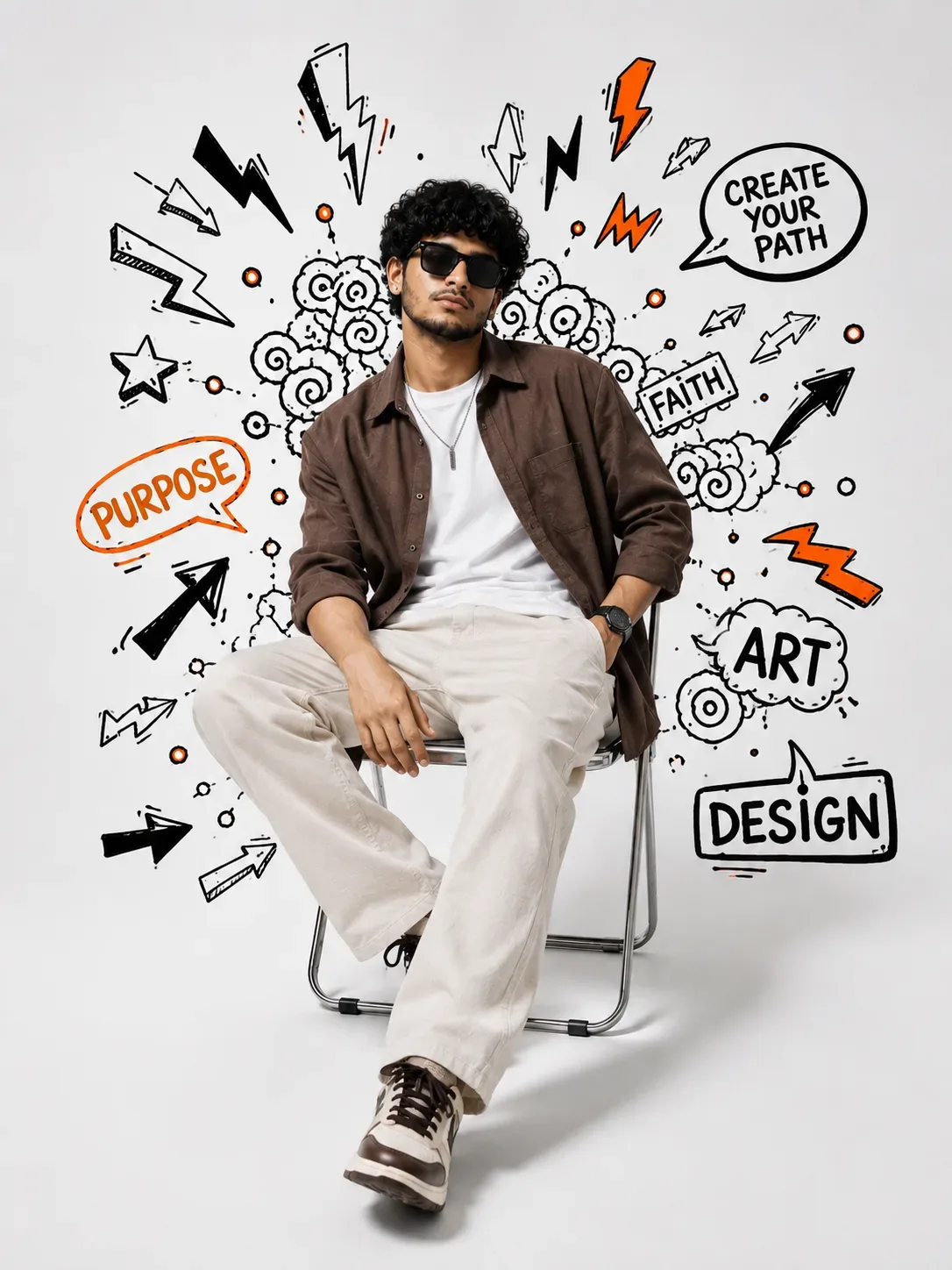
Create a highly realistic, professional fashion-editorial portrait matching the reference image’s composition, pose, studio setup, doodle artwork, lighting, and overall aesthetic.

STRICT IDENTITY LOCK

- Use the uploaded face photo to recreate the exact same person.
- Preserve the exact facial structure, forehead, eyebrows, eyes, nose, lips, cheeks, jawline, chin, skin tone, hairstyle, and natural facial proportions.
- Do NOT create a different person.
- Do NOT beautify, reshape, slim, widen, or alter the face.
- Keep the person's natural facial identity clearly recognizable.
- Sunglasses must not change the underlying facial identity.

POSE & COMPOSITION

- Person sitting casually on a simple modern chrome/metal-frame chair.
- Relaxed, confident fashion-editorial posture.
- One leg crossed naturally over the other, with the front shoe slightly closer to the camera.
- One hand resting naturally on the thigh.
- Other hand casually placed near/in the trouser pocket.
- Slightly relaxed lean.
- Full-body vertical portrait.
- Person centered in the frame.
- Generous clean space around the subject.

OUTFIT

Create a completely new outfit:

- Dark chocolate-brown relaxed-fit overshirt, worn open.
- Plain white crew-neck T-shirt underneath.
- Cream/off-white relaxed-fit trousers.
- Clean chunky sneakers in white, cream, and subtle brown.
- Minimal silver pendant/chain.
- Simple wristwatch.
- Stylish dark sunglasses.
- Modern premium casual streetwear aesthetic.

BACKGROUND & DOODLE ART

Use a clean bright white studio background surrounded by hand-drawn black-and-orange doodle artwork.

Include:

- Lightning bolts
- Arrows
- Spirals
- Stars
- Abstract symbols
- Hand-drawn circles and lines
- Speech bubbles
- Creative graphic elements

Include handwritten-style typography such as:
“CREATE YOUR PATH”
“PURPOSE”
“FAITH”
“ART”
“DESIGN”

Add orange accents selectively while keeping most doodles black and white.

LIGHTING & COLOR

- Bright clean studio lighting.
- Mostly white, black, orange, brown, and cream color palette.
- Soft realistic shadows beneath the chair and shoes.
- Natural skin tones.
- Premium fashion-editorial color grading.
- Clean high-end studio photography.

PHOTOREALISM

- Ultra-realistic human appearance.
- Natural skin texture.
- Realistic hair strands.
- Accurate hands and fingers.
- Correct anatomy and body proportions.
- Realistic clothing folds and fabric texture.
- Realistic sneakers, chair, and shadows.
- Sharp subject with subtle depth of field.
- No cartoon appearance.
- No artificial AI look.

IMPORTANT

The uploaded face photo controls ONLY the person's identity.

Keep the person's identity completely faithful to the uploaded face reference while recreating the brown overshirt, white T-shirt, cream trousers, sneakers, chair, pose, doodle graphics, typography, lighting, and studio composition.

The final image should look like an authentic professional fashion/editorial photograph, not an illustration.

Optical Identity & Likeness Preservation: Lock subject's authentic facial identity and natural posture while seamlessly integrating with sharp vehicle reflections and cinematic ambient lighting.Lock 100% exact facial identity, bone structure & eye shape in Gemini & Bing.
Technical Prompt Parameters (High-Fashion & Editorial Studio)
| Parameter | Configuration | Output Impact |
|---|---|---|
| Target AI Engine | Midjourney v6.1 & Google Gemini Pro | Tailored for high-end luxury editorial aesthetics, studio lighting ratios, and runway poses. |
| Recommended Aspect Ratio | 3:4 or 4:5 (Vogue & Instagram Portrait) | Matches professional fashion magazine crop standards and mobile feed aspect ratios. |
| Camera & Lens Settings | Hasselblad H6D-100c, 100mm f/2.2 medium format portrait lens | Produces ultra-clean skin pore texture, precise fabric weave detail, and three-dimensional falloff. |
| Lighting Style | Large parabolic softbox key light + silver reflector accent fill | Flattering, even illumination that highlights makeup, bone structure, and jewelry without harsh glare. |
| Negative Constraints | airbrushed wax skin, asymmetrical makeup, doll plastic appearance, deformed fingers, low resolution | Retains realistic human skin micro-texture without aggressive synthetic AI smoothing. |
| Reference Photo | Upload a clean studio headshot or selfie with neutral expression and hair pulled back. | Upload front-facing reference photo for face matching. |
How to use this prompt
- Copy the prompt, open Google Gemini or Bing Image Creator, attach your reference photo, and generate instant 8K results.
How to get better results from Brown Overshirt & Cream Trousers Creative Editorial Portrait AI Photo Prompt
Free 1-click copy brown overshirt & cream trousers creative editorial portrait ai photo prompt for Google Gemini and Bing Image Creator. Authentic wallpapers aesthetic, realistic lighting, and instant camera settings. Use it as a copy-ready starting point, then adjust the subject, scene, tone and output format for your own result.
- Wallpapers
- Ai Image
- Trending
- Viral Prompt
- Gemini Ai
- Bing Image Creator
Customize before generating
- Replace the main subject, name, product or character details.
- Adjust lighting, background, mood, camera angle or aspect ratio if the prompt is visual.
- Change tone, audience, language and output format if the prompt is for text.
- Keep this core idea clear: Use my uploaded face photo as the STRICT IDENTITY REFERENCE for the person. Create a highly realistic, professional fashion-editorial portrait matching the reference...
Quick variations to try
- Make Brown Overshirt & Cream Trousers Creative Editorial Portrait AI Photo Prompt more cinematic with stronger lighting and richer background detail.
- Turn Brown Overshirt & Cream Trousers Creative Editorial Portrait AI Photo Prompt into a cleaner mobile-first version for social media posts or profile use.
- Create a premium version of Brown Overshirt & Cream Trousers Creative Editorial Portrait AI Photo Prompt with sharper style, higher detail and a more polished final output.