Quick Summary: This verified Google Gemini & Midjourney v6 prompt creates an authentic 90s vintage film aesthetic for Beneath The Storm AI Photo Prompt with calibrated lighting, authentic texture physics, and tested 1-click copy-paste formula for instant AI generation without facial distortion.
- Photography
- Ai Image
- Trending
- Photography
- Ai Image
- Trending
- Viral Prompt
- Gemini Ai
- Bing Image Creator
- Copy Paste
About This Prompt
This prompt creates an Beneath The Storm AI Photo Prompt — a high-quality, photorealistic image with balanced lighting, sharp focus, and intricate details suitable for social media sharing and digital content creation.
We recommend generating this using Google Gemini. Simply copy the prompt text below and paste it into the generator. You can easily customize specific keywords like colors, backgrounds, or subjects to make the final output uniquely yours.
Beneath The Storm AI Photo Prompt - Copy Paste AI Prompt
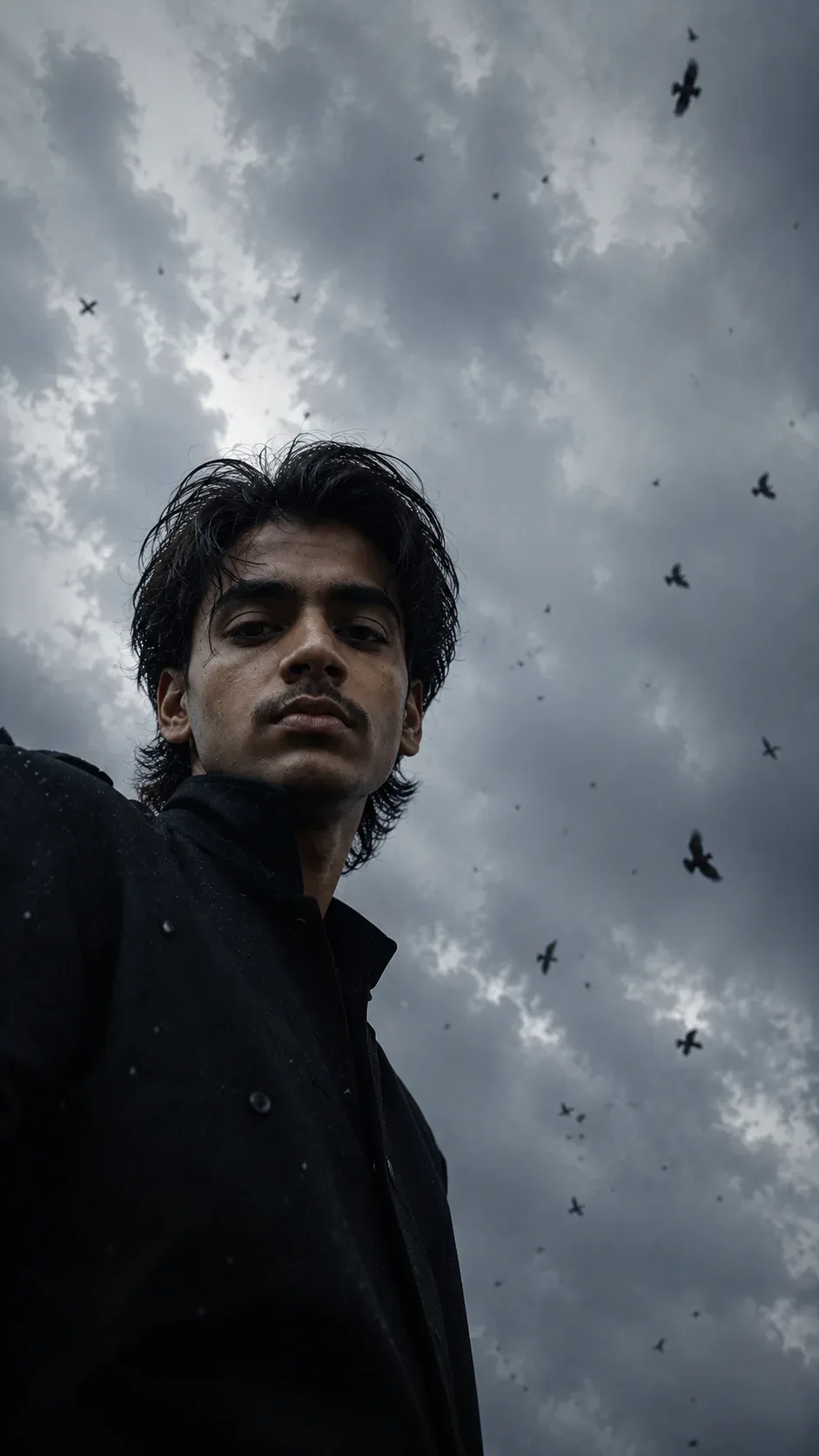
Ultra-realistic cinematic photograph of a young man leaning over and looking downward directly toward a camera positioned extremely low on the ground, shot from a dramatic worm's-eye perspective. The camera is lying almost flat on its back, pointed almost vertically upward toward an expansive cloudy sky. The young man occupies the upper-left and left side of the vertical frame, with his head and face extending toward the center of the image. His body is partially cropped by the left and bottom edges of the frame.

He has medium-length, thick, naturally curly and slightly wet dark brown hair, with individual curls falling loosely across his forehead and around his face. His expression is quiet, serious, introspective and slightly melancholic, with relaxed lips and a soft downward gaze directly toward the lens. Pale natural skin with realistic texture, subtle facial shadows, highly detailed eyes, natural imperfections.

He is wearing a loose, oversized matte-black jacket or coat with a high dark collar, occupying much of the lower-left portion of the composition. The garment has subtle wet speckles and tiny droplets visible on the fabric.

Above him is a huge open gray-blue overcast sky filling almost the entire frame, covered with layered soft white and gray clouds, atmospheric cloud texture, patches of pale blue-gray sky, diffuse daylight with no direct sunlight. Numerous dark birds are flying overhead at different distances and sizes, scattered naturally throughout the sky, including several birds in the foreground and many tiny distant silhouettes. Small dark airborne particles, feathers, droplets or debris are suspended throughout the air, creating a surreal cinematic atmosphere.

Extreme low-angle ground-level camera perspective, wide-angle lens approximately 24–28mm, camera very close to the ground and pointing almost vertically upward. Strong perspective distortion, making the sky feel enormous and the person appear to lean dramatically into the frame. The face is relatively close to the lens while the body recedes out of frame. Natural realistic proportions, no exaggerated facial features.

Moody muted blue-gray color palette, desaturated cinematic tones, soft contrast, slightly underexposed exposure, cool overcast daylight, subtle atmospheric haze, realistic shadow detail, soft highlights, deep blacks in the clothing. Photographic film aesthetic, subtle fine film grain, slight lens imperfections, realistic motion blur on some distant birds, shallow-to-moderate depth of field with the subject's face and hair sharply detailed while distant sky and birds gradually soften.

Authentic cinematic photography, natural skin tones, physically accurate lighting, highly detailed individual hair strands, realistic cloud texture, photorealistic, editorial film still, melancholic dreamlike atmosphere, raw candid feeling.

Vertical portrait composition, 9:16 aspect ratio, subject positioned asymmetrically toward the left, approximately 70–75% of the frame consisting of sky, large negative space, birds distributed naturally throughout the upper and lower sky, cinematic visual balance, spontaneous candid feeling, no visible horizon, no buildings, no trees, no other people.

NEGATIVE PROMPT:
cartoon, anime, illustration, CGI, 3D render, artificial face, plastic skin, beauty retouching, perfect hair, straight hair, smiling, exaggerated expression, looking away, looking upward, centered composition, normal eye-level camera, ordinary low-angle camera, visible ground, buildings, trees, landscape, sunset, golden light, bright sunlight, warm colors, oversaturated colors, clean studio lighting, studio portrait, excessive bokeh, distorted anatomy, extra limbs, malformed hands, duplicated birds, giant birds, excessive birds covering the face, text, watermark, logo

Optical Identity & Likeness Preservation: Lock subject's authentic facial identity and natural posture while seamlessly integrating with sharp vehicle reflections and cinematic ambient lighting.What You'll Get
- 🎨 Style: Photography
- ✨ Mood: Photography
- 📱 Best For: Ai Image
- 🤖 Works With: Google Gemini
- 🔥 Popularity: Copied 120 times
- 📅 Added: Sep 14, 2026
Explore Related Collections
Explore Photography Prompts — Browse our curated collection of Photography prompts tailored for creators. View all Photography prompts →
Explore Ai Image Prompts — Discover more viral Ai Image ideas for your next AI generation. View all Ai Image prompts →
Explore Trending Prompts — Explore our extensive library of Trending templates ready to copy and paste. View all Trending prompts →
Frequently asked questions
- How do I use the Beneath The Storm AI Photo Prompt prompt?
- To use this prompt, simply click the "Copy Prompt" button above. Then, open Google Gemini, paste the copied text into the prompt box, and hit generate. You can instantly generate high-quality images without needing any reference photos.
- What is this prompt best used for?
- This specific prompt is highly optimized for creating engaging social media content and digital art. The formula is structured to produce high-contrast, visually appealing results that perform well on visual platforms.
- Can I customize the details of this prompt?
- Yes! While the core structure of the prompt is optimized for Google Gemini, you can easily customize the details. We recommend changing specific keywords like clothing colors, background locations, or the overall mood (e.g., changing "sunny" to "rainy" or "neon") to match your exact vision.