Quick Summary: This verified Google Gemini & Midjourney v6 prompt creates an authentic 90s vintage film aesthetic for Basketball Court Fall Portrait AI Photo Prompt with calibrated lighting, authentic texture physics, and tested 1-click copy-paste formula for instant AI generation without facial distortion.
- Photography
- Ai Image
- Trending
- Photography
- Ai Image
- Trending
- Viral Prompt
- Gemini Ai
- Bing Image Creator
- Copy Paste
About This Prompt
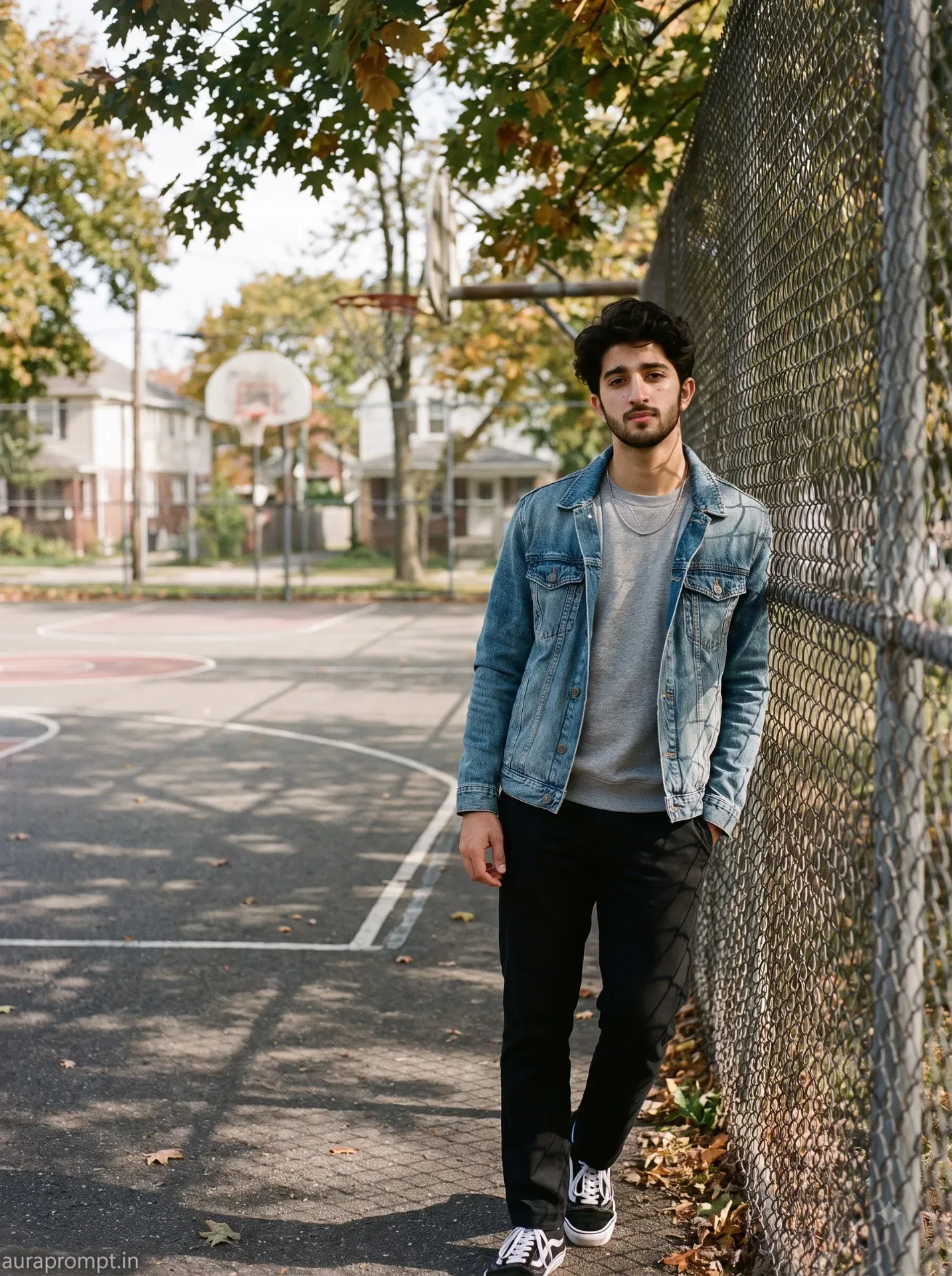
This prompt creates an Basketball Court Fall Portrait AI Photo Prompt — a high-quality, photorealistic image with balanced lighting, sharp focus, and intricate details suitable for social media sharing and digital content creation.
Optimized specifically for Google Gemini. Simply copy the prompt text below and paste it into the generator. You can easily customize specific keywords like colors, backgrounds, or subjects to make the final output uniquely yours.
Basketball Court Fall Portrait AI Photo Prompt - Copy Paste AI Prompt
Use the uploaded reference image as the strict facial identity reference and keep his identity completely unchanged. Preserve the exact facial structure, natural skin tone, eye shape, nose, lips, jawline, hair and all distinctive facial characteristics. No facial beautification, no reshaping, no smoothing and no identity drift. Create an ultra realistic natural street photograph of the same boy beside an outdoor American neighborhood basketball court during early autumn. He is wearing a washed blue denim jacket over a soft heather gray crewneck sweatshirt, straight black trousers and classic black and white sneakers with a minimal thin chain necklace. He leans naturally against a chain link fence with his shoulders relaxed, arms loosely folded and one knee slightly bent while keeping his body comfortable and believable. His face turns toward the camera and his eyes look directly into the lens. Expression is neutral with a subtle confident expression. Show realistic skin texture with visible pores, slight natural imperfections, fine facial hairs and accurate complexion. The environment contains a textured asphalt basketball court, faded painted court lines, metal chain link fence, concrete curb, weathered basketball hoop structure and mature maple and oak trees with early fall leaves. Include realistic residential buildings in the distant background. Materials remain physically accurate with visible asphalt grain, chipped paint, metal texture, denim fibers, sweatshirt fabric and dry leaf detail. Lighting is soft directional afternoon daylight filtered through nearby trees, creating patchy but believable illumination across the subject with subtle leaf shadow patterns on the jacket and pavement. Camera feel resembles a natural DSLR documentary photograph using a 50mm lens, realistic perspective, moderate depth and controlled background separation while keeping the basketball court recognizable. RAW image character, realistic dynamic range, subtle grain, natural contrast, muted autumn color grading and authentic social media photography. Maintain realistic subject background interaction, contact shadows and atmospheric perspective. Vertical 3:4 composition, sharp face and clothing texture, realistic human anatomy, no artificial skin, no cinematic fantasy effect, no text, no unwanted watermark. Add a subtle bottom left corner watermark reading “auraprompt.in” in Petit Formal Script, elegant and small, without interfering with the subject.

Optical Identity & Likeness Preservation: Maintain 100% exact facial identity, bone structure, jawline contours, and natural skin undertone of reference photo without alteration or distortion.What You'll Get
- 🎨 Style: Photography
- ✨ Mood: Photography
- 📱 Best For: Ai Image
- 🤖 Works With: Google Gemini
- 🔥 Popularity: Copied 48 times
- 📅 Added: Sep 14, 2026
Explore Related Collections
Explore Photography Prompts — Browse our curated collection of Photography prompts tailored for creators. View all Photography prompts →
Explore Ai Image Prompts — Discover more viral Ai Image ideas for your next AI generation. View all Ai Image prompts →
Explore Trending Prompts — Explore our extensive library of Trending templates ready to copy and paste. View all Trending prompts →
Frequently asked questions
- How do I use the Basketball Court Fall Portrait AI Photo Prompt prompt?
- To use this prompt, simply click the "Copy Prompt" button above. Then, open Google Gemini, paste the copied text into the prompt box, and hit generate. You can instantly generate high-quality images without needing any reference photos.
- What is this prompt best used for?
- This specific prompt is highly optimized for creating engaging social media content and digital art. The formula is structured to produce high-contrast, visually appealing results that perform well on visual platforms.
- Can I customize the details of this prompt?
- Yes! While the core structure of the prompt is optimized for Google Gemini, you can easily customize the details. We recommend changing specific keywords like clothing colors, background locations, or the overall mood (e.g., changing "sunny" to "rainy" or "neon") to match your exact vision.