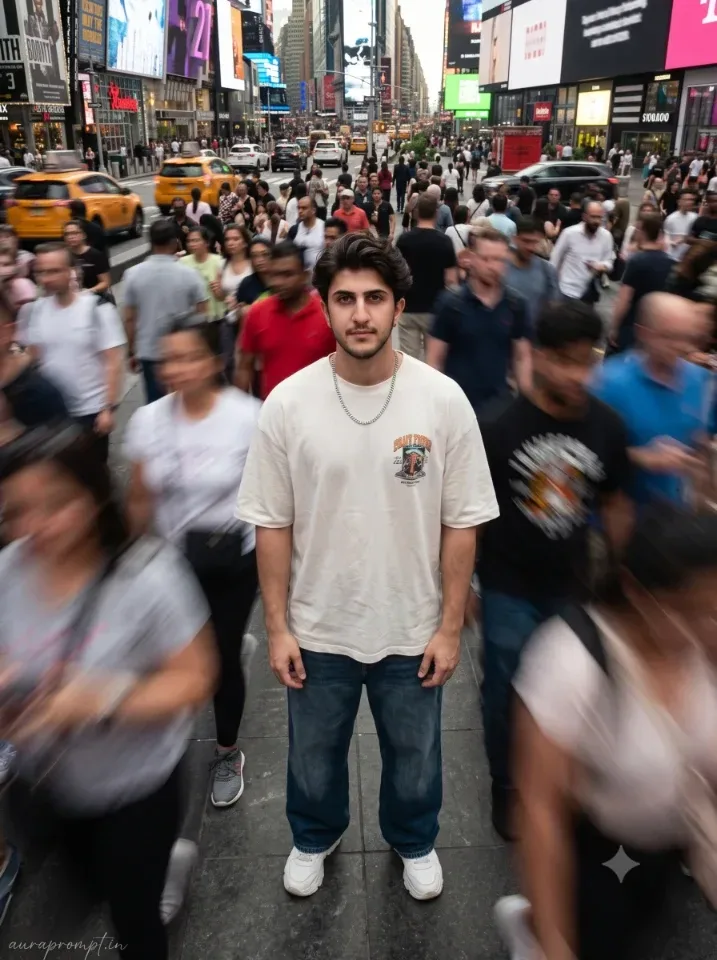
Quick Summary: This verified Google Gemini & Midjourney v6 prompt creates an authentic 90s vintage film aesthetic for Times Square Motion Crowd AI Photo Prompt with calibrated lighting, authentic texture physics, and tested 1-click copy-paste formula for instant AI generation without facial distortion.
- Photography
- Ai Image
- Trending
- Photography
- Ai Image
- Trending
- Viral Prompt
- Gemini Ai
- Bing Image Creator
- Copy Paste
About This Prompt
This prompt creates an Times Square Motion Crowd AI Photo Prompt — a high-quality, photorealistic image with balanced lighting, sharp focus, and intricate details suitable for social media sharing and digital content creation.
This prompt works best with Google Gemini. Simply copy the prompt text below and paste it into the generator. You can easily customize specific keywords like colors, backgrounds, or subjects to make the final output uniquely yours.
Times Square Motion Crowd AI Photo Prompt - Copy Paste AI Prompt
Generate a hyper-realistic editorial street portrait of a young Indian man in his early twenties with naturally open pores, slight pigmentation variation, visible micro skin texture, and no artificial smoothing applied anywhere on the face or hands, every facial detail locked to the reference with same features, same texture, same skin, same beard style, same natural expression as the original photo, standing and looking directly into the camera from within a densely packed moving urban crowd at a major city intersection environment inspired by the high-energy visual language of Times Square in New York, the surrounding crowd captured in heavy motion blur at 1/30 second shutter speed creating streaks of movement and color in every direction around him while the subject himself remains completely still and razor sharp against the motion, the camera is positioned at approximately a 60 degree elevated angle looking down toward him creating an immersive overhead perspective that emphasizes his stillness within the moving chaos, he is wearing a baggy oversized off-white graphic tee with natural wrinkles and fabric weight, relaxed wide-leg dark denim with a clean break at the ankle, and chunky white sneakers, a thick silver chain rests naturally against his chest with accurate light reflection, captured on a Nikon Z8 at 35mm focal length with ISO 640 and 1/30 second shutter at f/2.8, natural daylight falling from above with authentic city ambient fill, color grade is muted and filmic with slightly desaturated neutral tones and warm skin preservation, warm daylight and soft shadow color grading, ultra-realistic natural skin texture, photorealistic RAW DSLR quality, 8K resolution, vertical 3:4 aspect ratio, premium magazine aesthetic from head to toe, platform-safe and elegant, natural skin finish, cinematic light wrapping the entire frame beautifully, add “auraprompt.in” as a small watermark at the bottom-left corner, Petit Formal Script font, thin elegant cursive strokes, soft white color rgba(FFFFFF), 1px letter-spacing, subtle premium handwritten signature style, slight transparency, minimal and refined, no background on text, blends naturally into the image.

Optical Identity & Likeness Preservation: Maintain 100% exact facial identity, bone structure, jawline contours, and natural skin undertone of reference photo without alteration or distortion.What You'll Get
- 🎨 Style: Photography
- ✨ Mood: Photography
- 📱 Best For: Ai Image
- 🤖 Works With: Google Gemini
- 🔥 Popularity: Copied 25 times
- 📅 Added: Sep 14, 2026
Explore Related Collections
Explore Photography Prompts — Browse our curated collection of Photography prompts tailored for creators. View all Photography prompts →
Explore Ai Image Prompts — Discover more viral Ai Image ideas for your next AI generation. View all Ai Image prompts →
Explore Trending Prompts — Explore our extensive library of Trending templates ready to copy and paste. View all Trending prompts →
Frequently asked questions
- How do I use the Times Square Motion Crowd AI Photo Prompt prompt?
- To use this prompt, simply click the "Copy Prompt" button above. Then, open Google Gemini, paste the copied text into the prompt box, and hit generate. You can instantly generate high-quality images without needing any reference photos.
- What is this prompt best used for?
- This specific prompt is highly optimized for creating engaging social media content and digital art. The formula is structured to produce high-contrast, visually appealing results that perform well on visual platforms.
- Can I customize the details of this prompt?
- Yes! While the core structure of the prompt is optimized for Google Gemini, you can easily customize the details. We recommend changing specific keywords like clothing colors, background locations, or the overall mood (e.g., changing "sunny" to "rainy" or "neon") to match your exact vision.