Quick Summary: This verified Google Gemini & Midjourney v6 prompt creates an authentic 90s vintage film aesthetic for Monochrome Streetframe Premium Urban Editorial Portrait AI Photo Prompt with calibrated lighting, authentic texture physics, and tested 1-click copy-paste formula for instant AI generation without facial distortion.
- Photography
- Ai Image
- Trending
- Photography
- Ai Image
- Trending
- Viral Prompt
- Gemini Ai
- Bing Image Creator
- Copy Paste
About This Prompt
Use this prompt to generate a Monochrome Streetframe Premium Urban Editorial Portrait AI Photo Prompt — a high-quality, photorealistic image with balanced lighting, sharp focus, and intricate details suitable for social media sharing and digital content creation.
Optimized specifically for Google Gemini. Simply copy the prompt text below and paste it into the generator. You can easily customize specific keywords like colors, backgrounds, or subjects to make the final output uniquely yours.
What You'll Get
- 🎨 Style: Photography
- ✨ Mood: Photography
- 📱 Best For: Ai Image
- 🤖 Works With: Google Gemini
- 🔥 Popularity: Copied 248 times
- 📅 Added: Sep 14, 2026
Monochrome Streetframe Premium Urban Editorial Portrait AI Photo Prompt - Copy Paste AI Prompt
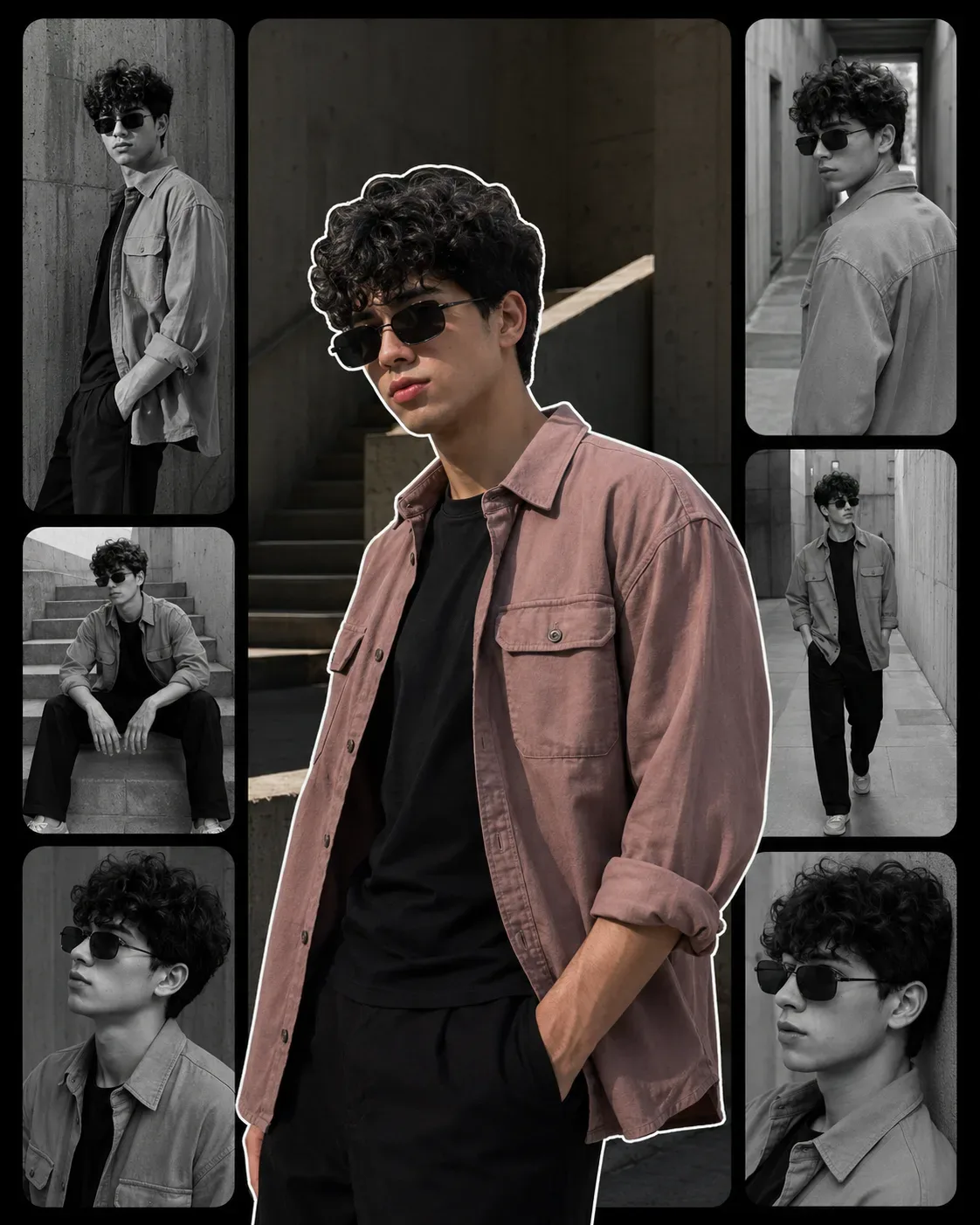
Create a premium ultra-realistic cinematic fashion editorial portrait of a young adult South Asian male, using the uploaded reference image as the primary composition and styling inspiration. Recreate the multi-frame editorial collage aesthetic, including the large central color portrait surrounded by smaller monochrome cinematic frames, while keeping the final result original, polished, realistic, and suitable for a high-end fashion magazine campaign.

The main subject is a young man in his early 20s with a naturally lean, well-proportioned physique and youthful masculine facial features. Give him thick, naturally curly dark-black hair, with dense curls, individual strands, subtle flyaways, realistic volume, and authentic texture. His face should have a softly defined jawline, natural eyebrows, realistic nose and lips, subtle facial hair, believable skin pores, and natural facial asymmetry.

He wears rectangular vintage-inspired black sunglasses with dark lenses and realistic reflections. His outfit consists of a premium muted dusty-rose / mauve overshirt, relaxed but structured, worn open over a minimal fitted black crew-neck T-shirt. The overshirt should feature realistic cotton twill texture, visible stitching, natural wrinkles, functional chest pockets, rolled sleeves, and believable fabric weight. Pair it with understated dark trousers.

Main Central Portrait

Make the central portrait the dominant visual element. Show the subject standing in a relaxed, confident pose with his torso slightly angled toward the camera, one arm naturally lowered and the other relaxed. His expression should be calm, confident, understated, and slightly introspective.

Use a medium/full-body fashion framing with a subtle low-to-eye-level camera perspective. Place him against a minimalist urban architectural environment featuring concrete walls, stairways, corridors, geometric surfaces, and soft depth in the background.

Apply a muted cinematic color palette: dusty rose, charcoal black, concrete gray, warm natural skin tones, and subtle earthy highlights. Keep the color grading sophisticated and slightly desaturated.

Supporting Monochrome Frames

Surround the central portrait with several smaller black-and-white cinematic editorial photographs of the same model, maintaining consistent facial structure, hairstyle, sunglasses, and wardrobe across every frame.

Include varied compositions:

Frame 1: Three-quarter standing portrait beside a textured concrete wall, head slightly turned toward camera.

Frame 2: Over-the-shoulder pose in an urban corridor, looking back toward the camera with a composed expression.

Frame 3: Seated naturally on concrete stairs, elbows relaxed and posture effortless, creating an introspective street-fashion mood.

Frame 4: Full/three-quarter walking portrait along a minimalist architectural walkway, captured with subtle motion and cinematic depth.

Frame 5: Another close-to-medium portrait with the subject leaning slightly against an architectural surface, emphasizing the curly hair, sunglasses, and facial profile.

Every supporting frame should feel like a different photograph from the same professional fashion shoot, not duplicated poses or artificial copies.

Collage & Graphic Composition

Arrange the photographs inside rounded-rectangle film-strip frames separated by a deep matte-black background. The central color portrait should overlap the monochrome frames slightly, creating a premium cutout editorial poster effect.

Add a clean, subtle white contour outline around the central subject, following the silhouette naturally without looking like a cartoon sticker. Keep the outline refined, smooth, and editorial.

Use generous negative space, balanced visual hierarchy, clean spacing, and sophisticated magazine-style art direction.

Lighting & Photography

Use soft directional natural daylight with gentle architectural shadows. The central image should have subtle warm highlights, while the surrounding frames are converted into rich monochrome black-and-white photography with detailed midtones, deep blacks, realistic skin texture, and controlled film grain.

Simulate a professional full-frame fashion camera, 50mm and 85mm lens aesthetics, natural perspective, realistic depth of field, sharp facial details, subtle optical falloff, authentic lens rendering, and high dynamic range.

Overall aesthetic: contemporary street fashion × luxury editorial × cinematic monochrome photography × minimalist urban architecture × sophisticated youth campaign.

Render with extreme photorealism, realistic skin pores, individual curly hair strands, authentic sunglasses reflections, detailed cotton fibers, natural clothing wrinkles, physically accurate shadows, realistic architecture, subtle film grain, refined tonal transitions, premium color grading, and 8K-level photographic detail.

The finished image should look like a professionally art-directed fashion campaign poster photographed entirely with a real camera, not CGI, illustration, or AI artwork.

NEGATIVE PROMPT

cartoon, anime, illustration, CGI, 3D render, plastic skin, waxy face, artificial skin smoothing, beauty filter, unrealistic face, distorted facial proportions, inconsistent face between frames, different person in supporting frames, inconsistent hairstyle, inconsistent clothing, deformed hands, extra fingers, missing fingers, fused fingers, extra limbs, malformed arms, distorted shoulders, unnatural anatomy, duplicate body, duplicate sunglasses, warped sunglasses, incorrect reflections, fake curls, helmet hair, synthetic hair, smooth hair, low-detail fabric, plastic clothing, unrealistic wrinkles, floating clothing, bad cutout outline, cartoon sticker effect, excessive white border, cluttered collage, misaligned frames, overlapping faces, distorted frame geometry, excessive saturation, neon colors, harsh HDR, blown highlights, crushed shadows, fake bokeh, excessive blur, motion artifacts, low resolution, jpeg artifacts, noise, oversharpening, watermark, logo, text, typography, random letters, social media handles, AI artifacts, uncanny appearance.

Recommended Generation Settings
Aspect Ratio: 4:5
Style: Ultra-Realistic Cinematic Editorial
Composition: Multi-frame fashion collage
Main Image: Full/medium-body portrait
Supporting Frames: Black & white
Lighting: Soft natural urban daylight
Color Grade: Muted dusty rose + charcoal + monochrome
Detail: Maximum photorealistic detail
Finish: Luxury fashion magazine / professional campaign poster

Optical Identity & Likeness Preservation: Lock subject's authentic facial identity and natural posture while seamlessly integrating with sharp vehicle reflections and cinematic ambient lighting.Explore Related Collections
Explore Photography Prompts — Browse our curated collection of Photography prompts tailored for creators. View all Photography prompts →
Explore Ai Image Prompts — Discover more viral Ai Image ideas for your next AI generation. View all Ai Image prompts →
Explore Trending Prompts — Explore our extensive library of Trending templates ready to copy and paste. View all Trending prompts →
Frequently asked questions
- How do I use the Monochrome Streetframe Premium Urban Editorial Portrait AI Photo Prompt prompt?
- To use this prompt, simply click the "Copy Prompt" button above. Then, open Google Gemini, paste the copied text into the prompt box, and hit generate. You can instantly generate high-quality images without needing any reference photos.
- What is this prompt best used for?
- This specific prompt is highly optimized for creating engaging social media content and digital art. The formula is structured to produce high-contrast, visually appealing results that perform well on visual platforms.
- Can I customize the details of this prompt?
- Yes! While the core structure of the prompt is optimized for Google Gemini, you can easily customize the details. We recommend changing specific keywords like clothing colors, background locations, or the overall mood (e.g., changing "sunny" to "rainy" or "neon") to match your exact vision.




![[Image1] A Professional 33 Collage Featuring AI Photo Prompt generated preview](https://viralprompts.in/uploads/image1-a-professional-33-collage-featuring-ai-photo-prompt.webp)