Quick Summary: This verified Google Gemini & Midjourney v6 prompt creates an authentic 90s vintage film aesthetic for Golden Monochrome Streetwear Editorial AI Photo Prompt with calibrated lighting, authentic texture physics, and tested 1-click copy-paste formula for instant AI generation without facial distortion.
- Ai Image
- Photography
- Trending
- Photography
- Ai Image
- Trending
- Viral Prompt
- Gemini Ai
- Bing Image Creator
- Copy Paste
About This Prompt
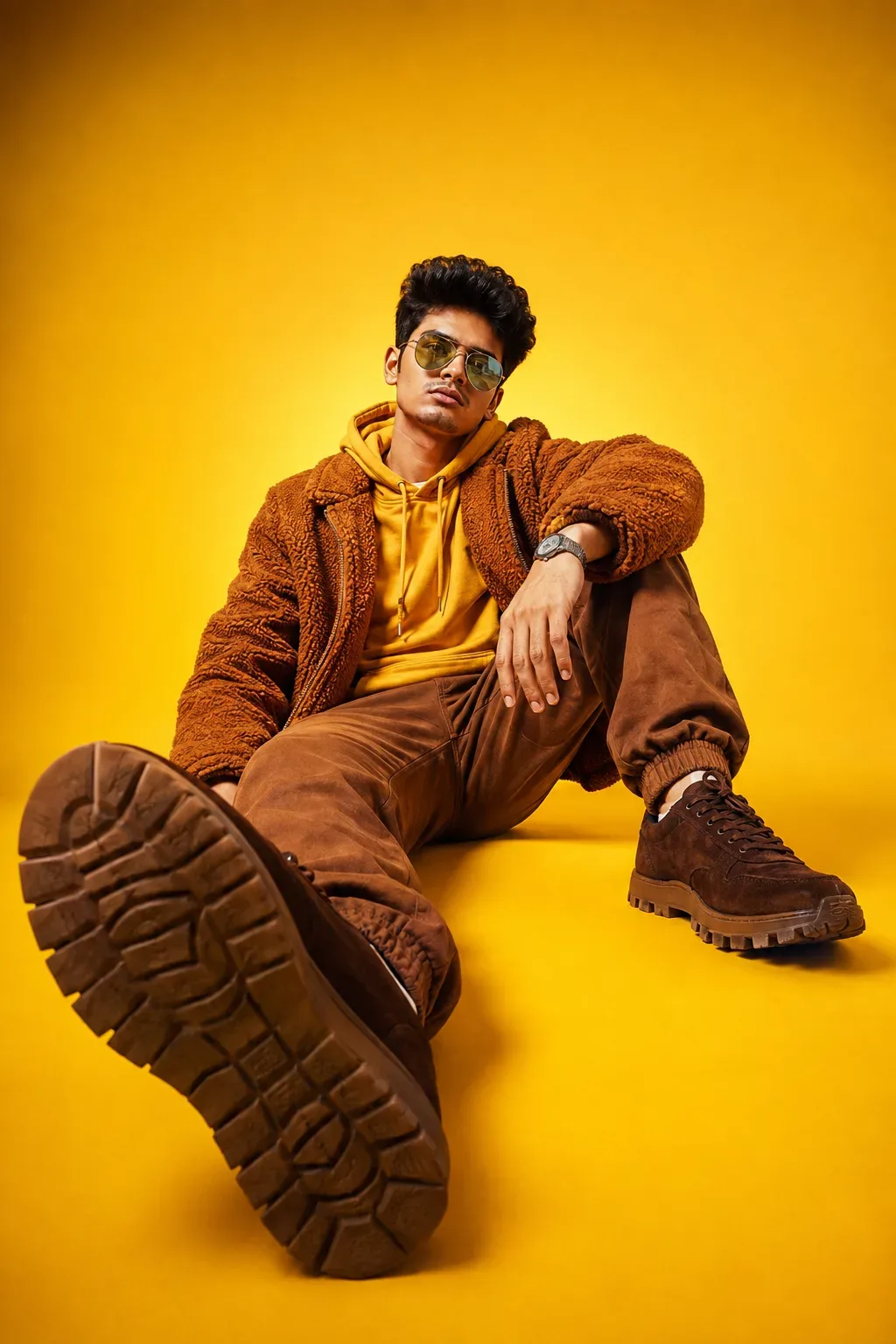
Use this prompt to generate a Golden Monochrome Streetwear Editorial AI Photo Prompt — a high-quality, photorealistic image with balanced lighting, sharp focus, and intricate details suitable for social media sharing and digital content creation.
This prompt works best with Google Gemini. Simply copy the prompt text below and paste it into the generator. You can easily customize specific keywords like colors, backgrounds, or subjects to make the final output uniquely yours.
Golden Monochrome Streetwear Editorial AI Photo Prompt - Copy Paste AI Prompt
Create a premium, ultra-realistic fashion portrait of the uploaded male subject, preservin5/ 6
natural facial identity, hairstyle, and facial features with high accuracy.
The subject is seated confidently on the floor of a seamless, rich golden-yellow studio. He wears a
rich golden-mustard hoodie with visible drawstrings, layered under a thick deep caramel-brown
teddy fleece jacket with clearly defined curly texture. Pair it with relaxed warm-brown jogger
pants in a loose, slightly baggy fit, with more room through the thighs and knees, a softly
tapered shape toward the bottom, and elastic ankle cuffs - clearly not slim-fit, matching dark
caramel-brown suede sneakers with chunky rugged soles, reflective silver aviator sunglasses, and
a silver metal wristwatch.
Give him a natural, relaxed seated pose with a high-fashion editorial feel. A stylish, believable
hand placement, one leg crossed while other leg extanded, shoe prominently close to the camera
for strong foreground impact. Keep the expression calm, confident, and slightly serious.
Use an extreme ground-level low-angle camera position, placed close to the extended shoe
and tilted upward toward the subject Use a 24-28mm wide-angle perspective to create strong
foreground exaggeration, making the outsole appear much larger than the face. Keep the face
around the upper-middle of the frame with sufficient yellow background above the head. Show
the complete seated pose and both shoes without awkward cropping.
The studio background and floor must remain bright, golden yellow, with a subtle glow behind
the subject and only a slightly deeper amber tone near the upper corners. Do not turn the
background orange, beige, ochre, brown, or muted mustard.
Maintain clear colour separation: the hoodie should be bright golden mustard, the fleece jacket
deeper burnt caramel, the joggers medium warm brown, and the sneakers darker suede brown.
The clothing must not merge into one flat brown shade.
Use strong, clean studio lighting from the upper front-left, creating brilliant golden highlights,
crisp facial definition, realistic metalic reflections, visible fleece fibres, natural fabric folds,
detailed suede texture, and strong directional shadows beneath the body and shoes. Keep the
exposure bright, colours rich and saturated, contrast punchy, and shadows deep but detailed.
Premium streetwear campaign photography, bold monochromatic styling, vibrant commercial
colour grading, bright, dramatic wide-angle perspective, realistic skin texture, accurate hands
and anatomy, sharp facial focus, high dynamic range, polished editorial finish, photorealistic,
high resolution.
Avoid faded colours, dusty orange grading, beige cast, sepia tones, matte film effects, low
saturation, flat lighting, identical clothing colours, upright formal posture, small foreground shoe,
distorted hands, distorted legs or eye-level camera framing.
4:5 or 3:4 aspect ratio.

Optical Identity & Likeness Preservation: Lock subject's authentic facial identity and natural posture while seamlessly integrating with sharp vehicle reflections and cinematic ambient lighting.Frequently asked questions
- How do I use the Golden Monochrome Streetwear Editorial AI Photo Prompt prompt?
- To use this prompt, simply click the "Copy Prompt" button above. Then, open Google Gemini, paste the copied text into the prompt box, and hit generate. You can instantly generate high-quality images without needing any reference photos.
- What is this prompt best used for?
- This specific prompt is highly optimized for creating engaging social media content and digital art. The formula is structured to produce high-contrast, visually appealing results that perform well on visual platforms.
- Can I customize the details of this prompt?
- Yes! While the core structure of the prompt is optimized for Google Gemini, you can easily customize the details. We recommend changing specific keywords like clothing colors, background locations, or the overall mood (e.g., changing "sunny" to "rainy" or "neon") to match your exact vision.
What You'll Get
- 🎨 Style: Ai Image
- ✨ Mood: Photography
- 📱 Best For: Photography
- 🤖 Works With: Google Gemini
- 🔥 Popularity: Copied 205 times
- 📅 Added: Sep 14, 2026
Explore Related Collections
Explore Ai Image Prompts — Browse our curated collection of Ai Image prompts tailored for creators. View all Ai Image prompts →
Explore Photography Prompts — Discover more viral Photography ideas for your next AI generation. View all Photography prompts →
Explore Trending Prompts — Explore our extensive library of Trending templates ready to copy and paste. View all Trending prompts →