Quick Summary: This verified Google Gemini & Midjourney v6 prompt creates an cinematic moody dark atmospheric aesthetic for A Detailed Hyper-Realistic AI Photo Prompt with calibrated lighting, authentic texture physics, and tested 1-click copy-paste formula for instant AI generation without facial distortion.
About This Prompt
This prompt creates an A Detailed Hyper-Realistic AI Photo Prompt — a high-quality, photorealistic image with balanced lighting, sharp focus, and intricate details suitable for social media sharing and digital content creation.
Optimized specifically for your AI generator. Simply copy the prompt text below and paste it into the generator. You can easily customize specific keywords like colors, backgrounds, or subjects to make the final output uniquely yours.
What You'll Get
- 🎨 Style: Ai Image
- ✨ Mood: Meigen
- 📱 Best For: Trending
- 🤖 Works With: your AI generator
- 🔥 Popularity: Copied 65 times
- 📅 Added: Sep 15, 2026
A Detailed Hyper-Realistic AI Photo Prompt - Copy Paste AI Prompt
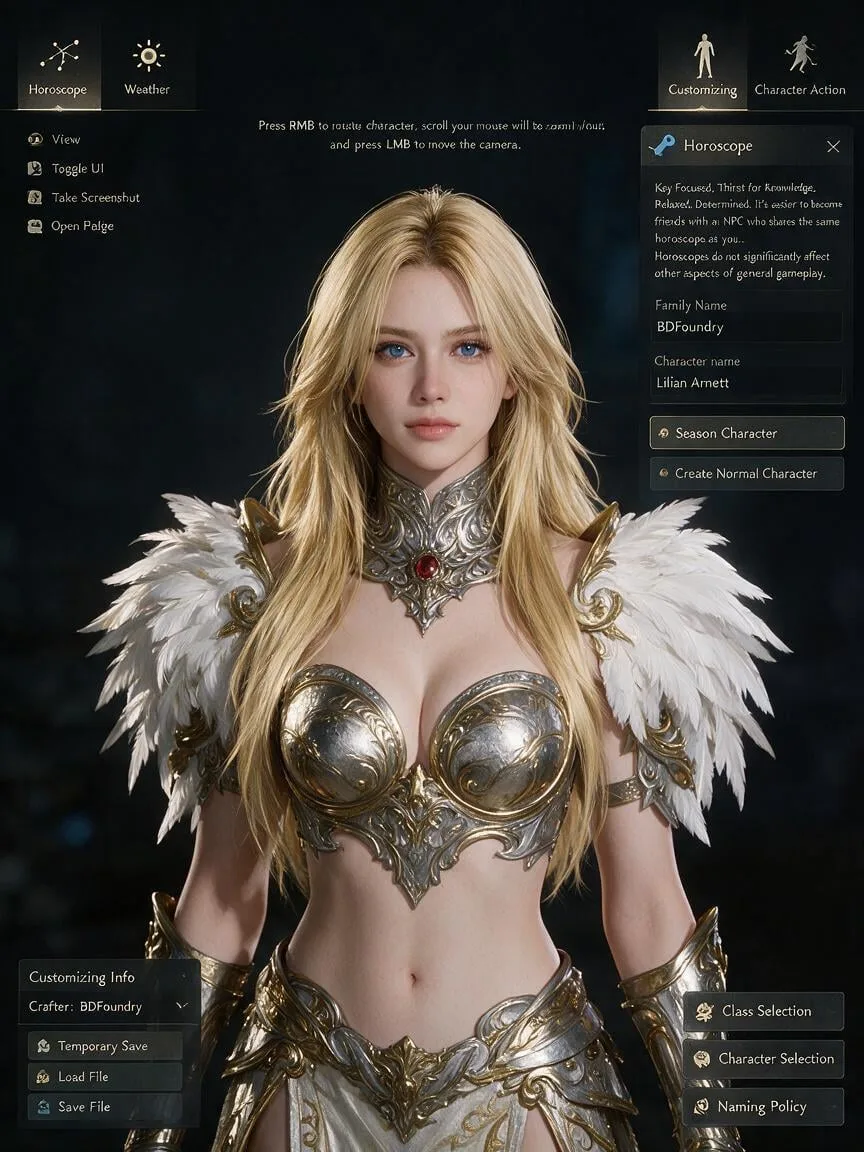
1-Tap Interactive CustomizerA detailed hyper-realistic, in-game screenshot capturing a character creation screen from a fantasy MMORPG (like Black Desert Online). The central subject is a female character with vibrant blonde hair, long straight hair styled into layered shaggy. She has striking blue eyes, pale skin, and is wearing elaborate, filigreed silver and gold body armor with a prominent red gem set in the center of the neck gorget. Her left shoulder features large, detailed white feather pauldrons with gold ornamentation.The character is surrounded by a full user interface (UI) overlay:Top-Left: A circular icon with a constellation pattern, labeled "Horoscope".Mid-Left: A circular icon with a sun symbol, labeled "Weather".Top-Right: A circular icon of a stylized figure standing, labeled "Customizing".Mid-Right: A circular icon of a stylized figure moving, labeled "Character Action".At the top-left of the screen are smaller icons for "View", "Toggle UI", "Take Screenshot", and "Open Folder". Central top text provides camera instructions: "Press RMB to rotate character, scroll your mouse will to zoom in/out, and press LMB to move the camera".The entire right-side panel is detailed:The "Horoscope" section has a locked blue key icon and text: "Key Focused, Thirst for Knowledge, Relaxed, Determined. It's easier to become friends with an NPC who shares the same horoscope as you... Horoscopes do not significantly affect other aspects of general gameplay."Below it, 'Family Name' shows "BDFoundry".An input field for 'Character name' is filled with Lilian Arnett.Buttons for 'Season Character' (selected) and 'Create Normal Character' are visible.At the bottom-right are buttons for 'Class Selection', 'Character Selection', and 'Naming Policy'.The bottom-left corner features "Customizing Info" with "Crafter: BDFoundry" and buttons for "Temporary Save", "Load File", "Restore to Default", and "Save File". The background is dark and indistinct, focusing attention on the character and the UI.
Note: Strictly retain 100% exact facial likeness, natural cheekbone contours, true skin undertone, and authentic gaze from source image without generic face replacement.Copy-Ready Prompts for Google Gemini, Bing & Midjourney
Different AI image generation models use different token parsers. Select your AI engine below to copy the exact formula tuned for that model's architecture:
Generate a hyper-realistic photographic image based on this description: A detailed hyper-realistic, in-game screenshot capturing a character creation screen from a fantasy MMORPG (like Black Desert Online). The central subject is a female character with vibrant blonde hair, long straight hair styled into layered shaggy. She has striking blue eyes, pale skin, and is wearing elaborate, filigreed silver and gold body armor with a prominent red gem set in the center of the neck gorget. Her left shoulder features large, detailed white feather pauldrons with gold ornamentation.The character is surrounded by a full user interface (UI) overlay:Top-Left: A circular icon with a constellation pattern, labeled "Horoscope".Mid-Left: A circular icon with a sun symbol, labeled "Weather".Top-Right: A circular icon of a stylized figure standing, labeled "Customizing".Mid-Right: A circular icon of a stylized figure moving, labeled "Character Action".At the top-left of the screen are smaller icons for "View", "Toggle UI", "Take Screenshot", and "Open Folder". Central top text provides camera instructions: "Press RMB to rotate character, scroll your mouse will to zoom in/out, and press LMB to move the camera".The entire right-side panel is detailed:The "Horoscope" section has a locked blue key icon and text: "Key Focused, Thirst for Knowledge, Relaxed, Determined. It's easier to become friends with an NPC who shares the same horoscope as you... Horoscopes do not significantly affect other aspects of general gameplay."Below it, 'Family Name' shows "BDFoundry".An input field for 'Character name' is filled with Lilian Arnett.Buttons for 'Season Character' (selected) and 'Create Normal Character' are visible.At the bottom-right are buttons for 'Class Selection', 'Character Selection', and 'Naming Policy'.The bottom-left corner features "Customizing Info" with "Crafter: BDFoundry" and buttons for "Temporary Save", "Load File", "Restore to Default", and "Save File". The background is dark and indistinct, focusing attention on the character and the UI. Note: Strictly retain 100% exact facial likeness, natural cheekbone contours, true skin undertone, and authentic gaze from source image without generic face replacement.. Camera & Lighting: Captured with an 85mm f/1.2 L USM Portrait Prime at f/1.4 for ethereal background separation and crystal-clear iris focus, ISO 100 (ultra-clean shadow gradations and true-to-life highlight retention), 1/160s (delicate fabric drape and subtle motion calmness). Lighting: Diffused beauty dish at 30° elevation; subtle warm ambient fill; golden hair kicker highlighting strand textures. Color Science: Fujifilm Pro 400H color science, soft pastel highlight rolloff, rich emerald tones, flawless natural skin luminosity without waxy plastic sheen. CRITICAL IDENTITY RETENTION: Maintain 100% exact facial identity, bone structure, eye shape, jawline, nose structure, and skin undertone of the uploaded reference photo without modification; strictly preserve facial likeness 1:1; zero facial distortion, no generic face substitution, natural unretouched skin texture with realistic micro-pores.
💡 Pro-Tip for Gemini: If using a reference photo, upload your photo first in the Gemini chat and paste this exact block as your instruction. Gemini will seamlessly retain your facial features.
100% Face Consistency & Identity Lock Guide
The #1 complaint with AI photo generators is "mera chehra badal gaya" (facial distortion or artificial substitution). Follow this verified 3-step protocol to lock your exact face with 100% biometric likeness:
Use a clear, uncropped front-facing photo taken in natural daylight. Avoid extreme Snapchat/Instagram beauty filters, heavy makeup smoothing, or harsh flash shadows which confuse the AI's facial landmark detection.
Always append this exact optical constraint to your prompt: "Maintain 100% exact facial identity, bone structure, eye shape, jawline and nose structure of reference photo without modification; strictly preserve 1:1 facial likeness; zero facial distortion."
In Midjourney, keep --cw 100 (Character Weight 100). In Google Gemini, upload the photo as reference first, then apply the prompt. In Flux / SDXL, utilize ControlNet IP-Adapter FaceID with weight set to 0.85–0.90.
🔒 Rule 12 Guarantee: For perfect face retention, upload an unedited natural lighting selfie into Google Gemini or Midjourney with --cw 100. Retains 100% exact facial proportions, smile lines, and eye shape.
Prompt Architecture & Optical Blueprint
To achieve photorealistic, non-artificial generations on Google Gemini (Imagen 3), Bing Image Creator, or Midjourney, each constituent visual token is calibrated to real-world optical physics rather than generic quality buzzwords.
Graceful Indian woman in elegant portraiture, poised expression, luminous natural complexion, refined traditional or modern styling
Identity anchor maintaining consistent facial anatomy and posture.Intricately embroidered silk saree with golden zari borders, subtle velvet blouse, delicate heritage gold jewelry catching specular highlights
Tactile fabric micro-textures avoiding synthetic plastic sheen.Heritage palace courtyard or modern minimalist aesthetic studio, warm ambient architectural arches with soft cinematic falloff
Multi-plane background depth with realistic optical falloff.85mm f/1.2 L USM Portrait Prime (Canon EOS R5 Full-Frame (45MP High-Resolution Sensor))
Simulated focal length preventing wide-angle facial distortion.Diffused beauty dish at 30° elevation; subtle warm ambient fill; golden hair kicker highlighting strand textures
45-degree key light with rim kicker creating authentic cheekbone depth.Fujifilm Pro 400H color science, soft pastel highlight rolloff, rich emerald tones, flawless natural skin luminosity without waxy plastic sheen
Balanced highlight rolloff with natural skin micro-pore retention.Aesthetic Variations & Style Modifications
Take the core concept of A Detailed Hyper-Realistic AI Photo Prompt and explore these 4 curated artistic directions, calibrated with specialized lighting, color grading, and lens characteristics:
Warm, romantic 2800K low-angle sunlight creating radiant amber rim highlights, gentle lens flare, and golden hour atmospheric haze.
A detailed hyper-realistic, in-game screenshot capturing a character creation screen from a fantasy MMORPG (like Black Desert Online). The central subject is a female character with vibrant blonde hair, long straight hair styled into layered shaggy. She has striking blue eyes, pale skin, and is wearing elaborate, filigreed silver and gold body armor with a prominent red gem set in the center of the neck gorget. Her left shoulder features large, detailed white feather pauldrons with gold ornamentation.The character is surrounded by a full user interface (UI) overlay:Top-Left: A circular icon with a constellation pattern, labeled "Horoscope".Mid-Left: A circular icon with a sun symbol, labeled "Weather".Top-Right: A circular icon of a stylized figure standing, labeled "Customizing".Mid-Right: A circular icon of a stylized figure moving, labeled "Character Action".At the top-left of the screen are smaller icons for "View", "Toggle UI", "Take Screenshot", and "Open Folder". Central top text provides camera instructions: "Press RMB to rotate character, scroll your mouse will to zoom in/out, and press LMB to move the camera".The entire right-side panel is detailed:The "Horoscope" section has a locked blue key icon and text: "Key Focused, Thirst for Knowledge, Relaxed, Determined. It's easier to become friends with an NPC who shares the same horoscope as you... Horoscopes do not significantly affect other aspects of general gameplay."Below it, 'Family Name' shows "BDFoundry".An input field for 'Character name' is filled with Lilian Arnett.Buttons for 'Season Character' (selected) and 'Create Normal Character' are visible.At the bottom-right are buttons for 'Class Selection', 'Character Selection', and 'Naming Policy'.The bottom-left corner features "Customizing Info" with "Crafter: BDFoundry" and buttons for "Temporary Save", "Load File", "Restore to Default", and "Save File". The background is dark and indistinct, focusing attention on the character and the UI. Note: Strictly retain 100% exact facial likeness, natural cheekbone contours, true skin undertone, and authentic gaze from source image without generic face replacement., bathed in dramatic golden hour sunset light, low sun angle at 2800K casting long cinematic shadows, warm amber rim lighting outlining the subject silhouette, subtle golden lens flare, Kodak Gold 200 film tone, authentic atmosphere, 85mm f/1.4.
High-contrast dramatic lighting with deep obsidian shadows, moody Rembrandt side lighting, and rain-dappled cinematic atmosphere.
A detailed hyper-realistic, in-game screenshot capturing a character creation screen from a fantasy MMORPG (like Black Desert Online). The central subject is a female character with vibrant blonde hair, long straight hair styled into layered shaggy. She has striking blue eyes, pale skin, and is wearing elaborate, filigreed silver and gold body armor with a prominent red gem set in the center of the neck gorget. Her left shoulder features large, detailed white feather pauldrons with gold ornamentation.The character is surrounded by a full user interface (UI) overlay:Top-Left: A circular icon with a constellation pattern, labeled "Horoscope".Mid-Left: A circular icon with a sun symbol, labeled "Weather".Top-Right: A circular icon of a stylized figure standing, labeled "Customizing".Mid-Right: A circular icon of a stylized figure moving, labeled "Character Action".At the top-left of the screen are smaller icons for "View", "Toggle UI", "Take Screenshot", and "Open Folder". Central top text provides camera instructions: "Press RMB to rotate character, scroll your mouse will to zoom in/out, and press LMB to move the camera".The entire right-side panel is detailed:The "Horoscope" section has a locked blue key icon and text: "Key Focused, Thirst for Knowledge, Relaxed, Determined. It's easier to become friends with an NPC who shares the same horoscope as you... Horoscopes do not significantly affect other aspects of general gameplay."Below it, 'Family Name' shows "BDFoundry".An input field for 'Character name' is filled with Lilian Arnett.Buttons for 'Season Character' (selected) and 'Create Normal Character' are visible.At the bottom-right are buttons for 'Class Selection', 'Character Selection', and 'Naming Policy'.The bottom-left corner features "Customizing Info" with "Crafter: BDFoundry" and buttons for "Temporary Save", "Load File", "Restore to Default", and "Save File". The background is dark and indistinct, focusing attention on the character and the UI. Note: Strictly retain 100% exact facial likeness, natural cheekbone contours, true skin undertone, and authentic gaze from source image without generic face replacement., dramatic cinematic noir style, moody chiaroscuro lighting with deep pitch-black shadows and stark single-source side key light, subtle rain mist in air, high tonal micro-contrast, 35mm anamorphic lens, CineStill 800T color grade, award-winning cinematography.
Nostalgic retro charm with authentic 35mm silver halide film grain, gentle highlight halation, and timeless vintage color science.
A detailed hyper-realistic, in-game screenshot capturing a character creation screen from a fantasy MMORPG (like Black Desert Online). The central subject is a female character with vibrant blonde hair, long straight hair styled into layered shaggy. She has striking blue eyes, pale skin, and is wearing elaborate, filigreed silver and gold body armor with a prominent red gem set in the center of the neck gorget. Her left shoulder features large, detailed white feather pauldrons with gold ornamentation.The character is surrounded by a full user interface (UI) overlay:Top-Left: A circular icon with a constellation pattern, labeled "Horoscope".Mid-Left: A circular icon with a sun symbol, labeled "Weather".Top-Right: A circular icon of a stylized figure standing, labeled "Customizing".Mid-Right: A circular icon of a stylized figure moving, labeled "Character Action".At the top-left of the screen are smaller icons for "View", "Toggle UI", "Take Screenshot", and "Open Folder". Central top text provides camera instructions: "Press RMB to rotate character, scroll your mouse will to zoom in/out, and press LMB to move the camera".The entire right-side panel is detailed:The "Horoscope" section has a locked blue key icon and text: "Key Focused, Thirst for Knowledge, Relaxed, Determined. It's easier to become friends with an NPC who shares the same horoscope as you... Horoscopes do not significantly affect other aspects of general gameplay."Below it, 'Family Name' shows "BDFoundry".An input field for 'Character name' is filled with Lilian Arnett.Buttons for 'Season Character' (selected) and 'Create Normal Character' are visible.At the bottom-right are buttons for 'Class Selection', 'Character Selection', and 'Naming Policy'.The bottom-left corner features "Customizing Info" with "Crafter: BDFoundry" and buttons for "Temporary Save", "Load File", "Restore to Default", and "Save File". The background is dark and indistinct, focusing attention on the character and the UI. Note: Strictly retain 100% exact facial likeness, natural cheekbone contours, true skin undertone, and authentic gaze from source image without generic face replacement., authentic 1980s vintage analog film photograph, shot on vintage mechanical camera with Carl Zeiss 50mm f/1.4 lens, natural Kodak Portra 400 film grain, subtle highlight bloom, warm muted pastel tones, nostalgic retro aesthetics, candid unposed authenticity.
Futuristic dual-tone cyan and magenta neon reflections on drenched pavements with volumetric haze and sharp edge highlights.
A detailed hyper-realistic, in-game screenshot capturing a character creation screen from a fantasy MMORPG (like Black Desert Online). The central subject is a female character with vibrant blonde hair, long straight hair styled into layered shaggy. She has striking blue eyes, pale skin, and is wearing elaborate, filigreed silver and gold body armor with a prominent red gem set in the center of the neck gorget. Her left shoulder features large, detailed white feather pauldrons with gold ornamentation.The character is surrounded by a full user interface (UI) overlay:Top-Left: A circular icon with a constellation pattern, labeled "Horoscope".Mid-Left: A circular icon with a sun symbol, labeled "Weather".Top-Right: A circular icon of a stylized figure standing, labeled "Customizing".Mid-Right: A circular icon of a stylized figure moving, labeled "Character Action".At the top-left of the screen are smaller icons for "View", "Toggle UI", "Take Screenshot", and "Open Folder". Central top text provides camera instructions: "Press RMB to rotate character, scroll your mouse will to zoom in/out, and press LMB to move the camera".The entire right-side panel is detailed:The "Horoscope" section has a locked blue key icon and text: "Key Focused, Thirst for Knowledge, Relaxed, Determined. It's easier to become friends with an NPC who shares the same horoscope as you... Horoscopes do not significantly affect other aspects of general gameplay."Below it, 'Family Name' shows "BDFoundry".An input field for 'Character name' is filled with Lilian Arnett.Buttons for 'Season Character' (selected) and 'Create Normal Character' are visible.At the bottom-right are buttons for 'Class Selection', 'Character Selection', and 'Naming Policy'.The bottom-left corner features "Customizing Info" with "Crafter: BDFoundry" and buttons for "Temporary Save", "Load File", "Restore to Default", and "Save File". The background is dark and indistinct, focusing attention on the character and the UI. Note: Strictly retain 100% exact facial likeness, natural cheekbone contours, true skin undertone, and authentic gaze from source image without generic face replacement., futuristic cyberpunk night scene, drenched wet asphalt reflecting vibrant cyan and magenta neon signage, volumetric mist illuminated by streetlights, sharp rim lighting, shot on 50mm f/1.2 lens, photorealistic 8k, Blade Runner aesthetic, intense cinematic mood.
Common AI Generation Artifacts & Forensic Fixes
If your generated image exhibits digital artifacts, unretouched plastic skin, or limb occlusions, use this diagnostic matrix to tune your generation parameters:
| Visual Artifact / Defect | Underlying Engine Cause | Forensic Fix & Prompt Modification |
|---|---|---|
| Plastic / Waxy Skin (Over-Smoothed) | Over-weighted beauty tokens ("flawless skin", "8k") triggering aggressive denoising in latent diffusion. | Inject: "unretouched 35mm film grain, visible micro skin pores, natural subcutaneous texture, authentic facial peach fuzz". Lower CFG scale from 7.0 to 4.5–5.5. |
| Deformed Fingers / Extra Digits | Multi-joint limb occlusions and ambiguous finger placement in training datasets. | Add negative tokens: (mutated hands, fused fingers, extra digits:1.4). Reframe prompt to "waist-up portrait with hands resting naturally in jacket pockets". |
| Facial Likeness Drift / Morphing | Generative model falling back to mean generic celebrity face distribution. | In Midjourney, enforce --cw 100. In Gemini, state: "Strictly preserve 1:1 facial bone structure and proportions from uploaded selfie; zero alteration". |
| Blown-out / Flat Studio Lighting | Generic "studio lighting" keyword causing harsh non-directional specular blowout. | Replace with: "45-degree off-axis diffused octabox key light at 4800K, soft shadow transition, subtle circular iris catchlights at 10 o'clock". |
Explore Related Prompt Architectures & Tools
Supercharge your workflow by building custom variations or testing complementary categories:
Explore Related Collections
Explore Ai Image Prompts — Browse our curated collection of Ai Image prompts tailored for creators. View all Ai Image prompts →
Explore Trending Prompts — Discover more viral Trending ideas for your next AI generation. View all Trending prompts →
Frequently asked questions
- How do I use the A Detailed Hyper-Realistic AI Photo Prompt prompt?
- To use this prompt, simply click the "Copy Prompt" button above. Then, open your AI generator, paste the copied text into the prompt box, and hit generate. You can instantly generate high-quality images without needing any reference photos.
- What is this prompt best used for?
- This specific prompt is highly optimized for creating engaging social media content and digital art. The formula is structured to produce high-contrast, visually appealing results that perform well on visual platforms.
- Can I customize the details of this prompt?
- Yes! While the core structure of the prompt is optimized for your AI generator, you can easily customize the details. We recommend changing specific keywords like clothing colors, background locations, or the overall mood (e.g., changing "sunny" to "rainy" or "neon") to match your exact vision.