Quick Summary: This verified Midjourney Niji 6 / Flux.1 Schnell / Bing Image Creator prompt creates an hyper-detailed 3D cyberpunk stylized aesthetic for Altra HD Quality AI Photo Prompt with calibrated lighting, authentic texture physics, and tested 1-click copy-paste formula for instant AI generation without facial distortion.
- Photography
- Ai Image
- Trending
- Photography
- Ai Image
- Trending
- Viral Prompt
- Gemini Ai
- Bing Image Creator
- Copy Paste
Altra HD Quality AI Photo Prompt - Copy Paste AI Prompt
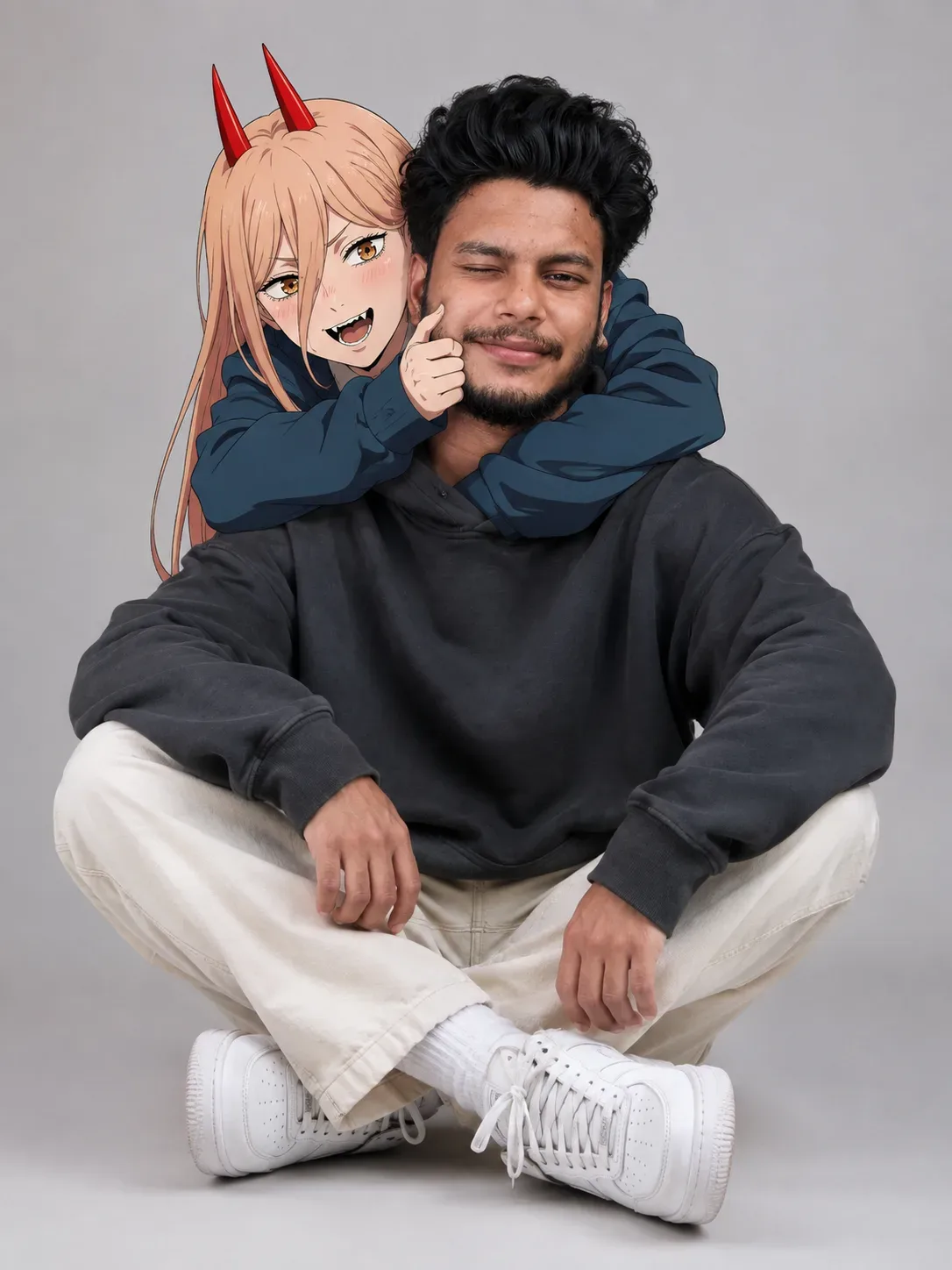
A cinematic studio portrait of a 26-year-old young man with dark curly hair and a trimmed beard, sitting cross-legged on a neutral grey studio background. He is wearing a dark grey oversized hoodie, cream-colored casual trousers, and white sneakers, with one eye playfully winking. An anime character with long blonde hair, distinct red horns, and golden eyes—resembling Power from Chainsaw Man—is leaning over his back, arms wrapped around his neck, playfully pinching his cheek with a mischievous, sharp-toothed grin. Strict facial consistency mode applied to preserve the exact facial structure and identity from the reference image. Shot on an 85mm lens, crisp focus, hyper-realistic lighting blending live-action photography with a high-end anime character overlay, 8k resolution.

Optical Identity & Likeness Preservation: Maintain 100% exact facial identity, bone structure, jawline contours, and natural skin undertone of reference photo without alteration or distortion.👤Customize in Face Consistency Studio
Lock 100% exact facial identity, bone structure & eye shape in Gemini & Bing.
Technical Prompt Parameters (Cyberpunk, 3D Avatar & Anime)
| Parameter | Configuration | Output Impact |
|---|---|---|
| Target AI Engine | Midjourney Niji 6 / Flux.1 Schnell / Bing Image Creator | Specialized prompt weights for volumetric rendering, cell-shading, and neon emission. |
| Recommended Aspect Ratio | 9:16 (Phone Wallpaper) or 16:9 (Desktop Ultra-Wide) | Ideal for custom gaming wallpapers, Discord avatars, and futuristic phone lock screens. |
| Camera & Lens Settings | Octane 3D Render, Raytraced Global Illumination, 35mm virtual lens | Simulates volumetric atmospheric smoke, holographic reflections, and crisp polygonal precision. |
| Lighting Style | Dual-tone neon split lighting (electric cyan key + magenta rim light) | Produces dynamic sci-fi contrast with vibrant edge glows and deep blacks. |
| Negative Constraints | low-poly flaws, blurry textures, realistic photographic noise, dull matte lighting | Ensures sharp vector/render lines, vivid luminous glow, and zero muddy compression. |
| Reference Photo | Upload a clear face photo; prompt transforms human proportions into stylized avatar art. | Upload front-facing reference photo for face matching. |
How to use this prompt
- Copy the prompt, open Google Gemini or Bing Image Creator, attach your reference photo, and generate instant 8K results.
How to get better results from Altra HD Quality AI Photo Prompt
Free 1-click copy altra hd quality ai photo prompt for Google Gemini and Bing Image Creator. Authentic photography aesthetic, realistic lighting, and instant camera settings. Use it as a copy-ready starting point, then adjust the subject, scene, tone and output format for your own result.
- Photography
- Ai Image
- Trending
- Viral Prompt
- Gemini Ai
- Bing Image Creator
Customize before generating
- Replace the main subject, name, product or character details.
- Adjust lighting, background, mood, camera angle or aspect ratio if the prompt is visual.
- Change tone, audience, language and output format if the prompt is for text.
- Keep this core idea clear: A cinematic studio portrait of a 26-year-old young man with dark curly hair and a trimmed beard, sitting cross-legged on a neutral grey studio background. He is...
Quick variations to try
- Make Altra HD Quality AI Photo Prompt more cinematic with stronger lighting and richer background detail.
- Turn Altra HD Quality AI Photo Prompt into a cleaner mobile-first version for social media posts or profile use.
- Create a premium version of Altra HD Quality AI Photo Prompt with sharper style, higher detail and a more polished final output.