Quick Summary: This verified Google Gemini & Midjourney v6 prompt creates an authentic 90s vintage film aesthetic for man in suit on street with calibrated lighting, authentic texture physics, and tested 1-click copy-paste formula for instant AI generation without facial distortion.
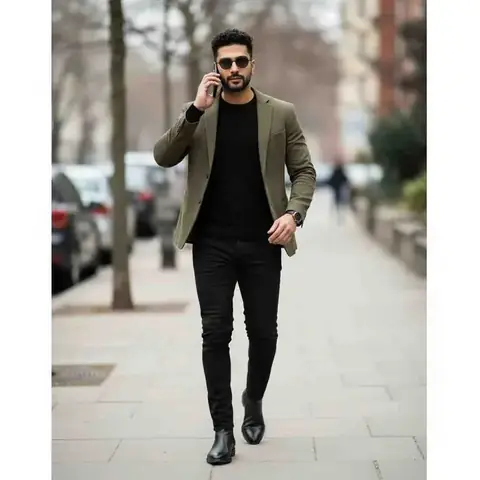
man in suit on street - Copy Paste AI Prompt
First ask me to upload a photo/selfie.
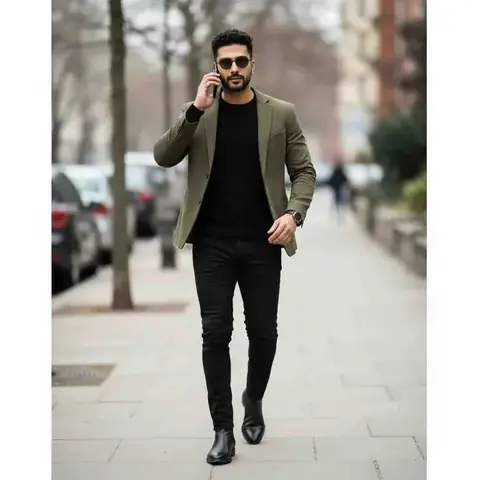
Generate a highly realistic street-style photo using my uploaded selfie as the exact face—preserve my facial identity, features, undertones, and proportions without altering them. Blend my face perfectly with the scene’s lighting and shadows; keep natural skin texture. Nothing should change except the face.
Create an urban sidewalk scene on an overcast day with parked cars and bare trees softly blurred in the background. Shallow depth of field; crisp but natural colors.
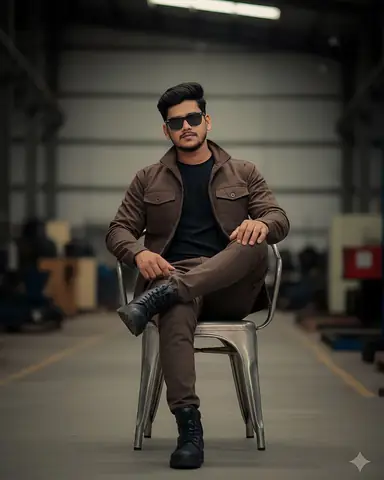
Wardrobe & styling (match exactly): olive/khaki single-breasted blazer over a black crew-neck knit; slim black jeans; black leather Chelsea boots. Dark round sunglasses on the face (keep and align to my swapped face). Black wristwatch on the left wrist. Smartphone held to the left ear.
Pose & expression: full-body walking stride toward camera, weight shifting forward; blazer hem flaring slightly with motion. Left hand holding the phone to the ear; right hand mid-swing near the waist. Neutral, confident expression with closed lips. Keep body proportions and hand anatomy realistic.
Hair: keep the scene’s short, tight curls/fade exactly as shown; integrate my face beneath the existing hair. Maintain light stubble/goatee exactly as in the scene unless it conflicts with natural face blending.
Lighting & finish: soft daylight from camera-left with gentle fill; subtle motion in the legs but keep the face sharp. Add a very light filmic grain for realism. No visible logos.
Identity rules: use ONLY my selfie to lock identity; maintain exact facial geometry and natural asymmetry. Remove any selfie accessories (glasses, cap, earbuds).
Negative instructions: no plastic skin or heavy HDR/oversharpening, no altered outfit/background, no warped hands or limbs, no extra fingers, no text/watermarks, no cartoon/AI look, and no mismatched tones between face, neck, and hands.
Output: high-resolution vertical image matching this composition and styling with my exact face seamlessly integrated.Technical Prompt Parameters (Vintage Film & Retro Polaroid)
| Parameter | Configuration | Output Impact |
|---|---|---|
| Target AI Engine | Google Gemini & Midjourney v6 | Preserves organic analog warmth, natural color saturation, and retro lighting response. |
| Recommended Aspect Ratio | 4:5 (Classic Film) or 1:1 (Square Polaroid) | Faithful recreation of vintage paper print dimensions and nostalgic photo albums. |
| Camera & Lens Settings | 35mm Leica M6, Kodak Portra 400, f/2.8, subtle chromatic dispersion | Renders genuine analog grain, gentle halation, and authentic film stock color science. |
| Lighting Style | Direct camera flash with soft falloff or warm golden hour sunset flare | Creates natural retro exposure highlights without artificial digital gloss. |
| Negative Constraints | digital sheen, oversaturated HDR, plastic skin, neon light, CGI 3D, modern watermark | Eliminates hyper-digital smoothness to maintain true photochemical aesthetic. |
| Reference Photo | Upload a daylight selfie; avoid heavy ring-light filters for best film look. | Upload front-facing reference photo for face matching. |
How to use this prompt
- Copy the prompt
- Go to Google gemini
- Upload the image you want to transform
- Paste the prompt
- Generate the image
How to get better results from man in suit on street
This advanced prompt generates a highly realistic street-style photo using your uploaded selfie to maintain your exact facial identity and features. It integrates your face into an urban, overcast sidewalk scene with a very specific, fashionable wardrobe (khaki blazer, black knit, jeans, Chelsea boots, and dark sunglasses). The resulting high-resolution image features a dynamic walking pose, natural lighting, and a subtle filmic grain for maximum realism. Use it as a copy-ready starting point, then adjust the subject, scene, tone and output format for your own result.
- Ai Image
- Boys
- City
- Fashion
- Gemini
- Photo Editing
Customize before generating
- Replace the main subject, name, product or character details.
- Adjust lighting, background, mood, camera angle or aspect ratio if the prompt is visual.
- Change tone, audience, language and output format if the prompt is for text.
- Keep this core idea clear: First ask me to upload a photo/selfie. Generate a highly realistic street-style photo using my uploaded selfie as the exact face—preserve my facial identity...
Quick variations to try
- Make man in suit on street more cinematic with stronger lighting and richer background detail.
- Turn man in suit on street into a cleaner mobile-first version for social media posts or profile use.
- Create a premium version of man in suit on street with sharper style, higher detail and a more polished final output.